
What Is the Best Pocket Projector? Pick by Use Case
The best pick depends on battery, brightness, and apps. This guide covers what is the best pocket projector in October 2026.
 By Tom Reyes
Updated
By Tom Reyes
Updated

A pocket projector looks great in a product photo, then you carry it to a room with the lights on and the picture nearly disappears. That gap between promise and reality is why the best choice depends on where and how you plan to use it, not on a single winner. The honest answer to what is the best pocket projector is to match battery life, brightness, resolution, and app support to your use, and then check the fine print in each listing.
The projectors listed here take different approaches. One is a pocket-sized DLP model with a rechargeable battery, an LED light source, and HDMI and wireless mirroring. The other is a compact smart projector with built-in streaming apps, a short throw ratio, and USB-C power. This guide is research-based and compares published listing details, not hands-on results, so brightness and quality claims stay attributed to the manufacturers. You’ll see where each model fits and where it falls short.
| Award | Product | Best Projector Reviews Score About Best Projector Reviews ScoreBest Projector Reviews Score is a comparison aid based on available product information, not a hands-on testing result. Read our review methods. | |
|---|---|---|---|
| Best Overall |
 AKASO Mini Projector, Pocket-Sized DLP
|
8.1/10 | Buy |
| Best Value |
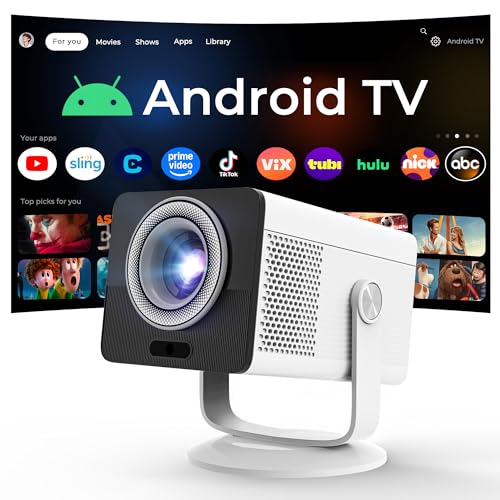 HP Projector Built-in Apps
|
7.8/10 | Buy |
Choosing a Pocket Projector: Battery, Brightness, Apps, and Throw Distance
No pocket projector wins in every situation, because small size forces trade-offs in brightness, battery, and features. The AKASO Mini Projector, Pocket-Sized DLP leans toward true portability with a built-in rechargeable battery. The HP Projector Built-in Apps leans toward streaming convenience and a short throw ratio. Which one suits you depends on the points below.
What pocket-sized really means for performance
A small body limits the light source, the cooling, and the lens size. That’s why pocket models usually give a modest picture size in a dark room and struggle in daylight. The AKASO listing describes a compact, lightweight DLP projector with a built-in battery and speaker, while the HP listing describes an ultra-portable projector that relies on external USB-C power. Both are small, but they’re small in different ways.
Portability also depends on what you must carry. A battery-powered unit travels with fewer accessories, while a USB-C-powered unit needs a suitable power source. The HP listing says power banks rated at 65W or higher can run it, which rules out many common phone power banks. Count the accessories before you call something pocketable.
Brightness: different measures
The AKASO listing states 50 ANSI lumens from an LED light source. The HP listing states 150 ISO lumens. ISO lumens and ANSI lumens are different measures, so the numbers can’t be compared directly, and no rating here is a verified result. These are manufacturer statements, and they suggest that a darkened room is the right setting.
The AKASO listing says outright that it recommends using the projector in a dark environment for good image performance. That candor is useful. Treat any pocket projector as a dark-room device unless the listing shows otherwise. A smaller picture also looks brighter than a larger one from the same light.
Contrast follows the same cautious reading. The AKASO listing states a 1000:1 contrast ratio, but contrast figures depend on measurement method and room conditions. In a lit room, blacks turn gray no matter what the number says. Shop for a dim room and treat the figure as a rough guide.
Resolution claims worth reading twice
The AKASO listing says it supports 1080P resolution, but it doesn’t say the panel is natively 1080P. The HP listing says the projector has a native 1280 by 720 panel and supports 1080P and 4K input. Support means the projector accepts the signal, and native resolution describes the pixel grid that actually draws the picture. A projector can accept a higher signal and still display it at a lower native resolution.
This matters most for text and fine detail. A 720p native panel at a large picture size shows softer text than a 1080p panel. For video at modest sizes, the difference is smaller. If you plan to show spreadsheets or small subtitles, ask for the native resolution before buying.
Battery and power
The AKASO listing states a rechargeable battery that runs up to 2.5 hours. That’s enough for many movies but not for long marathons or back-to-back events. It also includes a remote and a tripod. Plan to plug in for longer sessions, and note that battery life figures are manufacturer statements.
The HP listing takes a different route. It supports USB-C PD 3.0 input at 20V and 3.25A, lists a 40W operating power, and says power banks below 65W can’t supply enough power. That works for camping with the right bank, but it adds weight and cost to your kit. Without the right bank, the projector needs a wall outlet.
Cable management and safety matter on the go. Keep cords away from walkways, don’t cover the vents, and let the projector cool before packing. Batteries and power banks should stay out of hot cars. Follow each manufacturer’s charging guidance.
Streaming apps and the content catch
The HP listing describes an Android TV OS with Netflix, Prime Video, YouTube, Disney+, and Tubi, and says no streaming stick is required. That makes it simple to start a show without another device. It does need an internet connection, and app availability can change over time.
The AKASO listing works differently. It supports wireless mirroring from a phone using AirPlay or EZCast, plus wired connections, and it includes a note that copyrighted content from services like Hulu and Netflix can’t be mirrored or screencast through wireless transmission or HDMI. That is a significant limit for movie fans who rely on those apps. It suits people who show their own videos, photos, or slides, or who connect a device that plays content directly.
If streaming is your main use, the built-in apps route is simpler. If your content is personal media, presentations, or camera footage, the AKASO route fits. Think about what you actually play before choosing. This single difference changes the buying decision more than most specs.
Connections and what you can plug in
The AKASO listing names Type-C, HDMI, AV, and Micro SD ports and says it comes with HDMI cables for connecting a camera, storage drive, PC, or laptop. That’s a flexible mix for presentations and photo slideshows. The HP listing names USB Type-C, a 3.5mm headphone jack, and HDMI, plus WiFi 6 and Bluetooth 5.4. Both can take a laptop or phone.
Check the source device’s video output before buying cables. Some phones can’t output video through their charging port without an adapter. Console and laptop connections via HDMI are the most straightforward. Wireless mirroring depends on the phone, the network, and the projector’s software.
Picture size and throw distance
The AKASO listing states an adjustable picture up to 150 inches. It doesn’t give a throw ratio in the details, so check the manufacturer’s page for the distance needed for a given size. The HP listing gives a 0.9:1 throw ratio, a 40 to 100 inch range, and says an 80-inch picture is achievable from 1.6 meters. That suits tight spaces, such as dorms and bedrooms.
Bigger isn’t better with a weak light source. Doubling the picture width spreads the light over a much larger area, so the image gets thinner. Start with a size that looks bright in your actual room and enlarge from there. A smaller, punchier picture beats a giant, faint one.
Light source, upkeep, and ownership
The AKASO listing describes an LED lamp with a service life of up to 30,000 hours. That’s a manufacturer figure, not a verified result, and real-world brightness can fade over time. The HP listing doesn’t state a light source type or life in the details. Check the manual and warranty for replacement and service details rather than assuming.
Pocket projectors are small, so dust and heat matter. Keep vents clear, avoid enclosed bags while running, and clean the lens gently with suitable materials. Don’t open the housing. If something seems wrong, contact the seller or manufacturer.
Getting the most from a small projector
Place the projector on a stable surface at eye level or just below, and keep it level so keystone correction stays minimal. The AKASO listing includes a tripod, which helps with height and aim. Wipe the lens gently if the picture looks hazy, and make sure the vents are clear. These small habits make a modest light source look better than it has any right to.
Control the room before you adjust the projector. Close curtains, turn off lamps, and use a smooth, light wall or a screen. Then set the picture size to match the brightness, moving the projector closer if the image looks thin. A dark room and a right-sized picture do more than any menu setting.
Think about the mounting position too. A tabletop works for most setups, but a tripod gives you angle control for ceiling or wall viewing. If you plan to hang or mount a projector overhead, use the hardware the manufacturer specifies and ask a qualified installer for help. Never balance a warm projector on soft bedding.
Sound and fan noise
The AKASO listing mentions built-in stereo speakers, and the HP listing mentions dual HiFi stereo speakers and Bluetooth for external audio. Small speakers help in a pinch but won’t fill a room. A Bluetooth speaker or headphones gives better results. No listing gives a fan noise level in the details.
For quiet rooms, sound the unit out before buying if you can, or look for user feedback that describes actual noise. Placement helps. Keep the projector a few feet from your seat and not right beside your ears.
Creative and practical uses beyond movies
The AKASO listing highlights uses such as cookie decorating and image tracing, where the projector throws a design onto a surface for you to follow. That’s a niche use, but it shows how a small unit can serve crafts and presentations. The listing positions it for entertainment, office, and creative use. The HP listing positions its unit for dorms, apartments, camping, and gaming.
Each use puts different demands on the projector. Tracing needs a stable stand and a sharp image at a small size. Camping needs power and portability. Presentations need reliable connections and enough brightness for the room.
Matching a pick to your situation
If you want a self-contained, battery-powered unit for dark-room movies, photos, or crafts, the AKASO listing fits that profile, with the content restrictions in mind. If you want built-in streaming, a short throw, and a rotating body, the HP listing fits that profile, with a lower native resolution and the need for the right power source. Neither pick is a universal best. The right answer is the one that matches your lighting, your content, and your power situation.
Before you buy, ask four questions: how dark will the room be, what will I play, how will I power it, and how big does the picture need to be? Verify the brightness standard, the native resolution, and any content restrictions. Those checks matter more than the label on the box.
About the author
I like gear that earns its place in a bag, so I look at portable projectors the same way: weight, battery claims, fan noise, and whether the picture is usable without a perfect room. I write for people who want movie night in a hotel room, a dorm, or a small apartment. Expect plain talk about what small projectors do well and where they cut corners. My notes follow the site's review methods: research-based comparison, not lab testing.