
What Is the Brightest Projector? How to Judge Brightness
No single projector wins every room. Learn what is the brightest projector, how lumen ratings work, and how to match brightness to your space in October 2026.
 By Matthew Korfhage
Updated
By Matthew Korfhage
Updated

A projector that looks stunning in a dark showroom can fade into a gray rectangle when the sun comes through the window, and no spec sheet warns you about it. That gap between the number on the box and the picture on the wall is why people ask about the brightest model. The honest answer to what is the brightest projector starts with what brightness actually means, and with how a rating was measured.
No listing in this guide names a champion, and brightness ratings come from many measurement methods that don’t always compare cleanly. This guide explains ANSI lumens, ISO lumens, and the room factors that change what you see, then shows what the portable projectors in the product list below actually state. It relies on the supplied specs and general projection basics, not hands-on measurements or lab results, so treat every figure as a manufacturer claim. If you only need a quick takeaway, jump to the final section.
| Award | Product | Best Projector Reviews Score About Best Projector Reviews ScoreBest Projector Reviews Score is a comparison aid based on available product information, not a hands-on testing result. Read our review methods. | |
|---|---|---|---|
| Best Overall |
 Yaber T1 Pro2 Mini Projector with WiFi
|
8.3/10 | Buy |
| Best Budget |
 Littleluma Book Projector
|
7.8/10 | Buy |
 HP Projector Built-in Apps
|
7.8/10 | Buy |
How to Find the Brightest Projector for Your Room
The brightest projector is the one with the highest verified light output that also fits your room, screen size, and budget. A larger lumen number helps, but it only tells part of the story. Screen size, ambient light, and screen material change how bright the picture looks.
The sections below explain the lumen measurements, show what the listed models state, and walk through the other factors that make a projector look brighter or dimmer in practice. They end with a method for choosing a brightness level without guessing. That method works for any model, including ones not listed here.
What Lumens Measure
A lumen is a unit of light output. For projectors, the number describes how much light leaves the lens, not how bright the picture will look on your wall. ANSI lumens come from a standardized method that measures light at several points on the screen and averages them, which is why they are used for fair comparisons.
Other labels exist. ISO lumens refer to a different standard, and some listings use plain lumens or other terms with no stated method. LED lumens, peak lumens, and light-source lumens may not match ANSI measurements, so a high number under a loose label isn’t automatically brighter.
Always check the unit and the standard in a listing. A number with no label is a warning sign. If the listing doesn’t state a method, treat the figure with caution, because you can’t compare it with a rated number. A vague claim usually means a vague measurement.
What the Listed Models Say
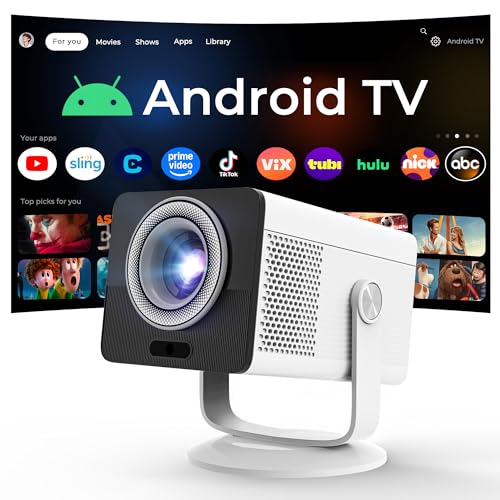
The listings in this guide give very little brightness data. The HP-branded MC400, sold under the LYNCAST brand, states 150 ISO lumens, native 1280 by 720 resolution, a 0.9:1 throw ratio, and a 40 to 100 inch image range. It also says an 80 inch picture is achievable from 1.6 meters, which is a manufacturer claim.
The Yaber T1 Pro2 listing does not state a lumen figure in the text. It lists native 1080 FHD with HDR10, autofocus, keystone correction, and streaming apps. Without a lumen number, you can’t rank it for brightness from this data.
The Littleluma Book Projector is a different product, a storybook projector for projecting text onto a wall for reading. Its listing mentions Wi-Fi, HDMI, USB, and 180 degree projection but no lumen rating, and it is designed for nighttime reading, not bright-room viewing. It isn’t a candidate in a brightness contest.
So the data cannot name the brightest projector. The only stated figure is the MC400’s 150 ISO lumens, and it can’t be directly compared with ANSI figures. If you see a listing claiming the brightest, ask what it measured and how.
Why Room Light Matters More Than the Number
Ambient light adds to the screen’s black level, which reduces contrast. A picture that looks vivid in a dark room can look thin in a room with windows. Dark curtains and a dark wall color can do as much for perceived brightness as a large increase in lumens.
That is why the same projector can seem bright to one buyer and dim to another. The first watches at night in a basement, and the second watches during the day in a bright living room. Think about when you actually watch before you shop.
For rooms with lots of ambient light, you’ll want a much higher lumen rating than for a dim bedroom. How much higher depends on the room and the screen, so the data cannot give a number. Look at independent reviews that use the same lighting conditions you have.
Screen Size, Gain, and Distance
The same light spread across a larger area looks dimmer. A projector that looks bright at 60 inches can look weak at 120. If brightness is a concern, a smaller image is a free fix.
Screen material matters too. Gain describes how much light a screen reflects toward the viewer. A higher-gain screen can look brighter, but it may narrow the viewing angle and add a hot spot. Some screens are designed to reject ambient light, which helps contrast in lit rooms.
Throw distance changes size as well. A short-throw design like the one the MC400 lists can fill a larger screen from a short distance, but a bigger image still means a dimmer picture. Match the projector’s throw ratio to your room, then decide how large a picture the light output can support.
Contrast, Color Mode, and Resolution
Contrast is the difference between the brightest and darkest parts of the picture. The listings give no contrast figures, and contrast ratio claims on any listing are manufacturer figures. A higher contrast can make the picture look punchier, but ambient light limits it.
Picture modes shift brightness too. Bright or dynamic modes raise light output at the cost of color accuracy, and eco modes lower it. Switching modes can make a visible difference without any new hardware.
Resolution matters for sharpness, not light output, though a sharper picture can feel more vivid. The MC400 states native 1280 by 720 with 1080P and 4K support, while the Yaber lists native 1080 FHD. Accepting a higher resolution signal isn’t the same as having more pixels.
Light Source Type and Aging
Lamps, LEDs, and lasers differ in how bright they can be and how they age. Lamps fade gradually and need replacement. LEDs are compact and run cooler, and lasers often appear in higher-output models. These are general observations, and the data doesn’t give light-source details for the listed projectors.
Any light source loses some output over time. A rating that holds on day one may not hold after thousands of hours. If you plan to use a projector heavily, ask about rated life and replacement cost.
Heat and dust speed up decline. Keep vents clear, clean the filter if your model has one, and let the unit cool after use. Don’t open the case, because internal service belongs to the manufacturer or a qualified technician.
Common Brightness Myths
One myth is that more lumens always means a better picture. Extra output helps in bright rooms, but in a dark room it can wash out blacks and tire your eyes. A mid-range rating with good contrast can look better at night than a very bright model.
Another myth is that a high resolution label means a bright picture. Resolution describes sharpness, and brightness describes light, so the two are unrelated. A 4K-supported projector can still be dim.
A third is that the biggest number wins. A loosely labeled lumen figure may be measured differently from an ANSI figure, so a lower labeled number can actually represent more usable light. Check the standard before you compare anything.
Questions to Ask About Any Brightness Claim
Ask which standard the figure uses, and whether it’s ANSI, ISO, or something else. Ask whether the figure applies in the default picture mode or in a boosted mode that shifts colors. Ask how large the image was when the rating was taken, since the same light looks dimmer on a bigger screen.
Check buyer feedback for comments about washed-out images, and look for photos taken in rooms like yours. Treat hands-on feedback as anecdotes, but use it to spot patterns. If many buyers say the picture needs a very dark room, that is a useful signal.
Portable Projectors and Power
Portable models trade output for size and battery or USB power. The MC400 lists USB-C power input that requires a power bank of 65W or higher, and says smaller banks can’t power it. That is a practical limit to note for outdoor use.
For camping and backyard movies, darkness is your friend. A modest-lumen projector in a dark yard can look better than a stronger one in a lit patio. Bring a screen or a plain, light surface, and keep the image size reasonable.
Match Brightness to the Use
Start with the room and the time of day. For a dark bedroom or backyard at night, a modest rating can be enough. For a living room with windows, a family room with lights on, or a classroom, you want a clearly higher rating, a smaller screen, or a room with light control.
Next, check the measurement label on each candidate. Compare ANSI to ANSI and be wary of unlabeled numbers. Then check native resolution, throw ratio, and the connection options you need.
Safety and Care for High-Output Projectors
Brighter projectors produce more heat and glare. Don’t look directly into the lens, and keep children and pets from the beam path. Keep the vents clear, and use mounting hardware the manufacturer specifies if you mount the projector overhead.
A Simple Way to Test at Home
If you can return a projector, test it in the room where it will live. Run it at the time of day you plan to watch, with the lights as you’d normally have them. Use a scene with both dark and bright areas, plus small white text, to see how it handles contrast and legibility.
Try two image sizes, one smaller and one larger. If the smaller one looks clearly better, the room or the light output is the limit. That result tells you whether to shrink the picture, add curtains, or look for a higher-output model.
The Bottom Line
The brightest projector is the one rated highest by a clear, stated standard and matched to the room where you’ll use it. With the listings, no brightness winner can be named, and the one stated figure uses a different standard. Compare labeled ANSI figures, control the room light, and keep the image only as large as the light can support.
About the author
Matthew Korfhage contributes product reviews and buying guides to Best Projector Reviews. See our review methods for the limits of these comparisons.