
What to Look for When Buying a Projector: A Checklist
Brightness, native resolution, and throw distance decide most projector purchases. See what what to look for when buying a projector in October 2026.
 By Ben Carter
Updated
By Ben Carter
Updated

Two projectors can both claim a big, bright picture and look nothing alike in your living room, and the spec sheets rarely explain why. A lamp left on, a couch that sits too close, or a missing streaming app can undo an otherwise good purchase. One struggles with a lamp left on, another can’t fill a screen from where your couch sits, and a third has a great picture but no way to stream anything.
Knowing what to look for when buying a projector means checking a short list of specifications against your own room: brightness, native resolution, throw distance, setup features, and connections. This guide is based on the listing for a compact LYNCAST projector and on general projector principles, not hands-on testing, so it uses that listing as a single worked example of how to read a spec sheet and what to question before you buy. The goal is a purchase that fits the room you actually have, not the room in the product photos, and one you won’t need to return.
| Award | Product | Best Projector Reviews Score About Best Projector Reviews ScoreBest Projector Reviews Score is a comparison aid based on available product information, not a hands-on testing result. Read our review methods. | |
|---|---|---|---|
| Best Overall |
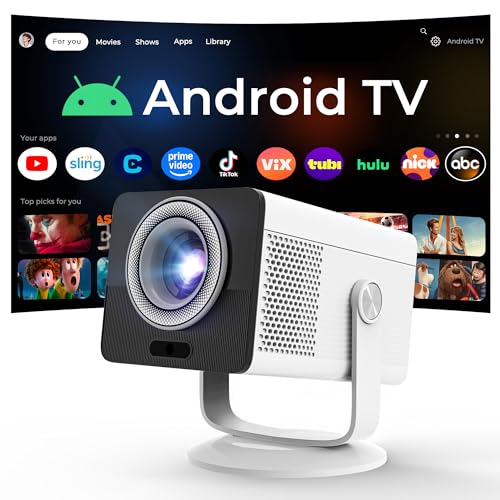 HP Projector Built-in Apps
|
7.8/10 | Buy |
Buying a Projector: Start With Your Room, Then Read the Specs
Begin with the space and the use, because those narrow the choices faster than any feature list. How dark can the room get, how far is the screen from where the projector will sit, and what will you watch? Movies in a dark bedroom, sports in a lit living room, and presentations in an office call for different strengths.
Then read the spec sheet with a skeptical eye, since marketing copy and measured specifications often sit side by side. Several headline numbers use loose terms, and the details underneath often change the picture. The sections below follow the order that most buyers find useful.
Brightness: Lumens Come in More Than One Kind
Brightness is listed in lumens, and the label before the word matters. ANSI lumens follow a standard measurement method, while other labels, such as ISO lumens, may use different procedures or be reported differently, so numbers aren’t always comparable. A listing that names its method is easier to trust than one that doesn’t.
The LYNCAST listing states 150 ISO lumens. That figure is the seller’s, and the data doesn’t convert it to ANSI or explain the conditions. A rating like that points toward dim or dark rooms, since little light is available to compete with ambient light.
Match the number to the room. A dark room can use a modest rating, while a room with windows needs more. Being honest about how much light you’ll have during viewing prevents the most common regret: a washed-out picture.
Native Resolution Versus “Supports 4K”
Native resolution is the number of pixels the projector’s imaging chip actually has. Listings often add phrases like “supports 4K” or “4K input,” which usually mean the projector accepts a 4K signal and scales it down to its own panel. The LYNCAST listing states a native 1280 by 720 resolution with support for 1080P and 4K input.
That distinction matters for detail. A 720p panel shows a 4K file at 720p quality, and the image will be softer on a large screen than a native 1080p or 4K model. For small screens in small rooms, the difference can be modest.
When the listing doesn’t state native resolution, ask. Pixel-shifting, which uses a lower-resolution chip to approximate a higher resolution, is another technique to watch for, and the seller should say plainly when it’s used.
Throw Ratio and the Distance to Your Screen
Throw ratio links how far the projector sits from the screen to how wide the image is. A short-throw projector fills a screen from a small distance, while a standard one needs more room. Checking this before buying avoids discovering that the screen you want can’t be filled from your couch or shelf.
The LYNCAST listing states a 0.9:1 short-throw ratio with a 40 to 100 inch image range, and says an 80-inch picture can be reached from about 1.6 meters, roughly 5 feet 3 inches. Those are manufacturer figures, but they illustrate how to plan. Measure the distance from the projector’s spot to the wall and compare it with the spec sheet.
A zoom range gives flexibility, and a fixed lens does not. If you plan a ceiling mount, add the lens position and mounting depth to your measurement. Use the manufacturer’s mounting hardware and a qualified installer for ceiling work.
Keystone, Focus, and Placement Flexibility
Projectors rarely sit perfectly square to the screen. Keystone correction reshapes the image into a rectangle when the angle is off, and lens shift physically moves the image without distorting it. Keystone is convenient, but heavy correction can soften edges, so square placement is better when possible.
The LYNCAST listing mentions four-point auto keystone correction and electronic focus adjusted by remote. It also describes a 90 degree rotation design that allows projection onto walls or slanted ceilings without an extra stand. Those features make awkward placements easier, though they don’t remove the need for a sensible position.
Check whether correction is manual or automatic, and whether it works in both directions. An automatic feature saves time when moving a portable unit between rooms.
Contrast and HDR: Read the Fine Print
Contrast describes the gap between the darkest and brightest parts of the picture, and it’s what makes a dim-room movie feel rich and not flat. Projector makers quote contrast ratios that are often measured under conditions the listing doesn’t explain, so a big number isn’t a promise. The listing gives no contrast figure.
HDR support is similar. A projector can accept an HDR signal and still lack the brightness to show it well, particularly at low light output. Treat an HDR label as a statement about compatibility until a measurement says otherwise.
Room darkness helps both. In a dark room, even a modest projector shows deeper blacks, and in a lit room contrast falls no matter what the spec says.
Light Source, Lifespan, and Upkeep
Projectors use lamps, LEDs, or lasers, and each has trade-offs in brightness, lifespan, and upkeep. Lamps are replaceable but wear out, while LEDs and lasers last longer on paper and don’t need regular swaps. The listing doesn’t state the light source or its rated life.
That gap is a reason to ask before buying. If the light source is a lamp, find out the replacement cost and how long it should last. If it’s LED or laser, look for the rated hours and the warranty terms.
Maintenance includes keeping air intakes clear and, on some models, cleaning a filter. Follow the manufacturer’s guidance, and never open the housing to service internal parts.
Smart Features and Streaming
A smart OS lets a projector run streaming apps without an external device. The LYNCAST listing describes Android TV OS with built-in apps for Netflix, Prime Video, YouTube, Disney+, and Tubi, plus screen mirroring. That could mean fewer cables, though app availability and performance depend on the platform and aren’t described in detail.
If you already own a streaming stick or console, a basic projector with an HDMI port can be enough. Built-in apps matter more for portable, grab-and-go setups. Either way, check that the apps you use are named in the listing.
Updates and app support can change over time. A projector that relies on its own operating system depends on the manufacturer to keep it current.
Ports, Wireless, and Sound
Look at the ports against what you plan to connect. The LYNCAST listing mentions HDMI, USB-C, and a 3.5mm headphone jack, with Wi-Fi 6 and Bluetooth 5.4. That covers laptops, phones, consoles, and external speakers, at least on paper.
Built-in speakers are usually modest, and the listing describes dual HiFi stereo speakers without power figures. For movies in a larger room, a soundbar or Bluetooth speaker is often worth adding. Make sure the projector has an audio output or Bluetooth for that purpose.
Count the HDMI ports if you have several sources. Switching cables is a nuisance, and one port may not be enough.
Portability and Power
Portable projectors trade brightness and features for size. The LYNCAST listing says it can run from a USB-C power bank rated at 65W or higher, with a 40W operating power, and warns that lower-rated banks can’t supply enough power. That is a handy detail for camping, and a reminder to check the power requirement before relying on a battery.
Weight and dimensions weren’t supplied, so check them on the full spec sheet. A projector that moves around should have a case, and one that stays put can prioritize image quality over size.
Noise, Gaming, and Screens
Fan noise matters for quiet movies and bedrooms. The listing gives no noise level, so check reviews and specs for a decibel figure and treat quiet claims cautiously. Input lag is the other thing gamers should check, and the listing offers no number.
Pair the projector with the right screen. A flat white wall works for casual use, while a screen helps with consistency. The size of the picture also changes brightness, since the same light spreads over a larger area.
Price Tiers, Warranty, and Returns
Price tiers usually trade brightness, resolution, and build quality against cost. Entry-level portable units tend to be dimmer and lower in native resolution, mid-range models add brightness and features, and premium ones offer higher resolution, better optics, and longer light-source life. The data places the LYNCAST model in the portable, compact category.
Warranty terms and return windows are part of the price. A projector can look fine on paper and fail to suit a room, so a generous return policy is worth more than a small spec advantage. The listing doesn’t state warranty terms, so confirm them with the seller. Keep receipts, original packaging, and the manual until you’re sure the projector fits your space.
Putting the Checklist to Work
Write down your room’s light level, the distance from projector to screen, and your must-have inputs. Compare those to the stated brightness basis, native resolution, throw ratio, and ports on each candidate. Ask the seller about anything the listing omits.
A lower-cost projector can be a good fit when the room is dark and the screen small, while a brighter and more capable model earns its price in lit rooms or large pictures. Match the tool to the space and the answer usually becomes clear.
About the author
I am the person friends ask whether a cheaper projector is good enough. My focus is budget picks and comparisons: where the savings are fine, where they hurt, and what to skip. I write buying guides that start with how you will use the projector and end with a short list, and I try to be upfront about the compromises at every price. My notes follow the site's review methods: research-based comparison, not lab testing.