
How to Make a Hologram Projector: DIY Pyramid Guide
Curious about a floating-image effect? See how to make a hologram projector with a simple pyramid build and screen options in October 2026.
 By Maya Okonkwo
Updated
By Maya Okonkwo
Updated

Watching a small 3D character appear to float above a phone is one of those tricks that looks harder than it is. The effect doesn’t use a real hologram at all. It relies on an old optical illusion, and you can build a version at home with clear plastic and a dark room. Once you see how the trick works, the whole project makes sense.
This guide explains how to make a hologram projector in practical terms: what the illusion really is, how a small pyramid prism works on a phone, and when a larger rear projection screen is the better path. You’ll also see how to choose or make videos, where the effect falls short, and which safety steps matter when you cut plastic. Please treat it as a hobby project with realistic expectations, not a lab-grade display. Kids, crafters, and party hosts can all pull it off with basic supplies and a little patience.
| Award | Product | Best Projector Reviews Score About Best Projector Reviews ScoreBest Projector Reviews Score is a comparison aid based on available product information, not a hands-on testing result. Read our review methods. | |
|---|---|---|---|
| Best Overall |
 Pack of 2! Individually Packaged
|
8.9/10 | Buy |
| Best Value |
 Halloween Projector Hologram Foldable Screen
|
7.8/10 | Buy |
Building a Hologram-Style Projector at Home
The short answer is that most DIY hologram projectors are really reflective illusions. A clear angled surface reflects an image from a screen, and your eyes read that reflection as an object floating in space. True holograms need lasers and specialized recording, which is a different matter.
That distinction matters because it sets expectations. A phone-sized pyramid can give a charming floating effect in a dark room. It won’t create a solid 3D object you can walk around, and it needs the right video to work.
How the Illusion Works
The technique is a modern version of an old stage effect often called Pepper’s ghost. A clear, angled surface reflects an image while still letting you see through it. When the reflected image sits against a dark background, it appears to hang in the air.
Most phone pyramids use four angled panels that each reflect one view of the video. The video shows the same object from four sides on a black background, arranged around the center of the screen. From any side, you see the reflection from the panel facing you, which creates the floating look.
The effect works best in a dark room with the phone at high screen brightness. Ambient light adds reflections that ruin the illusion, so dim the room as much as you can. A plain dark surface under the phone also helps.
Materials and Safety Before You Cut
For a basic pyramid you need a clear, stiff plastic sheet, a ruler, a marker, a cutting tool suited to the plastic, tape, and sandpaper for the edges. Many tutorials suggest reusing a clear plastic case, but any flat transparent sheet works if it’s smooth and free of scratches. Avoid glass for a first project, since cut edges are dangerous.
Cutting plastic takes care. Use a stable surface, keep fingers behind the blade, and wear cut-resistant gloves if you have them. Children should have adult help, and sharp edges should be smoothed so nobody gets cut when handling the finished pyramid.
Check the plastic for protective film and remove it before assembly. Clean the surface with a soft cloth so fingerprints don’t show in the reflection. Work in a well-lit area, and save the dark room for testing.
Sizing and Cutting the Panels
The panels are trapezoids, narrow at the top and wide at the bottom. The bottom edge should be a little smaller than the shorter side of your phone screen, so the pyramid sits within the screen area. The top edge is much smaller, and the height sets how tall the floating image appears.
Sketch one panel on paper first and test its size against your phone. Then trace it onto the plastic four times, cut the shapes, and sand the edges. The four panels should match closely, because small differences make the image look tilted.
Many builders aim for panel sides that lean at roughly 45 degrees, which suits the reflection geometry. Online templates exist for common phone sizes, and a quick search can save you from guesswork. Because screen sizes vary, check your own measurements before you cut.
Assembling the Pyramid
Lay the four panels in a row with their long edges touching, then tape the joints on the outside with clear tape. Fold the row into a four-sided shape and tape the last seam. The result should be an upside-down pyramid with the wide opening at the base.
Check that the seams are tight and the pyramid stands without wobbling. If it leans, trim the panels slightly or adjust the tape. A clean, symmetrical build makes a big difference to the final image.
Place the pyramid, point down, on the center of your phone screen. A small bit of removable tape or a dab of putty can hold it in place. Keep your fingers off the reflecting surfaces.
Choosing the Right Video
The video matters as much as the pyramid. Search for hologram pyramid videos made for four-sided viewing, which are commonly shared on video sites. These clips arrange four copies of an object on a black background so each panel reflects the correct view.
Set the phone to its highest brightness and disable auto-rotate and auto-lock. Start the video and place the pyramid at the center of the four-image layout. If the object looks cut off, adjust the pyramid’s position until the reflection lines up.
Simple objects with strong contrast, such as a glowing sphere or a brightly colored animal, tend to read better than detailed scenes. The black background is essential. Any gray in the video will show up as a faint haze.
A Ready-Made Alternative
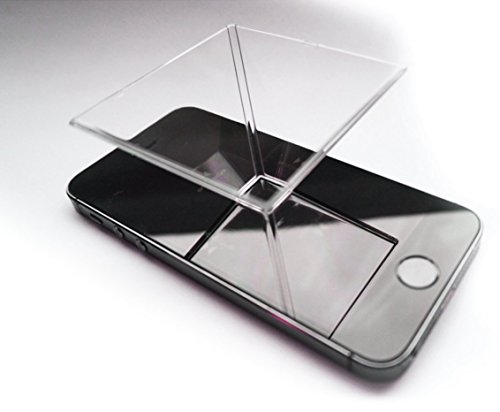
If you’d rather skip cutting, a ready-made prism is available. The Pack of 2! Individually Packaged listing from Spectre Hologram describes a smartphone hologram projector pack, with two individually packaged holographic prisms. The listing says it suits any smartphone and that you place it on your phone, turn the lights down, and play freely available holographic videos.
The listing also pitches the item as a gift and a conversation piece, and it describes the videos as calming and meditative. Those are the seller’s descriptions, not performance results. A buyer should still expect the effect to depend on a dark room, a bright screen, and a suitable video.
A ready-made pack makes sense if you want a clean, consistent shape or plan to give a few as gifts. A homemade pyramid costs less in materials and teaches the principle. The two approaches use the same trick, so the final effect is similar when both are built well.
Going Bigger: Rear Projection Screens
A phone pyramid is small by design. For a larger display, builders use a projector or monitor with a semi-transparent screen. The Halloween Projector Hologram Foldable Screen from HOIN is an example of the screen approach.
The listing describes a double-sided translucent fabric screen made from soft polyester, intended for rear projection. It says the screen can create a hologram-illusion effect where characters seem to appear from thin air, and it can be used indoors or outdoors. Hooks, ropes, and stickers come with it, according to the listing, and the title gives a size of 60 by 106 inches.
Rear projection means the projector sits behind the screen, and the audience watches from the other side. That setup hides the projector and gives a cleaner look for displays, windows, and events. It needs enough space behind the screen and a dark area to look convincing.
Use a projector placed on a stable surface, with its vents clear and its power cable secured. Mount the screen with the hardware included, and make sure it’s taut and free of wrinkles. Close curtains and turn off lights to keep the effect strong.
Making Your Own Four-Sided Video
Free editing apps can build a basic four-sided layout. Place the same object on a black canvas four times, one above, below, left, and right of the center, with each copy rotated so its base faces the middle. The pyramid sits in the empty center, and each panel reflects the copy facing it.
Keep the object compact so all four copies fit on the screen without touching. Use a pure black background and avoid shadows. Export at the highest quality your phone can play smoothly.
Looping a short clip works well, since the effect is mostly about presence, not storytelling. Slow, steady movement reads better than fast cuts. Test the video before an event to make sure it plays without buffering.
Phone, Monitor, or Projector: Choosing the Source
A phone is the simplest source and suits a small pyramid. A tablet or small monitor allows a larger pyramid with the same geometry, scaled up, but the plastic must be larger and stiffer. Bigger builds are harder to cut and tape cleanly.
A projector can drive a larger effect when paired with a translucent screen, as in the rear projection approach above. It needs a dark room and a stable stand, and the projector should have clear ventilation. Brightness matters, because a dim projector will make the floating image look faint against any ambient light.
Why the Effect Sometimes Disappoints
If the image looks dim, raise the phone’s brightness and darken the room. If it looks doubled or blurry, the plastic may be scratched, thick, or uneven. Clean the panels and use thinner, clearer plastic.
If the object seems to lean or distort, the panels may not match, or the pyramid might be off center. Recut or trim, and recenter the pyramid. If you only see part of the image, the video layout may not match your pyramid size.
Viewing angle also matters. The effect is strongest when your eyes are roughly level with the pyramid, and it weakens when you look straight down on the phone. Place the display on a low table and sit in front of it.
What to Take Away
A hologram-style projector is a lighting trick, and it succeeds when contrast, darkness, and clean geometry line up. Build a small pyramid for a phone, or use a rear projection screen for a bigger display. In both cases, pick the right video and control the room’s light.
Start small and keep safety in mind when cutting. With a little patience, you’ll have a fun display for gifts, parties, or classroom demonstrations. Keep expectations modest and the room dark.
About the author
For me a gaming projector lives or dies on lag and refresh rate, not on a big brightness claim. I write about consoles and PC on a big screen: what the input lag figures really mean, which resolution and refresh combinations are worth chasing, and which modes quietly add delay. I read spec sheets and owner feedback with a skeptical eye and I try to explain the catch behind every headline feature. My notes follow the site's review methods: research-based comparison, not lab testing.