
How to Make Hologram Projector at Home: Pyramid Steps
Learn how to make hologram projector at home with clear plastic, a simple template, and the right video, plus fixes for a dim image in October 2026.
 By Priya Raman
Updated
By Priya Raman
Updated

A floating image above a phone looks like a magic trick the first time you see it. The good news is that the trick is easy to reproduce at home with clear plastic, a ruler, and some patience. The less exciting news is that it isn’t a true hologram, and the effect depends heavily on room darkness and the video you play. Setting that expectation early makes the project more fun.
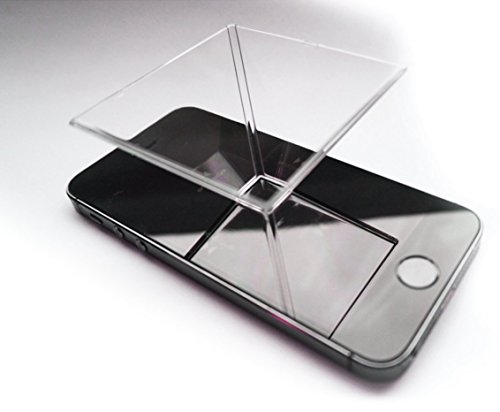
If you’re wondering how to make hologram projector at home, the practical route is a four-sided clear pyramid that sits on your phone screen and reflects a specially made four-view video. The products include a ready-made smartphone hologram prism and a DIY guide, so you can compare building your own with buying a finished piece. This guide covers materials, cutting, assembly, video choice, and troubleshooting, with product details taken from the listings. Expect a fun, small-scale illusion on a tabletop, not a big floating display that fills a room.
| Award | Product | Best Projector Reviews Score About Best Projector Reviews ScoreBest Projector Reviews Score is a comparison aid based on available product information, not a hands-on testing result. Read our review methods. | |
|---|---|---|---|
| Best Overall |
 Pack of 2! Individually Packaged
|
8.9/10 | Buy |
| Best Value |
 Make a 3D Hologram Viewer for Your Phone
|
7.8/10 | Buy |
How the Pyramid Illusion Works and What to Gather
A quick explanation of the effect
The pyramid sits upside down with its tip touching the phone. The phone displays a video that has the same object shown from four sides, arranged in a cross pattern. Each clear panel reflects one view toward the viewer’s eye, and the four reflections appear to merge into a single floating object in the middle.
Nothing is projected into the air, and there’s no laser involved. The illusion relies on reflection and a dark room, which is why the picture looks strongest when the phone is bright and the surroundings are dim. Calling it a hologram is common shorthand, but the technique is a reflective display trick, and that’s worth knowing before you spend an afternoon cutting plastic.
Materials that suit a first try You need a sheet of clear, rigid but thin plastic, such as the lid of a transparent case or a sheet of clear acetate. The plastic should be as clear and scratch-free as you can find, since marks and fogging show up as distractions in the image. You’ll also need a ruler, a marker, scissors or a craft knife, a cutting mat, and clear tape.
A thicker material gives a stronger frame but can cause ghosting, which is a faint second reflection. Thinner plastic tends to look cleaner, though it flexes more and needs careful taping. If you have extra material, cut a few spares so you can try different thicknesses.
Two ways to get started with the products The Pack of 2! Individually Packaged listing is for the Spectre smartphone hologram projector, described as suitable for any smartphone, compatible with holographic prism videos, and packaged as two individually wrapped units. The listing says you place it on the phone, turn the lights down, and play any of the holographic videos that are freely available on video sites.
The Make a 3D Hologram Viewer for Your Phone listing is a DIY project guide from Majosta for building a viewer that creates the illusion of floating images. No further specifications are supplied, so treat it as a learning resource and check its contents for the exact steps.
Building the Pyramid Step by Step
Sizing the panels for your phone
The size of the pyramid depends on your phone. A common starting template uses a trapezoid with a short top edge of about 1 cm, a long bottom edge of about 6 cm, and a height of about 3.5 cm, which suits many phone screens. These numbers are a general craft starting point and not from the listings, so adjust them to your phone.
Measure your phone’s screen width and decide how much of it the base of the pyramid will cover. A smaller pyramid sits comfortably on a small phone and gives a tidy image, while a larger one needs a larger screen. Draw the first trapezoid on paper and test it before you cut plastic.
Test the shape with paper first Cut one trapezoid from stiff paper or card and fold three more copies, then tape them into a paper pyramid. This costs almost nothing and shows whether the size suits your phone before you cut clear plastic. A paper version also reveals whether the base is wide enough to rest steadily on the screen.
If the paper pyramid leans or wobbles, adjust the template and test again. Once the paper version stands cleanly, use the same template for the plastic panels, since a good pattern makes the rest of the build easier.
Marking and cutting the plastic Trace your paper template four times onto the plastic with a fine marker, keeping the shapes identical. Even small differences between panels show up as a tilted or lopsided image. Mark the lines lightly, then cut along them with a craft knife and a metal ruler.
Cut slowly and use a cutting mat. Keep your free hand clear of the blade and cut away from your body. If you use scissors, a clean, steady cut is better than a fast one, since jagged edges look rough when taped.
Joining the panels Hold two panels edge to edge with the long sides at the bottom. Tape the joint on the outside with clear tape, then repeat until all four panels form a pyramid with a small flat opening at the tip. Take care not to leave bubbles or creases in the tape.
Check the pyramid on a flat surface. It should stand evenly with the tip pointing down and the four panels forming a regular shape. If one panel is slightly off, redo that joint rather than forcing the others to match.
Using the finished pyramid Place the phone flat on a table with the screen facing up, then set the pyramid tip in the center of the screen. Turn the brightness all the way up and disable auto-rotate. Play a hologram pyramid video, which you can find by searching for that phrase on a video site, and dim the room.
View the pyramid from each of the four sides. The image should appear to float in the middle, and the object should look correct from all four sides. If the view is off, shift the pyramid slightly until the video’s center aligns with the pyramid’s tip.
Getting a Better Image and Avoiding Problems
Choosing a video that works
Not every video works. The video must be made for the pyramid format, with four copies of the object arranged around a central point and a black background. A black background matters because any bright area shows up as an unwanted glow on the plastic.
Look for videos labeled for a pyramid or prism, and pick ones with clean white or bright objects. If you plan to make your own, keep to simple shapes and a black background. The Spectre listing notes that many free holographic videos are available online, which makes experimenting easy.
Making or editing your own video You can build a pyramid video by arranging four copies of a simple clip around a central point, with each copy rotated so its bottom edge faces the center. Many video-editing apps can do this with rotation and positioning tools, and the background should stay black. Keep the object small enough that it doesn’t touch the panel edges.
Test a short clip first, since mistakes in rotation show up right away as an object that appears sideways or upside down from one side. Save the file at a resolution suited to your phone so the picture stays sharp.
Dealing with a dim, blurry, or crooked picture Dim images usually come from a bright room or a low-brightness phone. Close curtains, switch off lights, and raise the screen brightness. If the effect is still faint, a smaller pyramid sometimes helps, because the reflected image travels a shorter distance.
Blur or ghosting can come from plastic that is too thick, scratched, or dirty. Wipe the panels carefully with a soft cloth, and try a thinner sheet. A crooked image points to uneven panels or a pyramid that isn’t centered, so recheck your cuts and the position on the screen.
Phone size, screen type, and orientation Larger phones and tablets can handle a bigger pyramid, which makes the effect easier to see from a distance. Some screens produce stronger color or contrast than others, and an OLED display with a deep black background often makes the object stand out. Results still vary from phone to phone, so try a few videos.
Keep auto-rotate off so the video doesn’t flip, and use a screen-lock setting that avoids sleep during a demonstration. Remove the case if it blocks the screen edge.
Should you build it or buy a finished one? Building your own costs little and teaches you how the illusion works, which is a good fit for a science project or a craft afternoon. Cutting four matching panels takes patience, though, and a small error can make the image look off. A finished prism like the Spectre pack saves that effort and may suit gifts, since it comes in individually packaged units.
The Spectre listing describes the product as suitable for any smartphone, but check the size of your phone against the prism’s footprint. A very large or very small device may not match the base, so read the product dimensions in the full listing before ordering.
Safety and kid-friendly tips Craft knives, thin plastic edges, and tape are the only hazards in this project. Let younger builders use scissors with adult supervision, and trim sharp corners so they don’t scratch screens or fingers. Always place the pyramid on the phone gently, and avoid dropping it on the glass.
Don’t leave a phone playing at full brightness on a soft surface for long, because it can heat up. Take breaks, and pick up the pyramid by its edges to keep fingerprints off the panels.
Caring for the panels Keep spare panels flat in an envelope or folder so they don’t scratch or bend. Clean the plastic with a soft, dry microfiber cloth first, and use only gentle, plastic-safe cleaners if needed. Harsh chemicals can cloud or craze thin plastic.
Store the finished pyramid with its tip protected, for example inside a small box with foam or cloth. A cracked or warped panel will bend the reflection, so replace it as soon as you notice distortion.
Using the effect in a display The illusion fits a room with controllable light, such as a bedroom or a classroom corner. A box with a black interior can act as a stage, with the phone at the bottom and the pyramid inside. That cuts reflections and makes the floating image easier to see from a few feet away.
About the author
A good screen can change a picture more than a small projector upgrade, and it is the part many buyers skip. I write about screen materials, gain, ambient light rejecting designs, and how room lighting, wall color, and seating position change what you see. I try to keep the advice grounded in what a normal room looks like, not an ideal one. My notes follow the site's review methods: research-based comparison, not lab testing.