
How to Change a Projector Lamp Bulb: A Practical Guide
Learn how to change a projector lamp bulb safely: confirm the problem, match the exact lamp, follow the manual, and reset the timer. Updated October 2026.
 By Elena Costa
Updated
By Elena Costa
Updated

A projector that goes dark halfway through movie night, or shows a lamp warning every time you power it on, usually points to one fix: a new lamp. The swap isn’t hard on many models, but it rewards patience. Buying the wrong lamp, skipping the cooldown, or forgetting to reset the hour counter are the usual reasons a simple job turns into a headache. If you want to know how to change a projector lamp bulb without guesswork, the process comes down to confirming the lamp is the problem, matching the exact part, and following your manual’s steps in order.
This guide is built from general projector practice and the product listings, not hands-on testing. It doesn’t replace the manual for your model, which shows where the lamp door sits and how the lamp seats. The sections below explain how to prepare, how to choose between lamp types, what the swap looks like in general terms, and what to check afterward.
| Award | Product | Best Projector Reviews Score About Best Projector Reviews ScoreBest Projector Reviews Score is a comparison aid based on available product information, not a hands-on testing result. Read our review methods. | |
|---|---|---|---|
| Best Overall |
 KAIWEIDI POA-LMP135 Replacement Projector Lamp
|
9.2/10 | Buy |
| Best Budget |
 EYB 82V 360W Projector Bulb
|
8.9/10 | Buy |
| Best Premium |
 DJL Projector Lamp Bulb Replacement Kit Retrofit
|
8.3/10 | Buy |
 RICTLY Night Light for Kids
|
8.1/10 | Buy | |
| Best Value |
 Grinsvalley 2 Pcs Projector Bulb 82v 360w Overhead
|
7.8/10 | Buy |
 Technical Precision ENX 82V 360W Projector Bulb
|
7.8/10 | Buy |
Changing a Projector Lamp Bulb Without Guesswork
Changing a projector lamp comes down to five moves: confirm the lamp is the cause, identify the exact replacement, power down and let the projector cool completely, swap the lamp through the access door your manual describes, and reset the hour counter. Every model differs in how the door opens and how the lamp locks in, so the manual’s diagrams outrank any general advice. The sections below cover what to check at each stage.
Make Sure the Lamp Is Actually the Problem
A dim picture does not always mean a worn lamp. Room light, the wrong picture mode, and a clogged filter can all make a projector look weak. Try the projector in a dark room, switch to a standard or bright preset, and clean or replace the filter as the manual describes before you order a lamp.
Signs that point to the lamp include a warning message or status light about lamp hours, a picture that fades or flickers, color that drifts toward yellow or pink, and a projector that shuts off soon after starting. Some models also show a lamp hour counter in the menu. If the counter is near or beyond the manufacturer’s rating, a replacement is likely due.
Also look at the old lamp if the manual lets you remove it safely. Discoloration, a cracked envelope, or a loose housing can hint at overheating, which is a good reason to check the vents and filter before you install the new one. A projector that won’t start at all deserves a second look. A lamp is one possibility, but a thermal fault, a blocked vent, or a power problem can look the same. If basic checks don’t solve it, contact the manufacturer instead of opening anything beyond the lamp access door.
Identify the Exact Lamp for Your Projector
The lamp has to match the projector, not just look similar. Start with your projector’s model number, usually printed on a label and in the manual, then look up the manufacturer’s replacement lamp part number. Match that number to the listing you plan to buy, and read the compatibility list line by line.
Replacement lamps come in two broad forms. Some arrive as a module, which is the bulb already mounted in a plastic or metal housing that slides into the projector. Others are bare bulbs that you seat into an existing housing or fixture. A module is generally easier to install, while a bare bulb needs more care to handle and align.
Compatible-lamp listings are written in careful language for a reason. They are described as fitting specified models, not as identical to the original, and details such as warranty and return terms can differ. Compare those terms alongside the part number and compatibility list, and treat any claim of better brightness or life as the seller’s statement.
Safety and Preparation Before You Open Anything
Power the projector off and let the fan finish its cooldown cycle. Then unplug the power cord and wait until the unit is cool to the touch, because a recently used lamp stays hot enough to burn skin. Many manuals specify a minimum waiting time, so follow yours.
Work on a clean, stable surface with good light, and have the tools listed in the manual ready. Many lamp doors need only a small screwdriver. Keep the new lamp in its packaging until you’re ready, and read the handling notes that came with it.
If the projector is ceiling mounted, take extra care. Use a stable ladder, ask someone to steady it, and consider lowering the projector if the mount allows it. For a fixed bracket or any wiring work, a qualified installer is the safer choice, and the lamp door is the only part you should open yourself.
The Swap Itself, in General Terms
The lamp compartment is usually on the side, top, or bottom of the projector, behind a cover held by one or two screws. Remove the cover as shown in your manual and look for fasteners on the lamp module. Many modules have a handle and release screws, and you loosen them and pull the lamp straight out.
If the old lamp resists, stop and recheck the release screws and the manual’s diagram instead of prying. A cracked or visibly blackened lamp deserves extra caution, so follow the manual’s guidance on handling it and ventilate the room. Insert the new lamp the way the old one came out, aligned with the connector and seated fully. Tighten the fasteners snugly without forcing them, then replace the cover. Many projectors have a safety switch that keeps them from powering on if the lamp door isn’t closed properly, and you should never bypass it.
Halogen bulbs, including the type used in overhead projectors, are often sensitive to skin oils. Manuals for such bulbs commonly advise handling them with a clean cloth or gloves and avoiding the glass. The EYB listing says to follow the projector manufacturer’s instructions for access, seating, and reassembly, which is the right approach for any lamp.
Reset the Lamp Timer and Test
After the lamp is in, plug the projector in and power it on. Many models track lamp hours and show a warning until you reset the counter in a menu. The path varies, so look for a lamp timer or lamp reset option in the manual, and do it only after you’ve installed a new lamp.
Watch the first minutes closely. The picture should appear within a short time, the fan should settle into its normal sound, and the image should look even. If the lamp doesn’t light, the projector shuts off, or a warning stays on, power it down and check that the lamp is seated and the door is closed.
Run a bright scene and a dark scene, and compare them with how the projector looked before. A fresh lamp should look brighter than the worn one, though the exact difference depends on the model and the lamp. Make a note of the date and hour counter so you know when the next replacement is likely.
How the Supplied Listings Differ
The listings here show how varied replacement lamps can be. The KAIWEIDI POA-LMP135 Replacement Projector Lamp is described as a lamp with housing for a list of Sanyo models, with an installation time under ten minutes and no technician required. The listing also says the lamp life runs from 2,500 to 4,500 hours, which is the seller’s claim and not a verified result.
The EYB 82V 360W Projector Bulb and the Grinsvalley 2 Pcs Projector Bulb 82v 360w Overhead are bare halogen bulbs for overhead-style projectors and stage lighting, each with a pin base and a listed life of about 75 hours. The EYB listing names compatible Apollo models and replacement references, while the Grinsvalley listing says it offers 460 lumens at 3300K without naming a test standard. A short rated life is part of how these bulbs are used, so keep a spare on hand.
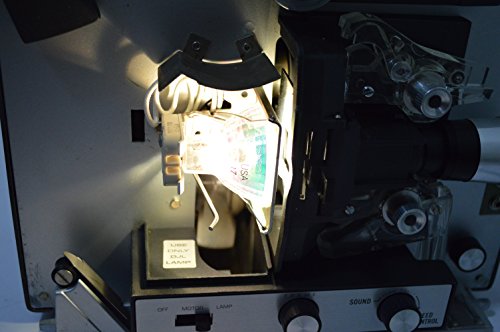
The DJL Projector Lamp Bulb Replacement Kit Retrofit is a different kind of product again. It is described as a retrofit kit for Bell and Howell projectors that swaps a lamp listed at 15 hours for a halogen lamp listed at 200 hours, installed with a Philips screwdriver. The Technical Precision ENX 82V 360W Projector Bulb listing has a title that mentions a three pack, but its details say one unit per sale, so confirm the quantity before ordering.
Which Product Is Not a Replacement Lamp
The RICTLY Night Light for Kids appears in the data, but it is not a projector replacement lamp. The listing describes a star projector night light with LED beads, color modes, and USB or battery power. It isn’t made to fit another projector, so it should not be on your shortlist for this job.
Watch for this sort of mismatch when browsing. Search results for lamp and bulb often mix real replacement parts with decorative lights. Always check the compatibility list and the part number before adding something to your cart.
Mistakes That Cause Trouble
Ordering by a guess is the leading mistake. Similar lamp codes can have different bases, voltages, or wattages, and a lamp that physically fits can still be wrong for the projector. Match the codes exactly and compare the listing’s compatibility list to your model.
Touching the glass of a halogen bulb, forcing a lamp into place, and leaving the lamp door loose are the next most common problems. Another is skipping the filter check, since a clogged filter can shorten the life of the new lamp. Clean it while the projector is open for service, if the manual calls for it.
Finally, don’t bypass a safety switch, disable a thermal protection feature, or open the projector beyond the lamp compartment. Those protections exist because a lamp runs hot and operates at high voltage. If the projector still misbehaves after a lamp swap, the manufacturer’s support line is the right next step.
What to Do With the Old Lamp and the Next Replacement
Dispose of the old lamp according to local rules, since some projector lamps need special handling. Keep the receipt and the packaging in case of an early failure. If the lamp has a warranty, note the terms and the date of installation.
For the next replacement, you’ll already have the part number, a rough usage rate, and the lamp hour counter to guide you. A spare on a shelf is a good idea for a projector you rely on for work or school. Before you buy, match the code to your projector, read the compatibility list, and open the manual to the lamp section.
About the author
Lumens, lamp life, fan noise, and eye comfort are where projector marketing gets slippery. I write about what brightness ratings actually promise, how long light sources really last, why a unit gets loud or hot, and how to set up a picture that is comfortable to watch. When something stops working I focus on the practical checks first. My notes follow the site's review methods: research-based comparison, not lab testing.