
How to Replace Epson Projector Bulb: Lamp Model First
How To Replace Epson Projector Bulb: match the ELPLP lamp code, compare housing and warranty details, and follow safe swap steps in October 2026.
 By Arriana Vasquez
Updated
By Arriana Vasquez
Updated

The picture goes dim, a lamp warning light blinks, or the projector shuts itself off a minute after you hit play. Those are the usual signs that an Epson lamp is near the end of its life, and they tend to show up right when the movie starts. The swap itself is a short job for most owners, but ordering the wrong lamp is where most of the frustration starts, and it’s easy to do when model names look alike.
Knowing how to replace epson projector bulb really begins with knowing which lamp your projector takes. Epson lamps use ELPLP part numbers, and each one fits a specific family of projectors. This guide uses the replacement lamp listings to explain how to match the code, what the listings say about housing, lifespan, and warranty, and what a careful swap looks like. Nothing here comes from hands-on testing, and your Epson manual is the final word on steps for your exact model.
| Award | Product | Best Projector Reviews Score About Best Projector Reviews ScoreBest Projector Reviews Score is a comparison aid based on available product information, not a hands-on testing result. Read our review methods. | |
|---|---|---|---|
| Best Overall |
 COOBAN ELPLP85 /V13H010L85 Replacement Projector
|
8.9/10 | Buy |
| Best Premium |
 EWO'S LP97 Replacement Projector Lamp Bulb
|
8.9/10 | Buy |
| Best Budget |
 COOBAN ELPLP96 /V13H010L96 Replacement Projector
|
8.8/10 | Buy |
 ABITAN for ELPLP89/V13h010l89 Epson Replacement
|
8.6/10 | Buy | |
 COOBAN ELPLP78 /V13H010L78 Replacement Projector
|
8.1/10 | Buy | |
| Best Value |
 COOBAN ELPLP97 /V13H010L97 Replacement Projector
|
7.8/10 | Buy |
 YOSUN v13h010l89 projector lamp bulb for epson
|
7.8/10 | Buy |
Replacing the Lamp in an Epson Projector
Replace an Epson projector lamp by first confirming the exact ELPLP lamp model, then powering the projector down and letting it cool, then swapping the lamp as your manual describes, and finally resetting the lamp hour counter. The order matters. A lamp that’s the wrong model, or a swap done on a hot unit, causes more trouble than a worn lamp does.
This section follows that sequence: confirming the lamp is the problem, matching the part number, choosing between lamp styles, reading the listing claims, doing the swap, and checking the result.
Confirming the Lamp Is the Problem
A worn lamp usually shows itself through a dim picture, a warning light or on-screen message, or a projector that powers off shortly after start. Those symptoms can also point to other issues. A blocked filter or vent can overheat a projector and trigger a shutdown, and a wrong picture mode can make the image look dim.
Check the lamp hours in the projector’s information menu if it has one, and compare them with the lamp life in the manual. Clean the air filter and clear the vents as the manual describes, then see whether the symptom remains. If the warning stays and the hours are high, the lamp is the likely cause.
When the projector doesn’t light at all but the fans run, a lamp that’s failed is still possible. A replacement is the usual next step, and the manual’s troubleshooting page can help rule out other causes.
Matching the ELPLP Part Number
The lamp number is the key to the whole job. Look for the ELPLP code in the projector’s manual, on the existing lamp’s label, or on Epson’s replacement lamp page for your model. Then match that code exactly to the lamp you order.
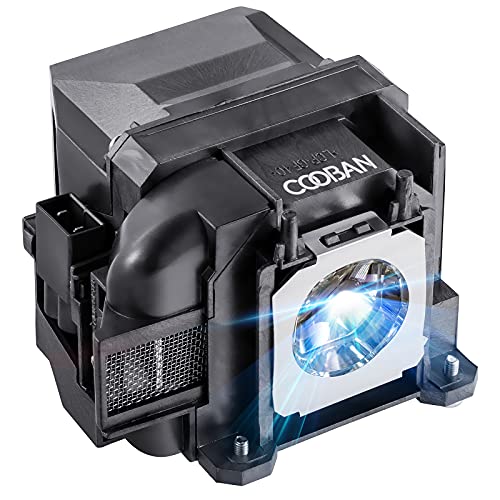
The listings show how the codes map to projector families. The EWO’S LP97 Replacement Projector Lamp Bulb and the COOBAN ELPLP97 /V13H010L97 Replacement Projector are both listed for the ELPLP97, with models such as the PowerLite Home Cinema 2200 and 2250. The COOBAN ELPLP85 /V13H010L85 Replacement Projector lists Home Cinema 3000-series models, and the COOBAN ELPLP96 /V13H010L96 Replacement Projector lists models such as the VS250 and Home Cinema 2150.
The COOBAN ELPLP78 /V13H010L78 Replacement Projector is listed for Home Cinema 2000-series and related models. The ABITAN for ELPLP89/V13h010l89 Epson Replacement and the YOSUN v13h010l89 projector lamp bulb for epson both list the ELPLP89 for Home Cinema 4000, 5040UB, and 5050UB models.
Several listings tell you outright to confirm the model before purchase, and one says not to buy if the part numbers don’t match. That’s good advice. Similar-looking projector names can take different lamps, so go by the code, not by the series name alone.
Lamp With Housing or Bare Bulb
Most of the listings describe a lamp with housing, which means the bulb is already installed in a plastic or metal cage that slides into the projector. The ABITAN and YOSUN listings say so directly, and the COOBAN listings say lamp with housing in the model line. That style is simpler for most owners, because you handle the cage and not the glass.
The EWO’S listing describes a bare bulb, which is the lamp itself without the housing. A bare bulb means you’d have to transfer the bulb into your old housing, and that involves handling fragile glass and following precise instructions. For most owners, a lamp with housing is the safer pick.
Whichever you choose, don’t touch the glass with bare fingers. Oils from skin can shorten a lamp’s life and create hot spots. The ABITAN listing says small gloves and a portable screwdriver come in the package, which is a sensible detail for a job that involves hot, delicate parts.
Reading Lifespan, Brightness, and Warranty Claims
The listings give several numbers, and they’re best read as manufacturer statements. The EWO’S listing mentions a lifespan between 2500 and 4500 hours and also describes 3000 hours of continuous use. The ABITAN listing describes 4600 hours in ECO mode and a lumen output of 2500.
Those figures depend on the mode the projector runs in. Epson’s brighter modes generally wear a lamp faster, and ECO or low-power modes tend to extend its life. So a listed hour figure isn’t a promise for your room, and you should treat it as a rough guide.
Warranty terms are clearer. COOBAN states a 200-day free replacement or refund policy. ABITAN lists a 200-day replacement service and a 30-day return policy, and YOSUN lists a 180-day replacement if the lamp stops working naturally. Check the exact terms on the seller’s page, since policies can change and may have conditions.
Price tier is a real consideration, since lamp cost varies by model and by seller. But a lower-cost lamp isn’t automatically a worse one, and a higher price doesn’t prove longer life. Compare the part number, the housing, and the warranty first, and then consider cost.
Reading the Marketing Language in Lamp Listings
Replacement lamp pages use confident wording, and it helps to separate facts from sales language. A model number and a compatibility list are checkable facts. Phrases about matching the original’s function, being as bright as the original, or having solved compatibility problems are the seller’s own statements.
None of the listings gives test data, so claims about brightness or durability should stay in the category of manufacturer descriptions. That doesn’t make them false. It just means the part number, the housing style, and the warranty are firmer things to base a decision on.
Also look at what the seller says about returns. A policy that lists a replacement window, a way to contact support, and a clear condition for a claim is more useful than a promise of high quality. Save the order details and the packaging until the new lamp has run normally for a while.
Doing the Swap Safely
Turn the projector off with its normal power button and let the fans finish. Then unplug it and wait for the unit to cool, because the lamp stays hot for a while after shutdown. The YOSUN listing makes a related point by telling you to shut down the projector before installing the lamp.
Find the lamp cover by checking the manual, since its position differs between models. Many projectors use a cover with a screw or latch, and some have a safety switch that keeps the projector from running with the cover off. Don’t bypass that switch or any cooling or thermal protection.
Remove the old lamp as the manual describes, and handle it by the housing. Set the new lamp in the same way, making sure the connector is seated, which the COOBAN and YOSUN listings both stress. Close the cover and tighten it, then plug in the projector.
Many projector lamps contain mercury and need proper disposal. Check local rules for recycling and don’t throw an old lamp in with household trash. If a lamp breaks, follow the manufacturer’s guidance and ventilate the room.
Resetting the Lamp Counter and Checking the First Run
Most Epson projectors track lamp hours, and the counter often needs to be reset after a new lamp goes in. The menu location varies by model, so use the manual instead of guessing. Skipping the reset can leave a warning message on screen even though the new lamp works.
Power on and watch for a normal start. The lamp indicator should settle, the fan should run normally, and the picture should appear after the warm-up. Check brightness against the old image, then confirm focus and keystone are still where you set them.
If the projector refuses to start, the first suspects are an unseated connector, a lamp cover that isn’t fully latched, or a lamp that isn’t the right model. Power down, let it cool, and check those before trying again. If the problem persists, the warranty terms in the listing and Epson’s support are the next steps.
Getting More Hours Out of the Next Lamp
Run the projector in a lower-power mode when the room is dark enough to allow it. A dim room lets an eco mode look just as watchable, and that can extend the lamp’s useful life. In a bright room, a higher-power mode is often the only way to keep the picture readable, so match the mode to the light.
Clean the air filter on the schedule the manual suggests, and keep the vents clear. Let the cooling fans finish before you unplug the projector. Moving a hot projector or cutting power right after use puts stress on a lamp that’s still cooling.
If the picture looks tinted or dim after the swap, check the picture mode first, since a new lamp doesn’t reset your color settings but a mode change might have happened during setup. A lamp that’s not fully seated can also cause flicker or a failure to light. Power down and cool the unit before reseating anything.
Ordering the Right Lamp the First Time
Write down the projector’s model name and the ELPLP code, and compare both with the listing’s compatibility list. Choose a lamp with housing if you want the simplest swap, and check the warranty and return terms on the seller’s page. If you’re ever unsure, confirm with Epson’s lamp finder or the manual before buying.
Once the new lamp is in, reset the counter and keep the old lamp’s packaging for the return window. That tiny bit of paperwork makes any warranty claim a lot easier.
About the author
Arriana Vasquez contributes product reviews and buying guides to Best Projector Reviews. See our review methods for the limits of these comparisons.