
How to Replace Epson Projector Lamp: Match, Swap, Reset
Choose the right ELPLP part, swap it safely and reset the timer. A clear guide to how to replace epson projector lamp for October 2026.
 By Marcus Bell
Updated
By Marcus Bell
Updated

An Epson projector that fades to a murky gray or flashes a lamp warning is telling you the light source is wearing out. Before you order anything, there’s one fact that decides the whole job: every Epson lamp is made for specific models, and the wrong one simply won’t do the job. Getting that match right is more than half the work, and it saves you from a return shipment and a second wait. Epson also sells many look-alike lamp numbers that differ by only a digit or two.
This guide covers how to replace epson projector lamp from identifying the part number to resetting the lamp timer afterward. It also compares the five replacement lamps in the product list, including their listed life, warranty terms, and the models they name. Grab your projector’s model name and the manual, because those two items will answer most of your questions. A small screwdriver, a clean table, and ten quiet minutes are all the job usually asks for once the right part arrives.
| Award | Product | Best Projector Reviews Score About Best Projector Reviews ScoreBest Projector Reviews Score is a comparison aid based on available product information, not a hands-on testing result. Read our review methods. | |
|---|---|---|---|
| Best Overall |
 ELP LP88 Replacement Projector Lamp for Elplp88
|
9.2/10 | Buy |
| Best Budget |
 Araca ELPLP49 /V13H010L49 Replacement Projector
|
9.2/10 | Buy |
| Best Premium |
 EWO'S LP97 Replacement Projector Lamp Bulb
|
8.9/10 | Buy |
 ABITAN for ELPLP89/V13h010l89 Epson Replacement
|
8.6/10 | Buy | |
| Best Value |
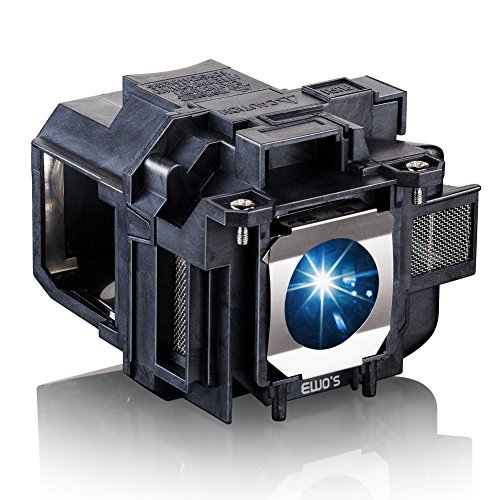 EWO'S LP88 Replacement Projector Lamp for Elplp88
|
8.1/10 | Buy |
Replacing an Epson Lamp the Right Way
The process comes down to four decisions: which lamp, when to swap, how to do it safely, and what to do afterward. Choosing the right part comes first, because installation is straightforward once the module matches. Treat the manual for your exact projector as the authority on cover location, screws, and timer reset.
The sections below begin with the lamp itself and then move to the hands-on work. Each point is tied to what the listings say, and where they leave something out, this guide says so instead of guessing.
Finding the Lamp Model That Matches Your Projector
The lamp number begins with ELPLP, followed by two digits, and Epson projectors list theirs in the manual or on the old lamp module. The lamp compartment label may also show it. Write the number down, along with your projector’s model name, before you shop.
The listings show how closely lamps are tied to models. The Araca ELPLP49 /V13H010L49 Replacement Projector is listed for the ELPLP49 and names PowerLite Home Cinema models such as 8350 and 8700UB. The ABITAN for ELPLP89/V13h010l89 Epson Replacement is listed for the ELPLP89 and names the Home Cinema 4000, 5040UB, and 6040UB families.
Two more listings cover the ELPLP88: the ELP LP88 Replacement Projector Lamp for Elplp88 and the EWO’S LP88 Replacement Projector Lamp for Elplp88, both naming Home Cinema 1040 and related PowerLite models. The EWO’S LP97 Replacement Projector Lamp Bulb is listed for the ELPLP97 and names Home Cinema 2200 and 2250. If your projector is not named, don’t assume it will work.
Compatibility lists come from the sellers. Compare the part number on your old lamp with the number in the listing, and ask the seller if anything is unclear. A matching number is a stronger sign than a long model list.
How to Tell the Lamp Is Due
Look for a lamp warning on screen, a lit indicator, a dim picture, or a lamp that fails to start. Many Epson projectors track lamp hours and show a message when the rated life is close. Check the hour counter in the menu if your model offers one.
Dimness alone doesn’t prove the lamp is the cause. A dirty filter, blocked vents, a wrong picture mode, or a source problem can make the picture look weak. Rule those out first, then decide on the lamp.
If you rely on the projector for work, buy a spare before the counter hits the limit. A lamp that dies during a presentation is a bad surprise, and a spare in the closet avoids it.
Comparing the Lamp Listings
The listings give different life figures. The Araca ELPLP49 lamp states 3200 hours, with ECO mode for longer life and a 2200 lumens rating. The ABITAN ELPLP89 listing states 4600 hours, an ECO mode for added life, and a 2500 lumens output.
The EWO’S LP97 Replacement Projector Lamp Bulb lists a 3000 hour figure, and it also says luminance decreases only slightly over a range of 2500 to 4500 hours. The EWO’S LP88 Replacement Projector Lamp for Elplp88 lists a 3500 hour figure, with a similar range statement of 3500 to 6000 hours. These are seller claims, and the data does not include independent test results.
Rated hours are only a starting point. Real life depends on room temperature, how often the projector is switched on and off, and whether you use a lower brightness mode. Use the hour counter, not the number on the box, to decide when to swap.
Eco Mode, Brightness, and Lumens Claims
Several listings mention ECO mode, which is a reduced-brightness setting that projectors offer to extend lamp life. The Araca and ABITAN listings say ECO mode makes the lamp last longer. Whether your projector has that mode depends on the model, so check the menu.
Lumens figures in the listings, such as 2200 and 2500, describe the lamp’s stated output, not what lands on your wall. The picture you see depends on the projector, the room, and the screen. The data doesn’t give measured results.
If your room is dark, a lower brightness setting can still look good and may help the lamp last. If you need a bright picture in a lit room, expect to run the lamp at full output and replace it sooner.
Warranty and Support Differences
Warranty terms vary by seller. The Araca listing states a 200-day warranty with a replacement or refund if the bulb fails. The Woprolight listing states a 220-day limited warranty, and the ABITAN listing states a 200-day replacement service with a 30-day return policy.
The EWO’S listings mention testing before delivery and after-sales support, without detail in the text. Read each seller’s terms on the order page, because the listing summary may not tell the whole story. Keep your order number and packaging in case you need to make a claim.
Support is not a substitute for a correct match. A lamp with a long warranty still has to fit your projector. Match first, then compare the terms.
What Comes in the Box
Listings differ on what’s included. The Araca ELPLP49 and the ABITAN ELPLP89 listings both mention a replacement lamp with housing. The ABITAN listing adds that installation steps are shown in pictures, and that small gloves and a portable screwdriver come in the package.
The Woprolight listing says a free installation tool is included and describes tool-free swaps for staff. The data doesn’t say the same for the other lamps, so keep a screwdriver ready. Read the packing list when the lamp arrives.
A lamp with a housing is the easiest format, since you swap the whole module instead of handling the bulb. Check that the housing is intact and that the connector is not damaged before you install it.
Preparing the Projector and the Workspace
Turn the projector off and let the fan finish its cooling cycle. Then unplug the power cord and wait until the unit is fully cool. The old lamp can cause burns, so don’t rush this stage.
Set the projector on a clean, stable surface with the lamp cover facing up or toward you. If the unit is on a ceiling mount, get help or call a qualified installer, because lowering a projector requires proper support. Follow the mount’s weight guidance.
Keep a small screwdriver and a soft cloth nearby. Lay out the new lamp, the screws, and the manual. Having everything within reach keeps the job calm and short.
Removing the Old Lamp and Fitting the New One
Remove the lamp cover screws and lift the cover off. Never bypass the safety switch that detects an open lamp door. Loosen the lamp module’s screws, then pull the module out by its handle.
Hold the new lamp by its housing. Don’t touch the glass, and don’t use force. Slide the module in until it seats firmly, tighten the screws, and fit the cover.
If the module won’t seat, stop and recheck the part number. Forcing the wrong lamp can damage the connector or the compartment. The lamp should drop into place with little resistance.
Resetting the Lamp Timer and Testing
Plug in the projector, switch it on, and confirm the picture. Open the menu and look for the lamp hours or reset option. Reset the counter only after the new lamp is in, so the warning clears and the next reminder is accurate.
The menu path depends on the model, so follow the manual. If the projector shuts down quickly, check that the lamp module and cover are fully seated. An open or loose cover can stop the unit from starting.
Run a test with a bright image for a few minutes. Look for flicker, odd noises, or warning lights. If anything seems wrong, power off, let the unit cool, and check the installation again.
When the New Lamp Doesn’t Fix It
Sometimes the picture is still dim or the projector still shuts off after a lamp swap. Check that the lamp module is fully seated and the cover is closed. Then confirm the filter is clean and the vents are clear.
If the lamp indicator stays lit, power the projector off, let it cool, and reseat the lamp once more. Repeated shutdowns can point to overheating, and the manual will list what the indicator lights mean. At that point, contact the seller about the lamp or Epson support about the projector.
Don’t keep restarting a projector that keeps failing. Repeated attempts can stress the unit, and the safer step is to stop and diagnose.
Safe Disposal and Spare Storage
Many projector lamps contain materials that need special disposal. Look up your local recycling rules and don’t toss the old module in the trash. Handle it gently so the glass doesn’t break.
Store a spare lamp in its original box, away from heat and moisture. Keep the packaging until you know the lamp works. That also helps if a return is necessary.
Making the New Lamp Last
Clean or replace the air filter on the schedule in your manual, keep the vents clear, and give the projector space to breathe. Let it cool before you move it. Avoid blocking the exhaust in a cabinet.
Use a lower brightness mode in dark rooms if your projector offers it. That may reduce wear and fan noise. Plan the next swap from the hour counter, and keep the ELPLP number on a sticky note inside the cabinet.
Replacing a lamp is a simple job once the part is right. Confirm the number, let the unit cool, handle only the housing, and reset the timer before the next movie.
About the author
Most projector frustration is a setup problem: wrong throw distance, a bracket in the wrong spot, a cable that will not carry the signal. I write step by step guides for mounting, placement, connecting laptops, phones, and streaming sticks, and getting a straight, sharp picture. I like checklists and I try to say what to measure before you drill anything. My notes follow the site's review methods: research-based comparison, not lab testing.