
How to Change the Bulb in a Projector: Match, Swap, Test
Learn how to change the bulb in a projector safely: match the bulb type, voltage, and base, let the lamp cool, and test the fit in October 2026.
 By Elena Costa
Updated
By Elena Costa
Updated

A projector that suddenly goes dark, flickers, or throws a dim picture often just needs a fresh lamp. The tricky part isn’t the swap itself but picking the right replacement, since bulbs differ in voltage, wattage, base style, and shape. A bulb that looks close can still be wrong for your machine, and a wrong match can mean a bulb that won’t light or one that burns out early.
If you’re working out how to change the bulb in a projector, start with the model number on the projector and the code printed on the old lamp. The products cover several halogen overhead, slide, and film projector bulbs, a retrofit kit, and one item that turns out not to be a projector lamp at all. That mix makes this a good case study in matching specifications before you buy, so the steps below focus on identification, safe handling, and checking your work. Specifications come from the listings, and your own manual always takes priority.
| Award | Product | Best Projector Reviews Score About Best Projector Reviews ScoreBest Projector Reviews Score is a comparison aid based on available product information, not a hands-on testing result. Read our review methods. | |
|---|---|---|---|
| Best Overall |
 EYB 82V 360W Projector Bulb
|
8.9/10 | Buy |
| Best Premium |
 ELH Projector Bulbs 2 Pack
|
8.8/10 | Buy |
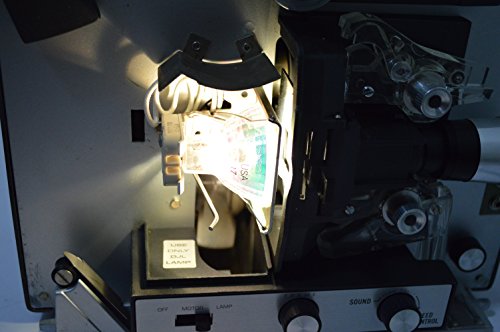 DJL Projector Lamp Bulb Replacement Kit Retrofit
|
8.3/10 | Buy | |
| Best Budget |
 RICTLY Night Light for Kids
|
8.1/10 | Buy |
| Best Value |
 Grinsvalley 2 Pcs Projector Bulb 82v 360w Overhead
|
7.8/10 | Buy |
Identifying the Bulb Your Projector Actually Uses
Which kind of projector are you working on?
Before touching anything, work out what sort of light source you have. Older overhead, slide, and film projectors usually use a standalone halogen bulb, while many modern home and office projectors use a sealed lamp module that drops in as one unit. LED and laser projectors generally don’t have a user-replaceable bulb, so if yours is one of those, the fix is a service question instead of a swap.
The owner’s manual is the best source for this. It will name the lamp type, describe how to reach it, and tell you any model-specific steps. If you’ve lost the manual, search the manufacturer’s support page using the exact model number printed on the projector’s label.
Read the old lamp’s code Many bulbs carry a code or specification stamped on the base or printed on the glass. Common ones include a wattage, a voltage, and a three-letter lamp code. The listings use exactly that kind of information, such as 82V 360W with a G5.3 base, or 120V 300W with a GY5.3 base.
Write the code down exactly as it appears, and compare it with the replacement’s listing. Voltage, wattage, and base need to line up, and so does the physical shape. If anything is unreadable or you’re unsure, ask the manufacturer or a qualified technician instead of guessing.
Reading the product listings The EYB 82V 360W Projector Bulb listing describes a two-pack of 82V, 360W halogen lamps with a G5.3 bi-pin base and a T3.5 envelope, and it lists Apollo overhead models as compatible. It states an average rated life of 75 hours. The Grinsvalley 2 Pcs Projector Bulb 82v 360w Overhead listing is similar on voltage and wattage, with a GY5.3 base, and also lists an average life of about 75 hours.
The ELH Projector Bulbs 2 Pack is a different spec: 120V, 300W, MR16 shape, GY5.3 base. It is listed as compatible with several Kodak Carousel slide projector models that specify an ELH lamp, and the listing states an average runtime of 35 hours.
Notice that the 82V and 120V options aren’t interchangeable. Even though several share a similar base, voltage and wattage are part of the match. Compatibility lists are a starting point, and the listing itself tells you to confirm your projector’s specifications before ordering.
Replacing like for like versus retrofitting A like-for-like bulb is the simplest path when your projector still calls for a standard lamp. You match the code, swap it, and you’re done. A retrofit kit makes sense mainly when the original lamp type is hard to source or wears out quickly, and it changes how the projector is fitted, so it deserves more time and attention.
Think about how you use the equipment. A projector that runs for hours every week in a classroom benefits from a longer listed lamp life, while one that comes out for an occasional slideshow may be fine with a basic replacement and a spare. Either way, the manufacturer’s instructions and the listing’s compatibility notes should drive the decision, not the shape alone.
A retrofit kit and a product that isn’t a lamp The DJL Projector Lamp Bulb Replacement Kit Retrofit is described as replacing a 15-hour DJL lamp with a 200-hour halogen lamp, and it lists Bell & Howell projectors among those it works with. The listing says no drilling, wire cutting, or special tools are needed, apart from a Philips screwdriver. That is a retrofit, not a simple bulb swap, so read the instructions with the kit.
The RICTLY Night Light for Kids is a different story. It is a star-projector night light with LED beads, powered by batteries or USB. It is not a replacement bulb for a presentation or movie projector, so don’t treat it as an option for this job.
Doing the Swap Safely
Power down, unplug, and let it cool
Turn the projector off and let the fan finish its cooling cycle. Then unplug it from the wall. Projector lamps run hot, and a recently used bulb can burn skin, so give it plenty of time to cool before opening anything.
The ELH listing includes the same basic sequence: turn off and unplug the projector, then let the old lamp cool completely. Following your own manual’s cooling time is more important than any general rule, because different projectors need different waiting periods.
Open the lamp area as the manual directs Set the projector on a stable, flat surface. Many models have a lamp door on the bottom or side, held by a screw or latch. Open it only as the manual describes, and never bypass the safety switch or defeat any thermal or lamp-door protection built into the unit.
If the access method isn’t obvious, stop and check the manual. Forcing a panel, prying at seams, or opening areas not meant for users can damage the projector and might expose you to hazards. Overhead projectors, in particular, vary widely in how the lamp is reached.
Remove the old bulb and handle the new one correctly Pull the old bulb straight out if it’s a plug-in type, or release any retaining clip or screws according to the manual. Compare it with the new bulb side by side. Pin spacing, shape, and length should match.
Handle the new bulb by its base or the packaging, not the glass. Oils from fingers can leave marks that may shorten the life of halogen bulbs, which is why the ELH listing specifically says to avoid touching the glass. If you do touch it, wipe it clean with a lint-free cloth as the manufacturer recommends.
Seat it, close up, and test Insert the new bulb gently until it is fully seated in the socket, lining up the pins before pushing. Don’t twist or force it. Replace any reflector, cover, or door, and make sure the lamp door is fully closed, because many projectors won’t power on if it isn’t.
Plug the projector in and turn it on. The picture should appear, and the lamp should light steadily without flicker. If anything smells odd, makes noise, or the unit shuts off, switch it off, unplug it, and recheck the bulb type and seating.
After the Swap: Hours, Spares, and Troubleshooting
Keeping track of lamp hours
Some projectors count lamp hours and show a warning when the lamp nears its rated life. If yours has that feature, the manual will say how to reset the counter after installing a new lamp. Skipping that step can leave a warning on screen even though the bulb is new.
Rated life is a manufacturer figure, not a promise. The listings here give different averages, from 35 hours for the ELH to 75 hours for the 82V options, and a retrofit kit lists 200 hours. Real life can vary with use, ventilation, and handling, so treat those as rough planning figures.
Why the two-pack format helps Several of the supplied bulbs come as two-packs, which gives you a spare for the next replacement. That is practical for equipment used in classrooms, stages, or studios, where a lamp failure mid-session is more than an inconvenience. Keep the spare in its packaging, away from heat and moisture.
For equipment you rarely use, a spare may sit for years. Check the listing and packaging for storage guidance, and inspect the bulb before installing it.
If the new bulb doesn’t light First, confirm the bulb is fully seated and that the lamp door is closed. Then check that the voltage and wattage match what the projector calls for. A lamp that fits physically but has the wrong rating can fail to light or burn out quickly.
If the projector still won’t work with a correct, properly seated bulb, the problem may be elsewhere, such as the power cord, a blown fuse, or a failed switch. At that point, consult the manufacturer or a qualified repair technician rather than opening the unit further.
Reading the listing details with a skeptical eye Marketing copy on bulb listings often mixes real specifications with promotional claims. Voltage, wattage, base, and compatible model lists are the facts you can check against your old lamp. Statements about brightness, color, or reduced eye strain are the seller’s descriptions, and they don’t replace the manufacturer’s own guidance for your projector.
Also note when a listing says it isn’t sold or made by the projector brand. That wording just means it is a third-party replacement, so confirm the fit yourself and keep the original packaging or order details in case you need to return it.
Cleaning and ventilation Dust restricts airflow and can shorten lamp life. Keep intake and exhaust vents clear, and clean accessible filters or vents following the manual. Don’t spray liquids into a projector.
Place the projector where hot air can escape, not in a closed cabinet. Allow it to cool before moving or packing it away. These habits cost nothing and may help any bulb last as long as it can.
Final check before you buy Match voltage, wattage, base, shape, and the compatibility list to the lamp already in your projector. Choose a source that clearly describes those details, and keep your old bulb for comparison until the new one works. With the correct match and a careful, unhurried swap, changing the bulb is a manageable job.
About the author
Lumens, lamp life, fan noise, and eye comfort are where projector marketing gets slippery. I write about what brightness ratings actually promise, how long light sources really last, why a unit gets loud or hot, and how to set up a picture that is comfortable to watch. When something stops working I focus on the practical checks first. My notes follow the site's review methods: research-based comparison, not lab testing.