
How Long Do Projector Bulbs Last? Rated Hours Explained
A dimming picture or a flicker usually means a bulb is near its end: see how long do projector bulbs last and what affects it, updated for October 2026.
 By Elena Costa
Updated
By Elena Costa
Updated

A picture that slowly turns dim and yellow, or a bulb that pops in the middle of a presentation, usually points to the same thing: the lamp has run out of hours. Knowing roughly when that will happen is the difference between a planned swap and a scramble. The tricky part is that the answer depends heavily on what kind of bulb your projector uses.
The honest answer to how long do projector bulbs last is that it depends on the bulb type, the rated hours the manufacturer lists, and how the projector is powered and cooled. The replacement bulbs covered here are halogen types for overhead, slide, and film-style projectors, and their listings give rated life in the tens of hours, not thousands. This guide sticks to those published figures and manufacturer wording, and it explains how to read them without treating them as promises. Keep your projector’s manual handy, since the right bulb always starts with the exact voltage, wattage, and base your model calls for.
| Award | Product | Best Projector Reviews Score About Best Projector Reviews ScoreBest Projector Reviews Score is a comparison aid based on available product information, not a hands-on testing result. Read our review methods. | |
|---|---|---|---|
 Grinsvalley 2 Pcs Projector Bulb 82v 360w Overhead
|
7.8/10 | Buy | |
| Best Value |
 ELH Projector Bulbs 2 Pack
|
8.8/10 | Buy |
| Best Premium |
 FH-S 82V 300W Projector Bulbs 2 Pack
|
8.1/10 | Buy |
| Best Overall |
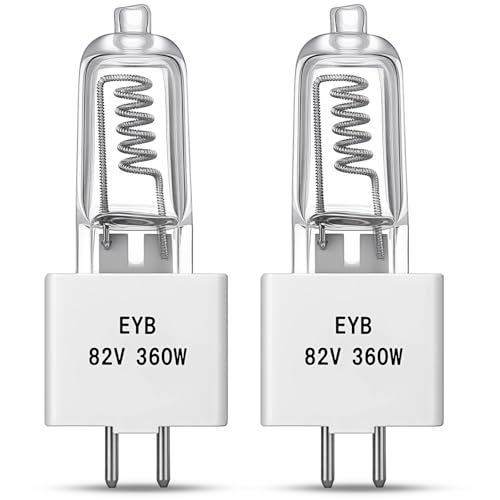
 EYB 82V 360W Projector Bulb
|
8.9/10 | Buy |
 Luboyear 2 Pack Projector Bulb
|
8.6/10 | Buy | |
| Best Budget |
 Grinsvalley 2 Pack 82v 360w Projector Bulb
|
8.6/10 | Buy |
 Technical Precision ENX 82V 360W Projector Bulb
|
7.8/10 | Buy |
What the Listed Hours Tell You, and What They Don’t
For the bulbs in this guide, the listed life runs from about 35 hours to about 75 hours of use. That is a short life compared with the LED and laser light sources found in many newer projectors, so these bulbs are consumables you should expect to replace and keep a spare for. The figures are manufacturer ratings, not results from any testing here, and real life can land above or below them. The rest of this section explains why, and how to plan around it.
The rated hours across the listed bulbs
Most listings cluster around the same figure. The EYB 82V 360W Projector Bulb listing gives an average rated life of 75 hours, and the Technical Precision ENX 82V 360W Projector Bulb listing states 75 hours of rated life. The Luboyear 2 Pack Projector Bulb and both Grinsvalley listings also cite an average of about 75 hours.
Two listings differ. The ELH Projector Bulbs 2 Pack lists a 35-hour average runtime, and the FH-S 82V 300W Projector Bulbs 2 Pack lists 70 hours. Those two are built for different lamp codes, a 120V 300W type and an 82V 300W type, so they aren’t direct substitutes for the 82V 360W bulbs.
It helps to read each number as an average, not a promise. An average rating means some bulbs will fail earlier and some will last longer, and the listing gives no range. If your presentations are short, 75 hours covers a surprising number of sessions, but a classroom that runs the projector all day will go through a bulb quickly.
A little arithmetic makes the rating easier to picture. At one hour of use per day, a 75-hour bulb covers about 75 days of use, and at five hours per day it covers about 15 days. A 35-hour bulb used five hours daily lasts about a week. Estimating your own weekly hours before you buy tells you how many spares are realistic to keep on hand.
Why one bulb can outlast or fall short of its rating
The Luboyear listing is unusually direct about this: it says results are affected by voltage stability and cooling. That matches how halogen bulbs behave in general, since heat and electrical stress are what wear a filament. A projector with blocked vents, a dusty intake, or an unstable power supply can shorten a bulb’s life, and the rating won’t reflect that.
Handling matters too. The ELH listing advises holding the new bulb by its base and avoiding the glass, so the glass stays clean. It also tells you to turn the projector off, unplug it, and let the old lamp cool completely before you do anything. Those steps protect your hands as well as the bulb.
Moving or bumping a projector while the bulb is hot may also cut a bulb short, though the listings don’t address it. Many manufacturers recommend letting the fan finish its cooldown before the unit is moved or unplugged. If your manual says the same, follow it, since that guidance comes from the people who designed the cooling system.
Spotting a bulb that is near the end
A fading bulb tends to announce itself before it dies. The picture may look dimmer or warmer than it did, colors can drift, and some projectors flicker or show a lamp warning. If your projector has an hour counter, it’s the most reliable way to track usage against the rating.
Not every dim picture means a bad bulb, though. Room light, the wrong picture mode, a dusty lens, and a dirty filter can all dull the image, and each has a different fix. Try the picture in a darker room and clean accessible filters per the manual before you spend money on a replacement.
Flicker can also come from a loose bulb or an unstable power source, not only an aging filament. If the bulb is new and the picture still flickers, check that it’s fully seated according to the manufacturer’s steps and try another outlet. Persistent trouble after that points to the projector itself, and that is a job for the manufacturer or a qualified technician.
Lamp-based versus LED and laser light sources
Bulb life is the main reason buyers compare light sources. Lamps are inexpensive to replace but need replacing often. LED and laser projectors usually quote far longer rated lives, though those are rated figures too, and the listing for a given model should state its number before you rely on it.
The bulb listings don’t belong to LED or laser machines at all. They are halogen bulbs with quartz or glass envelopes, 82V or 120V ratings, and two-pin bases such as G5.3 and GY5.3. That is why a question about bulb life for a modern home projector may not be answered by these figures, and why the model’s own manual comes first.
If you’re choosing a new projector and bulb upkeep worries you, ask what the replacement cost and rated hours will be over several years. A lower sticker price with a short-lived lamp can cost more over time than a pricier unit with a long-rated source. Build that ownership picture before deciding, not after the first bulb dies.
Matching the replacement to the fixture
Fit matters more than any rating. The EYB listing tells you to confirm that your equipment calls for an 82V 360W bulb with a T3.5 envelope and a G5.3 bi-pin base. The ELH and FH-S listings also ask you to check your projector model and original lamp code before ordering.
A few details are worth comparing on any listing: voltage, wattage, base type, and the model list. The 82V 360W bulbs here use GY5.3 or G5.3 bases, the ELH is 120V 300W with a GY5.3 base, and the FH-S is 82V 300W with a GX5.3 base. These look close on a shelf, but voltage and wattage differences can matter, so match them to the original rather than to a similar-looking bulb.
Compatibility lists are a guide, not a promise. The listings are marketed as replacements for named lamp codes and projector series, and the ELH and FH-S ones state they aren’t made by the brands they reference. That is worth reading if you own a Kodak Carousel or an Apollo unit, since it clarifies that the bulb is an aftermarket part.
Brightness numbers need caution as well. The listings quote 460 or 650 lumens for several of these bulbs, while one Grinsvalley listing states 11000 lumens for the same 82V 360W class, so the figures aren’t on a common basis. Treat lumen claims on bulbs as rough and prioritize the electrical match.
Counting cost per hour and the value of spares
Most of these bulbs come in packs, which changes the math. A two-pack of 75-hour bulbs gives roughly 150 listed hours across both, and the Technical Precision three-pack stretches that to about 225. The ELH two-pack at 35 hours each gives roughly 70, so a lower-cost pack may not be the lower-cost option per hour of use.
A spare also protects you from a failure at a bad moment. Several listings frame the second bulb as a ready replacement for the next failure, which makes sense for a classroom or a regular presentation room. Keeping the spare in its packaging, away from heat and handling, is a reasonable habit.
Price tiers across these packs are fairly close, so rated hours and exact fit should lead the decision. Choose by the original lamp code first, then compare listed hours, then consider pack size. That order avoids buying a cheap bulb that doesn’t fit.
One more detail is worth a glance on any pack: how many bulbs are inside. The two-packs describe one bulb to install and one to keep, while the three-pack gives a second spare. If several projectors in a room share the same lamp code, a larger pack can serve all of them, which keeps the lamp code and the rated hours the same across your equipment and makes tracking easier.
Replacing the bulb without making it worse
The safe order of work is short. Turn the projector off, unplug it, wait for the old bulb to cool completely, then follow the manual’s instructions for the lamp door and seating. Hold the new bulb by its base and keep fingers off the glass.
Don’t bypass the lamp door switch, thermal protection, or any cooling feature, and don’t open housings beyond what the manual describes. If the projector seems damaged, the bulb breaks, or a warning persists after replacement, stop and contact the manufacturer or a qualified technician. Fragile bulbs and hot parts are not a good place to improvise.
After the swap, reset the lamp hour counter if the model has one, since the next replacement reminder depends on it. Then run the projector for a few minutes and check brightness, color, and any flicker. A healthy new bulb should look steady and even.
Making the most of the hours you have
Good habits stretch whatever life the bulb has. Keep vents clear, let the projector cool before moving it, use stable power, and avoid switching it on and off repeatedly during one session. These are general practices rather than results from the listings, so defer to your manual if it says otherwise.
For a decision today, find the exact lamp code, note the rated hours on the listing, and buy a pack so a spare is on the shelf. The rated number is a planning figure, not a deadline. Your projector’s manual and your own hour counter will tell you more about your bulb than any average can.
About the author
Lumens, lamp life, fan noise, and eye comfort are where projector marketing gets slippery. I write about what brightness ratings actually promise, how long light sources really last, why a unit gets loud or hot, and how to set up a picture that is comfortable to watch. When something stops working I focus on the practical checks first. My notes follow the site's review methods: research-based comparison, not lab testing.