
Is 1080p Good for a Projector? Yes, With Caveats
Is full HD enough for your wall? See whether is 1080p good for a projector in October 2026, with screen size, brightness, and native versus 4K input.
 By Daniel Whitaker
Updated
By Daniel Whitaker
Updated

Full HD sounds old-fashioned next to 4K stickers, so it’s fair to wonder whether you’re settling for less. The short version is that 1080p is a solid choice for most rooms, and is 1080p good for a projector mostly depends on screen size, viewing distance, and how bright your room is.
The more important trap is wording. Many listings say “4K supported” while describing a native 1080p panel, which means the projector accepts a 4K signal but doesn’t show 4K detail. The listings include a laser projector, a streaming-ready portable, and several mini models, and they use these terms in different ways.
This guide explains what 1080p can and can’t do, based on manufacturer descriptions and general display principles, not on hands-on testing. It also shows how to read resolution wording on a listing, so you can spot a vague claim before you click buy and avoid paying for detail the panel can’t show.
| Award | Product | Best Projector Reviews Score About Best Projector Reviews ScoreBest Projector Reviews Score is a comparison aid based on available product information, not a hands-on testing result. Read our review methods. | |
|---|---|---|---|
| Best Overall |
 Aurzen Roku TV D1R air USB-C Powered
|
9.1/10 | Buy |
| Best Budget |
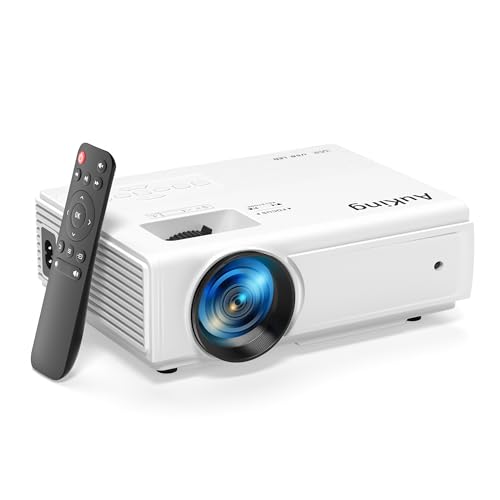 AuKing Projector, 2024 Upgraded Mini Projector
|
8.4/10 | Buy |
| Best Premium |
 Native 1080P Projector with WiFi 6 and Two-Way
|
8.4/10 | Buy |
 ViewSonic LS740HD 1080P Laser Projector
|
8.4/10 | Buy | |
 YGSKK Mini Projector with Wifi and Bluetooth
|
8.0/10 | Buy | |
| Best Value |
 HP Projector with Apps, FHD 4K Supported
|
7.8/10 | Buy |
Full HD on a Projector: Where 1080p Shines and Where 4K Starts to Matter
Yes, 1080p is good for a projector in most home setups, especially at modest screen sizes and in rooms where brightness and contrast limit the picture more than pixel count does. It starts to show its limits on very large screens viewed from close seats, or when you want the most detail from 4K sources. Knowing which case you’re in saves money.
What 1080p means, and what “4K supported” means
A 1080p image is 1920 by 1080 pixels, about 2.1 million in total. A 4K UHD image is 3840 by 2160, about four times as many. Native resolution describes the number of pixels on the imaging chip or panel itself. If a listing says native 1080P, the panel is 1080p, and a 4K signal gets scaled down to fit.
The phrase “4K supported” or “4K compatible” is a different claim. It usually means the projector can accept and process a 4K input, not that it displays one. The Dxyiitoo listing is a good example: it says native 1920×1080 resolution and compatible with 4K, which describes a 1080p panel that accepts 4K input. The YGSKK listing uses the same pattern, saying native 1080P with 4K compatibility.
Be skeptical when a listing says 1080p supported without saying native. The AuKing listing says Full HD 1080P supported, which doesn’t state the native panel resolution. If sharpness matters, look for the word native, and where it’s missing, consider it unclear.
Screen size and seating distance decide how sharp it looks
Pixels spread over a bigger area get easier to see. On a modest screen from a comfortable distance, 1080p looks clean, while on a very large screen from close up you can see individual pixels and edges. That is why a 4K projector makes more sense for a dedicated home theater with a large screen than for a bedroom wall.
The listings show a wide range of image sizes. The AuKing listing states a 35 to 200 inch projection size at 3.6 to 16.4 feet, and the ViewSonic listing states 30 to 300 inches with a 1.3x optical zoom. Those are manufacturer figures, and the useful part is that a larger image means a less sharp one for the same resolution.
If you sit far enough back that pixels blend together, the difference with 4K becomes harder to notice. Try to match screen size to your seat distance, and prefer a size that fills your view without making you scan the image.
Brightness often matters more than resolution
A sharp picture that’s too dim to see is worse than a soft one that’s bright. Brightness listed in ANSI lumens is a standard basis, while other figures such as ISO lumens or unlabeled lumens can be measured differently. The YGSKK listing says up to 300 ANSI lumens, the LYNCAST HP listing states 200 ISO lumens, and the ViewSonic listing states 5,500 ANSI lumens.
The ViewSonic LS740HD is aimed at boardrooms, classrooms, and similar spaces, and its numbers reflect that. A 5,500 ANSI lumen laser projector can handle rooms with ambient light better than a small portable, but it belongs to a different class of equipment. A mini projector with lower stated brightness is best in a dim room.
So for a bright living room, put lumens ahead of pixels. For a dark basement, resolution, contrast, and screen size all become relevant.
Contrast and room conditions
The Dxyiitoo listing mentions a 10000:1 contrast ratio, and the AuKing listing recommends a dark environment for optimal performance. Contrast ratio claims are manufacturer numbers and don’t have a universal test standard, so they can’t be compared across brands as if they were measured the same way.
A dark room improves perceived contrast on any projector. Walls, ceiling color, and a proper screen all influence the result. A light-colored room reflects projected light and lowers contrast, which is a common reason a 1080p image looks flat.
Content: when 1080p is plenty
Much of what people watch is delivered in 1080p or lower: broadcast TV, many streaming episodes, video games on older consoles, and presentations. On a 1080p projector those sources display at their intended resolution with no scaling. Sports and casual TV rarely benefit from extra pixels, and many presentations are designed for 1080p or lower.
4K content is where a native 4K projector can pull ahead, particularly on large screens. A 1080p projector will still play that content, downscaled, and a good picture mode can help it look pleasing. For most households, that is more than enough.
Will 1080p look blurry or soft?
A native 1080p panel can look sharp, but sharpness depends on more than pixel count. Lens quality, focus, keystone correction, screen surface, and room light all affect how crisp the picture appears. A well-focused 1080p image on a clean screen often looks better than a poorly focused higher-resolution one.
Soft edges usually point to focus or an extreme keystone setting. Square the projector to the screen where you can, refocus after any move, and keep the lens clean. If the picture is still soft, check whether the source is actually sending 1080p, since some apps and devices default to lower resolutions.
Gaming and fast action on a 1080p projector
Resolution is only part of a gaming setup. Input lag, refresh handling, and game modes affect how responsive the picture feels, and the listings don’t provide lag figures. If you play a lot, look for a stated game mode in the manual and avoid heavy picture processing, since that adds delay.
Consoles and PCs generally output 1080p comfortably, and 1080p is often the sweet spot for smoother performance. That makes a native 1080p projector a reasonable match for casual and family gaming, even if a 4K model might suit enthusiasts better.
Which room each type of 1080p projector suits
A bedroom or small den favors a compact model with modest brightness, a dark room, and a screen size that suits the short distance to the bed or couch. A living room with windows needs more brightness and a way to control light, and a portable model may struggle there unless the curtains are drawn.
An outdoor movie night after sunset suits a portable projector with battery or power bank support, a bright enough picture for the screen size, and a sturdy stand. For a classroom or office, installed models with higher brightness, keystone control, and multiple inputs fit best. Matching the model to the room does more for the picture than chasing the next resolution tier.
Features that matter alongside resolution
Light source and lifespan matter. The ViewSonic listing describes a laser phosphor source with up to 30,000 hours in Dynamic Eco mode, while lamp-based or LED mini projectors list their own figures, such as the AuKing listing’s 55,000 hour claim. These are manufacturer statements, and real-world life depends on use.
Setup flexibility matters too. The ViewSonic listing offers H/V keystone, four-corner adjustment, and a 1.13 to 1.47 throw ratio, which gives placement flexibility for a ceiling mount. The LYNCAST HP listing and others list auto focus and auto keystone for simpler setup, though heavy keystone correction can soften the image.
Smart features vary. The Aurzen Roku TV D1R air USB-C Powered listing describes Roku TV built in, native 1080P, and USB-C power delivery from a 65W or higher source. The HP Projector with Apps, FHD 4K Supported listing describes Android TV built in, native 1080P, and a requirement for a 65W or higher power bank for outdoor use. Those details matter more to a portable buyer than another few pixels.
Matching the listed projectors to uses
A buyer wanting a bright, installed projector for a classroom, office, or simulator room should read the ViewSonic listing, since it targets that use with high stated brightness and a laser source. A buyer after a portable streaming setup for movies on a wall should look at the Aurzen or HP-branded models, which list built-in streaming and portable power options.
A buyer who wants wireless phone mirroring and Bluetooth on a modest budget may look at the Dxyiitoo or YGSKK listings, which emphasize Wi-Fi 6 and Bluetooth. The AuKing listing lists HDMI, VGA, AV, and USB ports for older and varied sources, but it leaves the native resolution unstated.
When to spend more for 4K
Consider 4K if you plan a big screen, sit close, watch a lot of 4K content, and have a room dark enough to use the extra detail. In that case, check that the listing states native 4K or a chip resolution, and be cautious with pixel-shifting claims, which are not the same as native.
If your room is bright, your budget is tight, or your screen is modest, a bright, native 1080p projector with a good screen is usually a better investment than a dimmer 4K one.
Pairing with a screen
A screen can improve contrast and evenness over a wall, but results depend on the projector and room. A flat, light surface is the minimum, and a screen sized to your seating distance makes the 1080p image look its best.
For most rooms, 1080p is good enough. Check that it’s native, match the screen size to your distance, put brightness first in lit rooms, and spend on 4K only when screen size and darkness justify it.
About the author
I care more about how a projector handles a dark scene than about any single number on a spec sheet. My beat here is home theater: contrast, black levels, HDR handling, and how the same picture holds up in a dedicated room versus a living room. I write the way I shop. I compare spec sheets, read what owners complain about most, and point out the trade-offs before the highlights. If a feature only looks good on paper, I will say so. My notes follow the site's review methods: research-based comparison, not lab testing.