
What Does 4k Support Mean on a Projector? Decoding vs Native
What Does 4k Support Mean On A Projector? Usually the projector accepts a 4K signal but doesn't show 4K pixels. Learn to read the label in October 2026.
 By Arriana Vasquez
Updated
By Arriana Vasquez
Updated

A small projector listing says “4K support” in the title, then lists a native resolution a few lines down that sounds a lot lower. That mismatch is the single most confusing thing about budget projectors, and it catches plenty of shoppers who expected a sharper picture than they got. The label isn’t a trick so much as shorthand, and it only helps once you know what it’s shorthand for.
The short version is that what does 4k support mean on a projector usually means the projector can accept and decode a 4K video signal, then scale it down to the resolution of its own imaging panel. This guide reads the projector listings to show how that wording plays out, including models that list a native 720P panel next to 4K support, and explains which other specifications matter more for what you’ll actually see. It’s based on published listings and general specification definitions, not hands-on testing.
 Mini Projector 4K Support
![[100% Offset &500 ANSI] 4K Support Projector](https://m.media-amazon.com/images/I/41Hl3U1WyEL._SL500_.jpg "What Does 4k Support Mean on a Projector? Decoding vs Native 2") [100% Offset &500 ANSI] 4K Support Projector
[100% Offset &500 ANSI] 4K Support Projector
 Built-in Apps 1080P 4K Support Mini Projector
 Mini Projector, Portable Projector 1080P 4K
 Native 1080P 4K Support Projector
 Mini Projector with WiFi and Bluetooth
 Built-in Apps 1080P 4K Support Mini Projector
 Magcubic 2026 Upgraded HY300PRO Mini Projector
 Mini Projector, Portable Projector with Wifi
 Mini Projector with WiFi 6 and Bluetooth 5.4
 【Built-in APPS】Mini Projector With Wifi
 Magcubic Mini Projector with WiFi 6 and Bluetooth
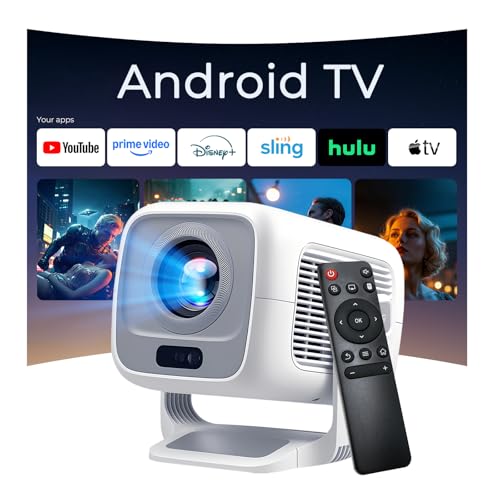 4K Support Native 1080P Smart Projector, 600 ANSI
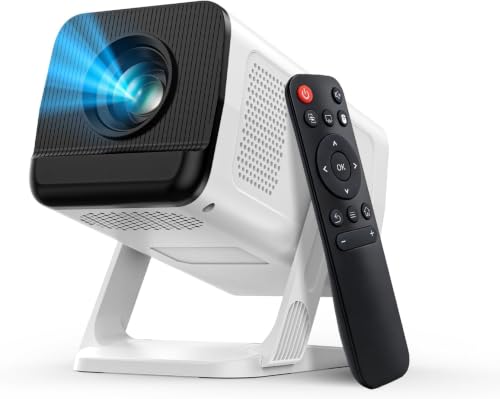 Portable Projector with 4K Support
What 4K Support Tells You, and What It Doesn’t
On a projector, “4K support” normally means the unit can take in a 4K signal and play it, not that its panel has 4K pixels. The picture you see is limited by the projector’s native resolution, which is the number of pixels the imaging chip actually has. A 4K input on a lower-resolution projector gets scaled down to fit.
That distinction drives everything below: how to read the wording, what you’ll actually see on the wall, which other specs deserve more attention, and how to decide whether a label like this is worth paying attention to at all.
Input Support Versus Panel Resolution
Decoding is a software and chip feature. It lets a projector open a 4K video file or accept a 4K signal from a source without refusing it or showing an error. Resolution, on the other hand, is hardware. It describes how many pixels the projector can show at once.
Think of it like a small window with a very good view. The window accepts a huge picture, but it can only show as much detail as its frame allows. So a projector that decodes 4K but has a 720P panel will show a picture with 720P detail.
Scaling does one useful thing. A high-quality source can look cleaner than a compressed one when scaled down, because there’s more information to work from. But that’s an improvement within the panel’s limit, and it doesn’t turn the projector into a 4K model.
How the Listings Phrase It
The listings use several wordings, and they show the pattern clearly. The Built-in Apps 1080P 4K Support Mini Projector states a native 1280×720 resolution with 1080P and 4K decoding support. The Magcubic HY300PRO and the Magcubic Mini Projector with WiFi 6 and Bluetooth both list native 720P with 4K support.
The Mini Projector with WiFi 6 and Bluetooth 5.4 lists native 720P resolution with 1080P compatibility. The Portable Projector with 4K Support is described as 1080p HD, and the [100% Offset &500 ANSI] 4K Support Projector calls itself a 1080P projector with 4K support. Others, such as the Mini Projector with WiFi and Bluetooth, say 1080P HD and 4K support without naming the native resolution.
That last pattern deserves caution. When a listing doesn’t state the native resolution, you can’t assume it. Look for the words native, panel, or physical resolution, and if they’re missing, check the specification tab or ask the seller before buying.
What You’ll See at Screen Size
Pixels spread across a bigger image look coarser up close. A 720P picture at 100 inches shows less fine detail than a 1080P picture at the same size, and the gap shows most in small text, thin lines, and menus. For video watched from a few feet back in a dim room, many viewers find lower resolution acceptable, especially on a smaller image.
A 1080P panel gives a visible step up for text and detailed scenes, though it’s still not 4K. A projector that accepts a 4K signal shows no extra detail beyond its panel, so the sharper picture comes from the panel, not from the label. If you plan to use the projector for spreadsheets, game text, or on-screen menus, native resolution is worth paying attention to.
Screen size and seating distance work together. Sitting farther back hides pixel structure, and a smaller image hides it too. So a modest panel can feel fine in a bedroom or dorm and feel soft in a big living room.
Brightness and Contrast Often Matter More Here
At this tier, ANSI lumens and contrast say more about the picture than the 4K label does. The listings state a range. The LYNCAST listing mentions 400 ANSI lumens, the ClokoWe model lists 300, the Magcubic lists 200, the Xorytin lists 180, and the antmap listing mentions both 500 and 600 ANSI in different places.
Treat those as manufacturer-stated figures, since the listings don’t describe a test method. Brightness only helps when it’s matched to the room. A higher rating can handle a bit more ambient light, but a sunlit room will still wash out a small projector, so a dim room is the best condition for any of them.
Contrast numbers are even less comparable. One listing states 10,000:1, another 2,000:1, another 1,000:1, and the numbers depend on how each maker measures. Use them as rough hints, and treat a real-world dim-room picture as the thing that counts.
Throw Distance and Screen Size
Throw ratio decides how far back the projector sits for a given image width. The SKUOU listing states a 0.9:1 throw ratio and says it projects a large image from about 2.1 to 6.6 feet away, with support for 40 to 100 inch screens. The ClokoWe model lists a 0.8:1 short throw and zoom.
The Magcubic listing gives a practical example, recommending a distance of 5.2 feet for an 80-inch image. The Sainyer listing mentions up to 200 inches, though a larger image spreads the same brightness and pixels over more area. For small rooms, a short throw is useful, but measure the room first and compare it to the listing’s figures.
Bigger isn’t automatically better with a low-resolution, lower-lumen projector. A recommended size range, like the 40 to 100 inch range some listings give, is a more honest guide to where the picture stays watchable.
Smart Features, USB Playback, and Connections
Several of the listings pair 4K support with built-in apps and wireless features. The LYNCAST listing mentions Android 14 and a large app library, the ClokoWe listing mentions YouTube and Prime Video, and the SKUOU listing lists AirPlay, Miracast, and DLNA screen mirroring along with HDMI and USB. These can matter more day to day than a resolution label.
Playing a 4K file doesn’t mean streaming 4K. One ClokoWe listing says it supports 4K video playback via USB drive, which describes file decoding. Streaming apps depend on the app’s own limits and your internet connection, and some protected content can be restricted regardless of what the projector can decode.
Connections also differ. The Sainyer listing states it has no Wi-Fi, no Bluetooth, and no built-in apps, and it relies on wired connections for iOS devices. That’s a very different product from a smart model, which is a good reason to read the details and not the title.
Auto Keystone, Placement, and Image Quality
Most of the listings advertise automatic vertical keystone correction, which squares up the picture when the projector sits at an angle. It’s convenient, but digital keystone correction works by reshaping the image, and that can soften fine detail a little. Placing the projector square to the screen is the cleaner way to keep whatever resolution the panel has.
The antmap listing takes a different route with a 100% offset design, which it says lets the projector sit below the screen without a skewed picture. Others offer rotating stands, with the listings stating 180, 210, or 270 degrees, so you can aim at a wall or ceiling. Those features help with setup, but none of them changes the native resolution.
Manual focus matters too. The ClokoWe listing mentions a focus wheel and the antmap listing mentions electric focus. A sharp focus does more for perceived detail on a lower-resolution panel than any 4K label.
Sound, Size, and Portability
Built-in audio is modest on small projectors. The Xorytin and Magcubic listings mention a 5W speaker, and the antmap listing mentions a 12W speaker, while the ClokoWe listing mentions stereo speakers. For a bigger room, Bluetooth output to an external speaker, which several listings support, usually makes a bigger difference than the resolution.
Portability is a real selling point for these models. The Xorytin and Magcubic listings give a weight of 0.88 pounds, which suits backpacks and travel. Small size also means a small cooling system, so keep the vents clear and don’t block the airflow on a shelf or blanket.
When you’re deciding between models, consider what you’d actually carry and where you’d set it up. A projector that gets used often at a modest resolution beats a sharper one that stays in the closet.
When Native Resolution Is Worth Paying For
If your main use is casual viewing, such as kids’ shows, bedroom movies, or a backyard movie night, a native 720P or 1080P projector can be an affordable fit. The listings themselves describe the lower-resolution models as suited to casual use. For work documents, reading text, or a larger screen, a higher native resolution is worth the extra budget.
True native 4K projectors sit in a different price tier and are a different kind of purchase. A listing for a small projector that says 4K support isn’t describing that. If native 4K matters to you, look for a statement that the panel itself is 4K, and be cautious of anything that leaves it out.
Pixel-shifting projectors, which use a lower-resolution chip to create a higher-resolution image, are another category. Their listings should say so plainly, and none of the listings claims it.
A Quick Way to Read Any Listing
Find the native resolution first. If it’s missing, treat the product as unverified. Then look at ANSI lumens, throw ratio, and the connections you’ll use, such as HDMI, USB, Wi-Fi, or Bluetooth. Finally, compare the room’s light level and your seating distance to the stated screen size range.
If a listing leans heavily on 4K support but doesn’t give native resolution or brightness figures, the missing details are the answer. A projector that tells you what its panel is gives you more to trust than one that only tells you what it can decode.
About the author
Arriana Vasquez contributes product reviews and buying guides to Best Projector Reviews. See our review methods for the limits of these comparisons.