
How to Make the Projector Screen Bigger (2026 Guide)
How To Make The Projector Screen Bigger: adjust throw distance, zoom, and screen size to get a larger picture that still looks good in October 2026.
 By Priya Raman
Updated
By Priya Raman
Updated

A picture that looks small on a big wall is a familiar frustration, and it usually has more than one fix. The image size depends on how far the projector sits from the screen, what the lens can zoom, and how large the screen surface actually is. Working out how to make the projector screen bigger means separating those three pieces before spending money on anything.
A bigger picture isn’t automatically a better one. Stretching the image across more area spreads the projector’s light thinner, and a low-resolution source can look softer when enlarged. Room lighting and seating distance matter just as much as raw size.
Sketching the room on paper first, with the wall width, seat positions, and projector spot marked, keeps the whole project grounded in real numbers.
This guide explains the adjustments that cost nothing, when a larger screen makes sense, and how the portable and pull-down screens listed here compare on their stated dimensions.
| Award | Product | Best Projector Reviews Score About Best Projector Reviews ScoreBest Projector Reviews Score is a comparison aid based on available product information, not a hands-on testing result. Read our review methods. | |
|---|---|---|---|
| Best Overall |
 Mdbebbron 100 inch Projector Screen 16:9 Foldable
|
9.2/10 | Buy |
| Best Value |
 150inch Outdoor Projector Screen Anti Crease
|
9.2/10 | Buy |
| Best Budget |
 Mdbebbron 120 inch Projector Screen 16:9 Foldable
|
8.3/10 | Buy |
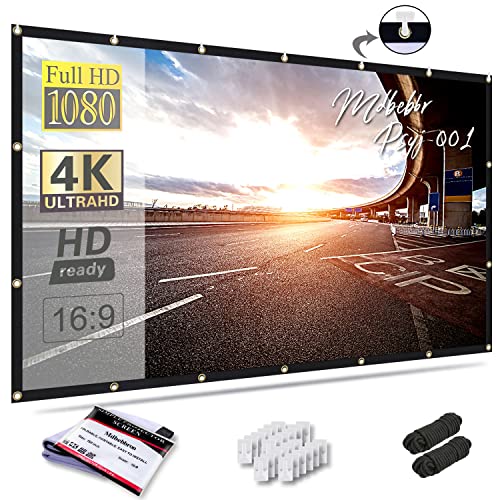 Mdbebbron 150 inch Projection Screen 16:9 Foldable
|
8.1/10 | Buy | |
| Best Premium |
 VIVOHOME 100 Inch 16:9 Pull Down Projector Screen
|
8.1/10 | Buy |
 120inch Projector Screen with Stand
|
8.0/10 | Buy |
Why the Picture Looks Small and What Controls Its Size
Image size on the wall follows the projector’s throw distance. Move the projector farther from the screen and the picture grows; move it closer and the picture shrinks. Most projectors also have a zoom or size control that lets you grow or shrink the picture without moving the unit, though the range is limited by the lens.
The screen itself sets a second limit. If the projected image is larger than the screen surface, part of the picture spills onto the wall or frame and wastes light. If the picture is smaller than the screen, you leave unused surface around the edges. The goal is a picture that fills the usable viewing area without overshooting it.
Free Adjustments to Try First
Start by measuring the current distance between lens and screen, then move the projector back a small amount and see how the picture changes. Use the zoom control to fine-tune the size, then refocus, because focus shifts when distance changes. Check your projector’s manual for its recommended throw distance range, since pushing beyond it can produce a dim or soft picture.
Keystone correction can square a tilted picture, but it can also shrink the usable area. If you see a trapezoid, try leveling the projector or adjusting its height rather than relying only on digital correction. Cleaner geometry often gives you a larger, sharper picture than heavy correction does.
Also check aspect ratio. A 16:9 image on a screen with a different shape leaves bars at the top and bottom or sides. Matching the picture shape to the screen’s stated format makes full use of the surface.
When the Projector Itself Is the Limit
Some projectors can’t reach a big picture in a small room, no matter how you adjust them. The manual lists the supported image size range and the matching throw distances, and those numbers are the real ceiling. If the room is too short for the picture you want, a projector designed for shorter throw distances may be the better answer than a bigger screen.
The reverse problem happens in a long room, where the projector must sit far back to fill a wide screen. In that case, check that the projector can focus and zoom across that distance, and that cable runs or wireless connections can reach it. Mounting options, shelves, or a ceiling bracket give you flexibility, and overhead mounting should follow the hardware maker’s instructions.
Remember that the screen can be the cheaper change. If your projector already produces a larger picture than the screen can hold, a bigger screen with the right viewing area uses what you already own. Check the listed viewing-area numbers against the picture width you measured at the wall.
Reading Screen Dimensions Before Choosing a Bigger One
Screen listings give a diagonal measurement, but the useful numbers are the width and height of the viewing area. For a 16:9 screen, the viewing area grows quickly with each step up in diagonal. The listings here show how those numbers relate, and they help you test a room before you buy.
The Portable Folding Options
The Mdbebbron 100 inch Projector Screen 16:9 Foldable is listed with a 100-inch diagonal, a 16:9 ratio, and an 87-inch by 49-inch viewing area. The Mdbebbron 120 inch Projector Screen 16:9 Foldable states a 104-inch by 58-inch area, and the Mdbebbron 150 inch Projection Screen 16:9 Foldable lists 130 inches by 73 inches. The 150inch Outdoor Projector Screen Anti Crease lists a 132-inch by 73-inch viewing area, which is close to the Mdbebbron 150-inch listing’s 130-inch width.
These screens are described as foldable and portable, with attachment options including hooks, brackets, ropes, nails, or double-sided tape, depending on the listing. That makes them flexible for a wall in a rented space or a temporary event. A fabric screen needs to be hung or stretched well, so check how it attaches to your wall before choosing a size.
Several listings mention double-sided projection and material described as anti-crease. Those are manufacturer descriptions, and how a fabric hangs depends on installation and tension. Hanging a folded screen to let it relax before use, and following the seller’s care notes, is a sensible habit.
A Pull-Down Screen and a Freestanding Stand
The VIVOHOME 100 Inch 16:9 Pull Down Projector Screen lists a 100-inch diagonal at 16:9 with an 87-inch by 49-inch viewing area. Its overall size is listed as 92 inches wide by 57.5 inches high, and the listing recommends a viewing distance of 9.2 feet. It’s a manual retractable design that locks at a chosen height, and it can be mounted on a wall or ceiling, although screws and an L-bracket are not included.
The 120inch Projector Screen with Stand is listed at 120 inches with a stand, a carry bag, ground stakes, ropes, and sandbags, and it’s marketed for outdoor use. A stand-based screen can go where a wall isn’t available, such as a backyard or camp site. Wind safety still depends on proper anchoring and common sense, so follow the included instructions.
Both designs show that screen housing and frames take up more room than the viewing area. Measure the wall for the overall size, not just the picture. Allow for clearance above and beside the screen so you can install it safely.
Aspect ratio is worth a second glance when you shop. Every screen listed here is described as 16:9, which matches most video and many projectors. If your projector or content uses a different shape, a screen with the same ratio avoids unused bands at the edges. Business users who present from a laptop should check whether the laptop’s output is 16:9 or 16:10 before choosing.
Screen surface and gain are other specs to check when a listing provides them. The listings here describe fabric and materials, but they don’t give gain values for every screen, so avoid assuming a number. Results depend on the projector, the room lighting, and where people sit, so treat any surface claim as a starting point.
Does a Bigger Screen Need a Brighter Projector or Better Resolution?
A larger picture lowers the apparent brightness, because the same light covers more area. That’s why a 150-inch image in a bright room can look washed out while a 100-inch image looks fine. If your room has windows, a smaller image or a darker room may beat a bigger screen.
Resolution matters too. The same number of pixels covers a larger area, so a 720p source on a very big screen can show visible pixel structure from close seats. Higher-resolution content, a sharper projector, or a bit more distance can help. The projector’s native resolution is the number to check, not only the highest input it accepts.
Matching Size to Seating Distance
Sit at the main viewing position and imagine the picture at several widths. A very large picture can force you to turn your head to follow action, while a smaller one can feel distant. The 9.2-foot viewing distance in the VIVOHOME listing is one data point, though your own comfort is the better guide.
For presentations, the back row’s ability to read text sets the size. Bigger is useful until text blurs or glare takes over. A short test slide with small text projected from your actual setup answers the question more reliably than a formula.
Mounting and Safety for a Larger Screen
Larger screens weigh more and catch more air, so hardware and anchors matter. Follow the manufacturer’s mounting instructions, use fasteners suited to your wall type, and consider qualified help for ceiling work. Never exceed the weight limits listed for brackets or mounts.
Outdoor screens add wind to the equation. Use the stakes, ropes, and sandbags that the listing includes, and take the screen down if gusts pick up. A flapping screen is both a bad picture and a hazard to people nearby.
Indoors, leave room to reach the screen for tensioning and cleaning. Keep fabric away from heat sources and follow the care notes from the seller before washing anything. If the listing doesn’t state washing instructions, don’t assume the material can be washed.
Storage, Setup Time, and Everyday Handling
A bigger screen means a bigger bundle to store and set up. Folding fabric screens pack small, according to their listings, while stand-based and pull-down designs need more space and a plan for where they live between uses. Think about who will set the screen up and how often, because a design that takes twenty minutes will stay in the closet.
Smoothing the surface matters for picture quality. Let a folded fabric screen hang and settle before you project onto it, and keep it clean and dry when stored. If the seller provides care instructions, follow them rather than guessing. Keep the original bag or case, since it protects the fabric during transport and makes repacking quicker. A quick wipe of the floor or wall area before setup also keeps dust from landing on the screen.
A Sensible Order for Getting a Bigger Picture
Begin with distance and zoom, since they cost nothing and reveal how much room the projector has. Then compare your wall and seating to the viewing-area numbers in the listings, and choose the largest screen that fits without crowding the room. Finally, test with the lights you’ll actually use, because brightness is the limit most people hit first.
About the author
A good screen can change a picture more than a small projector upgrade, and it is the part many buyers skip. I write about screen materials, gain, ambient light rejecting designs, and how room lighting, wall color, and seating position change what you see. I try to keep the advice grounded in what a normal room looks like, not an ideal one. My notes follow the site's review methods: research-based comparison, not lab testing.