
How to Make Projector Screen Bigger? Distance, Zoom, Screen
Learn how to make projector screen bigger with throw distance, zoom, and larger screen options, plus brightness trade-offs for October 2026.
 By Priya Raman
Updated
By Priya Raman
Updated

The picture fills only part of the wall, and the rest of the screen sits empty. Or the projector is already as far back as the room allows, yet the image still feels small for movie night. Both situations have the same two levers: how big the projector throws the picture, and how big the surface is that catches it.
This guide covers how to make a projector screen bigger in practical order: using distance and zoom first, then choosing a larger screen, then handling the side effects such as a dimmer picture, mismatched shapes, and wrinkles. It uses the screen listings for real dimensions and keeps the advice grounded in published specifications and general setup practice. It does not rely on hands-on testing, so measure your own room before you buy anything. A tape measure and a few minutes of testing will tell you more than any spec sheet.
| Award | Product | Best Projector Reviews Score About Best Projector Reviews ScoreBest Projector Reviews Score is a comparison aid based on available product information, not a hands-on testing result. Read our review methods. | |
|---|---|---|---|
| Best Overall |
 Mdbebbron 120 inch Projector Screen 16:9 Foldable
|
8.3/10 | Buy |
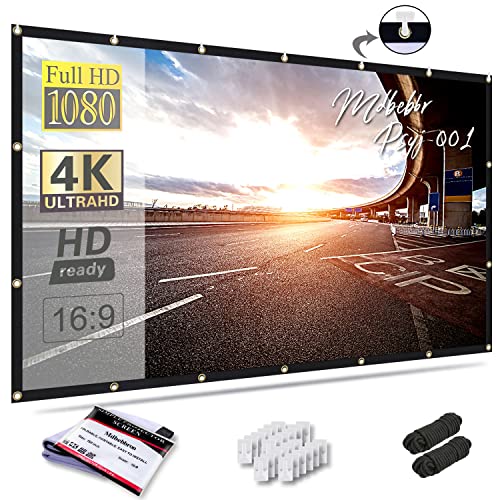 Mdbebbron 150 inch Projection Screen 16:9 Foldable
|
8.1/10 | Buy | |
 120inch Projector Screen with Stand
|
8.0/10 | Buy |
Enlarging the Picture: Distance, Zoom, and Screen Size
The image gets bigger when the projector moves farther from the screen, when you widen its zoom, or when you switch to a larger screen that the projector can actually fill. Those three changes work together, and they have different limits. Before you spend anything, check what your projector can already do.
Start With Throw Distance and Zoom
Every projector has a throw ratio, which links the distance to the screen with the width of the image. In simple terms, distance equals the throw ratio times the image width. So a wider image needs the projector farther back, unless the projector has a short-throw lens.
The listings give useful width figures to work with. A 120-inch 16:9 screen has a viewing area of roughly 104 by 58 inches, while a 150-inch 16:9 screen is about 130 by 73 inches. At the same throw ratio, the 130-inch width needs about 25 percent more distance than the 104-inch width.
Zoom is the free adjustment to try first. Many projectors have a zoom lens or a digital zoom setting that makes the picture larger or smaller without moving the unit. Check your projector’s manual for the range, since it determines how much room you have to grow the image where it sits.
If the projector is already at its farthest practical spot and the picture still can’t fill your target screen, the limit is the throw distance, not the screen. Moving the projector back, or choosing a model with a throw ratio suited to the room, is then the next step. Measure the distance from the lens to the wall before you decide.
Digital Zoom, Resolution, and Picture Quality
Be careful with digital zoom. It enlarges the picture by cropping or scaling the image, which can soften detail compared with an optical zoom lens. Where possible, change the distance or use optical zoom first.
Resolution matters more as the picture grows. The Mdbebbron listings describe 1080P Full HD support, and the ZUVMITG listing describes 4K HD visuals on its fabric. A screen surface doesn’t add resolution, though. Your projector’s native resolution sets the detail, and a larger image just spreads that detail over more area.
What a Bigger Image Costs in Brightness
The light from the projector spreads over the screen, so a larger image looks dimmer. Going from a 120-inch to a 150-inch diagonal increases the screen area by about 56 percent, which means the same light is spread over that much more surface. That is simple geometry, and it holds for every projector.
In a dark room, the drop in brightness may be easy to live with. In a room with windows or lamps, the picture can look washed out sooner. If you plan to go bigger, check your projector’s listed ANSI lumens and consider dimming the room.
Color and contrast change too. A bright picture on a large screen needs a projector with enough output, and the screen listings don’t state gain values for the fabric screens. Without a gain figure, assume the surface reflects light in an ordinary way and don’t count on it to rescue a dim picture.
Choosing a Larger Screen: What the Listings Show
If your projector can fill more than your current screen, a bigger surface is the way to use the extra space. The Mdbebbron 120 inch Projector Screen 16:9 Foldable listing shows a 16:9 screen with a 120-inch diagonal. The Mdbebbron 150 inch Projection Screen 16:9 Foldable listing shows a 150-inch diagonal at the same shape.
Both Mdbebbron screens are described as folding and made of anti-crease polyester, with a design that supports front and rear projection and a 160-degree viewing angle. They are listed as washable and can be fastened with hooks, ropes, brackets, nails, or double-sided tape. They suit a temporary or movable setup, though a fabric screen may need tensioning to look flat.
The 120inch Projector Screen with Stand listing takes a different approach. It describes a 120-inch screen on a stand with a reinforced base, plus windproof accessories: four ground stakes, two ropes, and two sandbags. It also lists a 160-degree viewing angle and describes the fabric as washable milk silk, which makes it a candidate for backyard use.
A stand-mounted screen avoids drilling holes and can move from room to room. The trade-off is setup time and floor space. For a permanent living room installation, a wall-mounted or fixed-frame screen may be neater, though none are in the data.
Matching Screen Shape to the Picture
Screen shape needs to match the image shape. All three listed screens use a 16:9 aspect ratio, which matches common widescreen video and the 1080p format. If you project onto a screen with a different shape, you either lose part of the screen or part of the picture.
Check your projector’s aspect ratio settings. Some projectors let you stretch, zoom, or crop the picture to match a different screen. Stretching distorts faces and circles, so use it sparingly.
Bigger doesn’t always mean better for viewing distance. A very large screen in a small room makes you move your eyes across the picture, and the pixel structure becomes easier to see. A common approach is to choose the largest size that still looks comfortable from your usual seat.
Fabric, Frame, and Where the Light Goes
Screen material changes how the picture looks as well as how big it can get. A fabric screen is light and easy to store, but it relies on tension and hanging to stay flat. A framed screen holds its shape better, though it costs more space and effort to install.
Front and rear projection also change the setup. A screen that supports both, as the Mdbebbron and ZUVMITG listings describe, lets you place the projector in front of the screen or behind it. Rear projection needs enough space behind the screen and a projector setting that mirrors the image correctly.
Color of the room matters as well. Dark walls and ceilings absorb stray light and keep contrast up on a big picture, while bright walls bounce light back onto the screen. If you can’t repaint, keep the area near the screen as dark as possible.
Weighing Portability Against Permanence
Portable screens trade permanence for flexibility. The foldable Mdbebbron models pack down for travel and the ZUVMITG model comes with a stand and carry accessories, which suits camping or backyard movies. A permanently installed screen usually looks tidier in a fixed home theater.
Price tier follows these trade-offs. Lower-cost screens tend to be simple fabric models, while higher tiers add frames, motors, and specialized surfaces. The right tier depends on how often you set up the screen and how much picture quality you expect from it.
Setting Up a Bigger Screen Safely and Flat
Wrinkles show up more on a larger screen. For a folding fabric screen, smooth it out and allow it to hang or stretch flat before use. The Mdbebbron listings say the polyester is anti-crease, but you should still check for folds after unpacking.
Secure the screen so it can’t fall or tip. For a wall installation, use hardware rated for the screen’s weight and the wall type. For a stand, use all the stabilizing parts provided, which is especially important with the larger sizes and any breeze.
Outdoors, wind is the main concern. The ZUVMITG listing includes stakes, ropes, and sandbags to hold the stand in place. Use them whenever there is any wind, and take the screen down if the weather turns bad.
Placement and Viewing Angle
A larger screen changes where people should sit. The listed 160-degree viewing angle suggests the image can be seen from the side, but picture quality may vary across the angle. Place seating so most viewers sit near the center line.
Keep the area around the screen clear of bright light sources. Lamps and windows throw light on the surface and reduce contrast, which hurts a larger image more than a smaller one. Closing curtains or dimming lights makes a bigger difference than most buyers expect.
Leave room around the projector for ventilation, and keep cables out of walkways. If the projector is mounted overhead, use the hardware the manufacturer specifies and consider a qualified installer for the ceiling work. Let the projector cool after use before moving it.
Quick Troubleshooting for a Picture That Won’t Grow
If the picture is too small, move the projector back, widen the zoom, or choose a projector setting with a larger image size if it has one. If the picture is the right size but dim, shrink the image, darken the room, or consider a brighter projector. If the picture is too big for the screen, bring the projector closer or zoom out.
If the picture is the right size but crooked, check the projector’s keystone and level settings. If the edges look blurry, adjust the focus after the final size is set. Always finish with a quick check of focus, shape, and brightness.
Deciding How Big to Go
Measure the throw distance, check the zoom range, and note the room lighting before choosing a size. For a darker room and a capable projector, the 150-inch option from the listings gives a larger image. For a smaller space, a portable 120-inch screen may be the more practical fit.
Then pick a screen that matches your setup: a foldable screen for flexibility, or a stand-based screen for outdoor use. A bigger picture works best when distance, brightness, and shape are all matched to the room. Test the final size before you commit to a permanent mount.
About the author
A good screen can change a picture more than a small projector upgrade, and it is the part many buyers skip. I write about screen materials, gain, ambient light rejecting designs, and how room lighting, wall color, and seating position change what you see. I try to keep the advice grounded in what a normal room looks like, not an ideal one. My notes follow the site's review methods: research-based comparison, not lab testing.