
What Is a Short Throw Projector: Uses and Trade-Offs
A short throw projector fills a big screen from close range: see what is a short throw projector, how far it sits, and who benefits in October 2026.
 By Marcus Bell
Updated
By Marcus Bell
Updated

Someone walks across the living room mid-movie, and a shadow blooms on the screen because the projector sits in the middle of the walkway. That’s the everyday headache a short throw projector is built to fix. It’s also a good reason to learn how throw distance actually works. Understanding what is a short throw projector helps you decide whether it belongs on your coffee table, your media cabinet, or not in your room at all.
A short throw projector produces a large picture from a much shorter distance than a standard model, which makes it handy in small rooms, dorms, and apartments. This guide explains the idea, shows how the numbers work with examples from the models listed below, and covers the compromises that come with close placement. The figures come from published listings and are best read as manufacturer claims. Along the way you’ll see a few quick room-planning tricks that apply to any close-range projector, whatever brand you end up considering.
| Award | Product | Best Projector Reviews Score About Best Projector Reviews ScoreBest Projector Reviews Score is a comparison aid based on available product information, not a hands-on testing result. Read our review methods. | |
|---|---|---|---|
| Best Overall |
 Optoma ML1080UST Photon GO Ultra Short Throw 1080p
|
9.2/10 | Buy |
| Best Premium |
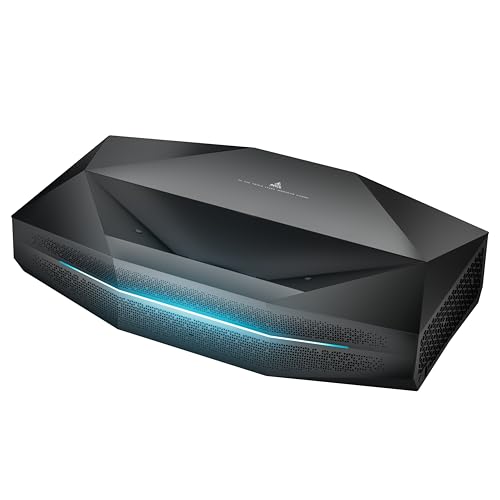 AWOL VISION Aetherion Pro 4K Ultra Short Throw
|
9.2/10 | Buy |
| Best Budget |
 Mini Projector 4K Support
|
8.8/10 | Buy |
 JMGO O2S Ultra 4K Ultra Short Throw Triple Laser
|
8.1/10 | Buy | |
![[5000 ANSI/10,000+ Apps/Live TV/65W Dolby]](https://m.media-amazon.com/images/I/51aXtCX69UL._SL500_.jpg "What Is a Short Throw Projector: Uses and Trade-Offs 5") [5000 ANSI/10,000+ Apps/Live TV/65W Dolby]
[5000 ANSI/10,000+ Apps/Live TV/65W Dolby]
|
8.0/10 | Buy | |
| Best Value |
 Optoma UHD35STX 4K UHD Short Throw Gaming and Home
|
8.0/10 | Buy |
 BenQ TH671ST 3000 Lumens 1080p Short Throw Home
|
7.8/10 | Buy |
The Direct Answer: Big Picture, Short Distance
A short throw projector uses a wide-angle lens to project a large image from close to the screen. The distance it needs is set by its throw ratio, which is the projection distance divided by the picture width. A lower ratio means the projector can sit closer for the same picture size.
Many projectors sit far back, often near the rear of a room or on a ceiling mount. Short throw designs bring the projector forward, so it can sit on a coffee table or shelf. That reduces the chance of people walking through the beam.
Short Throw vs Ultra Short Throw
The two terms overlap, and the cutoffs vary by source. A short throw model typically sits a few feet from the screen, while an ultra short throw model sits inches from the wall. The listed throw ratio is the number that lets you compare them fairly.
The JMGO O2S Ultra 4K Ultra Short Throw Triple Laser lists a 0.16:1 ratio and a 150-inch picture. A 150-inch 16:9 picture is about 131 inches wide, so that ratio puts the lens roughly 21 inches from the wall. The Optoma ML1080UST Photon GO Ultra Short Throw 1080p claims a 100-inch image from less than one foot.
By contrast, the BenQ TH671ST 3000 Lumens 1080p Short Throw Home lists a 100-inch picture from about 5 feet and up to 300 inches. That works out to a ratio near 0.7:1 on a 16:9 screen, which is a classic short throw range. The [5000 ANSI/10,000+ Apps/Live TV/65W Dolby] lists a 1:1 ratio and about 8 feet for 100 inches.
Doing the Math for Your Room
Convert the screen’s diagonal to a width, since a 100-inch 16:9 picture is about 87 inches wide. Multiply the width by the throw ratio to estimate the distance. Add a few inches for the projector’s depth and any distance-measuring differences.
Check the manual to see where the distance is measured. Some listings measure to the lens and others to the back of the unit. Confirm that your furniture can hold the projector at that spot.
Why People Choose Short Throw Designs
Small Rooms and Shared Spaces
A dorm room or small apartment may have only a few feet between the wall and the couch. A standard projector would need more depth than the room offers. A short throw projector can fit a big picture into that space without a long beam path.
The Sainyer listing, Mini Projector 4K Support, describes short throw projection for smaller rooms and a picture up to 200 inches. It also lists 270-degree rotation, electric focus, and ±60-degree angle adjustment. It notes the unit has no Bluetooth, no Wi-Fi, and no built-in apps, so it needs an external source.
Fewer Shadows and Easier Placement
When a projector sits close to the screen, a person standing near the screen still blocks some light but is less likely to cast a shadow from the beam across the room. Presenters and gamers who stand near the wall benefit. Close placement also shortens cable runs.
This convenience has a cost: the projector sits in a position where bumps and tripped cords are more likely. Keep the unit on a stable surface and route cables away from walkways. Leave room for ventilation.
Gaming and Fast Motion
Console players often pair short throw projectors with game modes. The BenQ listing mentions low input lag and a refresh rate matched to the Xbox One X and PS4 Pro, though it doesn’t give a number in the data. The AWOL VISION listing, AWOL VISION Aetherion Pro 4K Ultra Short Throw, lists 1ms lag, VRR, and ALLM.
Treat input lag figures as manufacturer claims, since the listings don’t describe how they were measured. Look for a dedicated game mode and confirm it works at your console’s output. A low claim helps, but room brightness and screen choice affect the experience just as much.
Trade-Offs of Close Placement
Alignment Is Less Forgiving
At short distances, a tiny tilt changes the picture shape a lot. The projector must sit parallel to the screen to avoid keystone distortion. Automatic and four-corner correction help, but correction processes the image and can soften details.
The Optoma UHD35STX listing mentions short throw projection, lights-on viewing, and four corner correction, but the data gives little else. The Sainyer listing mentions electric keystone correction, and the BenQ lists auto vertical keystone. Use these tools for small adjustments, not as a replacement for careful placement.
Screens, Walls, and Ambient Light
Ultra short throw projectors send light at a steep upward angle, so wall flatness shows up quickly. Bumps and wrinkles bend the picture. Many buyers use a flat screen made for close projection, though the data doesn’t list specific screens.
Brightness helps in rooms with light, but figures aren’t directly comparable. The JMGO lists 3,600 ISO lumens, the AWOL lists 2,600 ISO lumens, the BenQ lists 3000 lumens, and the Goiaey lists 5000 ANSI lumens. Labels and test conditions differ, so compare cautiously and still dim the room.
Eye Comfort and Safety
Laser models are bright, so don’t stare into the lens. The JMGO listing mentions eye-safe projection and the AWOL listing mentions harmful light reduction, but follow the maker’s guidance rather than assuming safety. Keep children and pets away from the beam path.
Vents need clearance, especially when the projector sits close to a wall or in a cabinet. Don’t block airflow. Let the unit cool before moving it.
Planning the Furniture Around the Projector
Ultra short throw models need a surface directly below the screen, such as a low media console. Measure that surface’s depth, because the distance from the wall must include the projector’s own body. A cabinet that is too shallow leaves the unit hanging over the edge.
Short throw models need a spot a few feet back, such as a coffee table or the front of a bookshelf. Use the throw math to mark the spot with tape before you buy. If the coffee table moves around, the picture will too, so choose a stable position and keep the unit level.
Think about cable routing as well. HDMI, power, and audio cables should run along the wall or under rugs, not across a walkway. A neat setup keeps the projector from getting bumped out of alignment.
Sound and Portability
Close-range projectors often include speakers, because the unit sits near the audience. The JMGO listing mentions a 20W Dynaudio system, the Optoma mentions 20-watt stereo speakers, and the Sainyer mentions a built-in speaker with options for a richer external setup. Speaker claims are listed features, not measured results.
Portability varies widely. The Optoma lists a built-in battery with up to 1.5 hours of battery life, and the Goiaey lists a 360-degree stand. Heavier laser models are better treated as fixtures. If you plan to move the projector often, confirm its weight and set a repeatable spot for it.
Resolution, Light Source, and Smart Features
Resolution is a separate choice from throw distance. The Optoma ML1080UST lists Full HD 1080p, the BenQ lists native 1080p, and the JMGO and AWOL list 4K UHD. For big pictures, higher resolution shows more fine detail.
Light source affects ownership. The Optoma, JMGO, and AWOL listings describe triple laser sources, and the Optoma notes no lamp replacements. Lamp-based models need bulb replacement over time, so check the listing.
Smart features vary. The JMGO and AWOL list Google TV, the Optoma lists Google TV and Google Cast, and the Goiaey lists a large app library with live TV. The Sainyer needs an external stick, and its listing says it is compatible with TV sticks and set-top boxes.
Reading Listing Claims Without Getting Fooled
Maximum picture sizes are the first claim to treat carefully. The BenQ lists up to 300 inches and the Goiaey lists up to 500 inches, but a picture that large is very dim and needs a long distance. The recommended size is usually the better guide, such as the 100 inches the Goiaey listing suggests.
Comparison claims deserve a second look too. A listing that says it sits closer than standard projectors is describing its own design, not a measured test, and the data doesn’t give test conditions. Use the throw ratio and the stated distance, and confirm them in the manual.
Finally, check what is missing. The Sainyer listing is clear that it has no Wi-Fi, Bluetooth, or built-in apps, while the Optoma UHD35STX listing in the data gives only a short list of features. When a listing is thin, ask the seller for the spec sheet before relying on it.
Deciding Whether Short Throw Fits You
If you have a short room, a coffee-table spot, or a shared living area, a short throw design is worth a look. If you have a long room and a ceiling mount already, a standard projector may be simpler. Measure your distances first, and sketch the room with the screen, the projector spot, and the seating positions. A sketch exposes problems that a spec sheet hides.
Pick the category by the throw ratio, then check brightness, resolution, and connectivity for your needs. Confirm warranty terms with the seller, since the BenQ listing mentions a 3-year limited parts and labor coverage that you should verify. Test the picture size in your room before you commit.
About the author
Most projector frustration is a setup problem: wrong throw distance, a bracket in the wrong spot, a cable that will not carry the signal. I write step by step guides for mounting, placement, connecting laptops, phones, and streaming sticks, and getting a straight, sharp picture. I like checklists and I try to say what to measure before you drill anything. My notes follow the site's review methods: research-based comparison, not lab testing.