
What Does a Projector Do: Simple Answer and Guide
Learn what does a projector do, how optical projection creates massive displays, and what features matter for your space in this November 2026 guide.
 By Tom Reyes
Published

An optical projection device takes a video signal from an external source or internal app, shines light through an internal imaging chip, and beams the enlarged visual onto an external surface. Understanding what does a projector do helps viewers realize how a compact device can replace a bulky television while casting images well past one hundred inches.
The equipment processes incoming visual data, shapes the beam through specialized glass lenses, and projects the resulting illumination across a room. Anyone researching modern display gear will find that our guide on diffused light and eye comfort highlights how reflected screen light differs from direct panel backlights.
Modern projection units do far more than simply magnify static slides on an office wall. Today’s hardware integrates digital sound processing, wireless streaming connectivity, autofocus sensors, and geometry adjustments into portable housings. Whether you want an immersive cinema night in your living room or a versatile presentation screen for work, these devices bridge the gap between media storage and massive displays. Knowing how these optical systems operate ensures you select the right light source, throw ratio, and connectivity ports for your setup.
| Award | Product | Best Projector Reviews Score About Best Projector Reviews ScoreBest Projector Reviews Score is a comparison aid based on available product information, not a hands-on testing result. Read our review methods. | |
|---|---|---|---|
| Best Overall |
 Yaber T1 Pro2 Mini Projector with WiFi |
8.3/10 | Buy |
| Best Value |
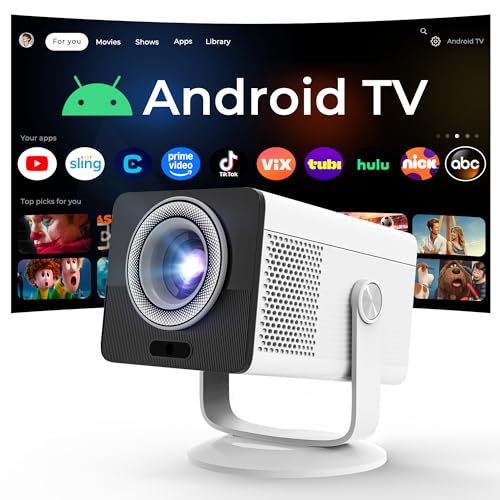 HP Projector Built-in Apps |
7.8/10 | Buy |
The Role and Function of Modern Projectors
At its primary level, a projection system converts electronic video data into visible beams of focused light that reconstruct an image on an exterior surface. Unlike flat-panel displays that generate light and color directly on a glass pane in front of your eyes, a projection unit separates the image engine from the display surface entirely.
This optical separation allows you to adjust your final picture size simply by moving the unit closer to or farther from your viewing area. The flexibility of this design makes projection technology ideal for spaces where a permanent giant television screen feels impractical or intrusive.
The primary job of the hardware involves four consecutive operations: receiving data, generating intense light, modulating individual pixels, and focusing the beam through an optical lens. Each subassembly inside the chassis plays a critical role in preserving color fidelity, contrast, and motion clarity across large surface areas. By understanding these functional steps, shoppers can better understand why different units excel in dark home cinemas while others work better in illuminated offices or outdoor patios.
| Component | Primary Operation | Key Output Metric |
|---|---|---|
| Light Engine | Produces illumination using lamps, LEDs, or lasers | Lumen output and lamp lifespan |
| Imaging Panel | Modulates light into individual colored pixels | Native resolution and contrast |
| Projection Lens | Focuses and enlarges the beam across distance | Throw ratio and optical zoom |
| Adjustment Sensors | Aligns geometry and refines picture sharpness | Keystone degrees and focus speed |
| Audio System | Decodes digital audio and powers drivers | Wattage and sound stage width |
Before examining internal engineering, consider the fundamental tasks every modern unit executes during standard playback:
- Accepts incoming digital media signals through wired ports like HDMI or wireless protocols such as Wi-Fi.
- Decodes encoded video codecs and scales resolution to match the internal microdisplay chip specifications.
- Generates a powerful, balanced beam of white or primary colored illumination via specialized light sources.
- Directs light through thousands of microscopic optical elements to produce discrete color channels and shadows.
- Magnifies the miniature generated visual through high-precision glass elements across several feet of air.
- Corrects keystone trapezoids and focal blur so the resulting projection remains square and legible.
Converting Video Signals into Optical Light
The operation begins the moment a playback device delivers digital data into the unit. An onboard processor strips the incoming signal into separate color channels, timing signals, and audio tracks. If you are setting up a multimedia station, following proper steps for connecting a computer to a display ensures that your source outputs a resolution that matches your hardware native pixel array. The processor then maps those pixel values across the microdisplay panel at rapid refresh rates to prevent motion stutter.
Once video data is structured, the device turns on its central light source. Traditional cinema units use high-pressure gas discharge lamps, whereas modern compact designs utilize solid-state light-emitting diodes (LEDs) or semiconductor lasers. Solid-state emitters turn on instantly and generate far less heat than older mercury vapor bulbs. Because these components run cooler, manufacturers can build smaller enclosures that draw significantly less power during continuous evening operation.
The emitted light passes directly through or bounces off the internal imaging array. In Digital Light Processing (DLP) systems, millions of microscopic mirrors tilt back and forth thousands of times per second to create shades of gray while a synchronized color wheel or multi-color LED pulse injects hue. In liquid crystal display (LCD) designs, polarized light splits into red, green, and blue streams that pass through semi-transparent panels before combining into a single vivid beam. Both approaches yield identical objectives: transforming abstract data into tangible photons.
Throw Distance and Image Magnification
A central function of projection hardware is magnifying a tiny microdisplay chip into an expansive view that can cover an entire wall. This enlargement relies on a specialized optical assembly containing multiple concave and convex glass lenses. The distance between the physical lens and the target surface determines how wide the beam expands. This mathematical relationship is known across the industry as the throw ratio, and it dictates exactly where you must place your unit in a room.
Standard throw systems require several feet of open space to expand their beam into a large viewing area. In contrast, short-throw and ultra-short-throw models employ extreme wide-angle optics or curved internal mirrors to throw wide visuals from mere inches away. For instance, compact models like the HP Projector Built-in Apps feature a short 0.9:1 throw ratio that can generate an eighty-inch picture from just over five feet away. This optical flexibility allows renters and bedroom viewers to enjoy massive screen sizes without rearranging furniture.
Optical zoom rings allow users to expand or shrink the projected area without physically moving the mount or table. Digital scaling can also adjust margins by reducing the active pixel grid inside the processor, though optical adjustment preserves full native sharpness. By managing these optical mechanics, the machine adapts video output to diverse room shapes, wall spaces, and ceiling heights.
Geometry Correction and Automated Calibration
Projectors rarely sit perfectly perpendicular to the center of a projection screen. Whenever a beam strikes a wall at an upward, downward, or side angle, the resulting image distorts into a trapezoid. Correcting this geometric distortion is one of the most critical automated functions built into modern projection equipment. Without correction, straight horizontal lines skew diagonally and subtitles become difficult to read along the screen edges.
Digital keystone correction modifies the active pixel grid to counter angle distortion, reshaping the image into a clean rectangle. High-end units also include physical lens shift, which physically repositions the glass assembly inside the chassis to move the picture without altering digital resolution. Contemporary portable units like the Yaber T1 Pro2 Mini Projector with WiFi feature automated keystone sensors, autofocus cameras, and intelligent obstacle avoidance routines that calibrate the frame in seconds. These onboard computer vision systems measure surface distance and instantly dial in crisp focus.
Proper alignment ensures that focus remains uniform across the entire viewing plane. Cheaper optical systems sometimes produce sharp text in the center while leaving peripheral corners slightly blurry. Advanced lens elements balance the optical path so that edge-to-edge clarity remains uniform from top to bottom. This geometric consistency is vital when reading presentation spreadsheets or following fast gaming HUD elements.
Integrated Media and Operating Systems
Older visual equipment functioned purely as passive display monitors that required external media boxes, receivers, or disc players. Modern smart projectors act as complete standalone entertainment hubs equipped with internal microprocessors, storage, and wireless transceivers. These systems run customized operating systems, such as Android TV, that run streaming applications directly without requiring external dongles. Built-in app support allows users to access library content directly using a single remote control.
Wireless networking standards such as Wi-Fi 6 allow high-bitrate video streams to buffer quickly without drops in resolution. Modern operating software also provides native screen mirroring protocols, enabling users to cast phone screens, tablets, or laptops over local airwaves. Furthermore, these units feature integrated media players that read flash drives plugged directly into onboard USB ports. This all-in-one capability transforms the projection hardware into an autonomous cinema station.
Hardware controllers balance background processes, heat management, and user interface responsiveness simultaneously. When a high-resolution video stream starts, the internal system monitors operating temperatures and adjusts cooling fans to maintain silent operation. This balance between processing power and thermal control ensures uninterrupted playback during lengthy sports broadcasts or marathon movie sessions.
Sound Processing and Audio Output Functions
While visual display remains the primary objective, sound processing represents an indispensable secondary function of modern units. When a video stream enters the chassis, the audio digital-to-analog converter decodes multichannel formats like Dolby Audio. The processor then routes these signals to internal speaker drivers engineered with specialized acoustic chambers. These integrated speakers produce clear dialogue and dynamic sound effects without demanding auxiliary soundbars in casual viewing spaces.
In addition to onboard sound, these devices manage external audio distribution through multiple connection paths. Built-in Bluetooth transceivers transmit two-way sound, functioning either as an audio output to wireless headphones or as a standalone Bluetooth speaker for mobile music. Physical audio ports, including auxiliary headphone jacks and HDMI Audio Return Channel (ARC) outputs, pass high-fidelity audio to home theater surround sound receivers. This versatility ensures that your audio scale matches the dramatic impact of your hundred-inch visual display.
To understand what components enable complete audiovisual operation, review these core internal functions:
- Decodes multichannel spatial audio standards to deliver clear vocal tracks through compact speaker enclosures.
- Pairs with wireless headphones to facilitate quiet late-night movie viewing without disturbing other household members.
- Operates high-efficiency digital amplifiers that maximize volume without distorting sound at elevated output levels.
- Transmits digital sound streams to external soundbars via HDMI connections or optical interfaces.
- Synchronizes audio latency automatically to prevent distracting lip-sync mismatch during high-framerate action scenes.
Managing Ambient Light and Screen Surfaces
The visual impact of any projection system depends heavily on how it interacts with the room lighting environment. Because projectors cast light onto a surface rather than illuminating pixels from behind glass, competing ambient light washes out deep shadow levels. Understanding lumens allows owners to position their hardware effectively. Anyone setting up a patio theater can consult our resource on outdoor brightness requirements to understand how evening dusk affects visibility.
Ambient light rejection (ALR) screens help optical units maintain high contrast in moderately lit living areas. These specialized projection screens feature micro-structured optical ridges that reflect projector light toward viewers while deflecting overhead ceiling light away. In completely darkened home theaters, standard matte white surfaces or light gray projection screens work exceptionally well. Matching the surface material to your hardware lumen rating ensures deep blacks and vibrant color saturation.
Directing light accurately across wide surfaces demands proper ventilation and thermal dissipation. Powerful projection bulbs and laser diodes generate heat as they convert electricity into intense illumination. Internal blower fans push cool air across heat sinks to protect sensitive digital imaging chips from overheating. Keeping ventilation grilles unobstructed preserves light engine longevity and ensures stable color balance over thousands of operating hours.
Comparing Projector Capabilities to Flat-Screen Displays
Evaluating what a projector accomplishes often leads to direct comparisons with conventional flat-screen televisions. A standard television uses a fixed glass chassis that limits image dimensions to whatever size fits through your doorway. In contrast, projection equipment offers scalable screen sizes ranging from forty inches to over one hundred and twenty inches from a chassis smaller than a shoebox. This portability allows users to pack a massive screen into a backpack for camping, travel, or backyard events.
Another major difference lies in visual comfort during prolonged viewing sessions. Flat televisions project concentrated light beams directly into the eyes, which can contribute to digital eye fatigue in dark rooms. Projection units cast light against a neutral surface, meaning the viewer observes soft, diffused reflected illumination. Many movie fans find this indirect reflection significantly more comfortable during three-hour epic cinema viewings.
Televisions maintain an advantage when operating in rooms with unshaded south-facing windows, as backlights cut through direct sunlight easily. Projectors require controlled ambient lighting or curtains to produce rich black levels and cinema-grade contrast. Choosing between these technologies ultimately depends on whether you prioritize maximum screen scale, portability, and theatrical ambiance over daytime viewing simplicity.
Practical Use Cases and Everyday Applications
Understanding the versatility of modern projection gear helps buyers match equipment to specific lifestyle needs. In family living rooms, compact units provide temporary giant screens that vanish into a drawer when movie night concludes. In dedicated home theater rooms, ceiling-mounted 4K models recreate authentic cinema scale with dedicated multichannel surround sound systems. Gamers also appreciate low-latency game modes that project expansive multiplayer split-screen action across entire walls.
In professional and educational settings, portable hardware enables clear visual collaboration without requiring fixed monitors in every conference space. Presenters can carry a lightweight unit between meeting rooms, project spreadsheets onto whiteboards, and annotate data directly on the illuminated area. Educational institutions benefit from large display areas that allow students seated in the back row of a lecture hall to read small text clearly.
Outdoor entertainment represents another rapidly expanding use case for modern projection hardware. Compact designs powered by external battery banks allow families to project films onto garage doors, inflatable screens, or hanging bedsheets during camping excursions. The ability to create an impromptu outdoor cinema within minutes demonstrates the unique functional freedom that optical projection technology delivers.
Ultimately, a projector functions as a versatile optical bridge that converts digital video signals into scalable, immersive visual displays on virtually any flat surface. By balancing light engine output, lens throw ratios, and room lighting conditions, you can tailor your display to match any entertainment or presentation goal. Selecting the right hardware unlocks expansive viewing experiences that traditional televisions simply cannot replicate.
About the author
I like gear that earns its place in a bag, so I look at portable projectors the same way: weight, battery claims, fan noise, and whether the picture is usable without a perfect room. I write for people who want movie night in a hotel room, a dorm, or a small apartment. Expect plain talk about what small projectors do well and where they cut corners. My notes follow the site's review methods: research-based comparison, not lab testing.