
How Does a Hologram Projector Work: Clear Answer
Learn how does a hologram projector work in November 2026, covering spinning LED fan blades, optical reflection pyramids, and true 3D spatial visuals.
 By Maya Okonkwo
Published

Floating visual displays create 3D imagery by rapidly projecting light into space or reflecting coordinated angles into your line of sight. Wondering how does a hologram projector work usually leads people to two distinct consumer technologies: high-speed spinning LED fans and reflective optical prisms.
Rather than projecting solid physical beams into thin air like science fiction, these devices rely on optical illusions and human biology to fool your visual cortex. Exploring how modern displays handle light distribution also connects to general viewing dynamics, which you can read about in our display eye comfort guide.
Most commercial units found in retail stores and trade shows operate on a principle known as persistence of vision. When a spinning arm equipped with microscopic light-emitting diodes rotates faster than thirty frames per second, your eyes blend the rapid flashes into a continuous, seamless floating picture. Consumer desktop prisms, on the other hand, rely on angled transparent plastic to reflect four synchronized screen angles simultaneously. Understanding these mechanics helps shoppers select the right equipment without falling for misleading advertising claims or impossible specifications.
| Award | Product | Best Projector Reviews Score About Best Projector Reviews ScoreBest Projector Reviews Score is a comparison aid based on available product information, not a hands-on testing result. Read our review methods. | |
|---|---|---|---|
| Best Overall |
 Pack of 2! Individually Packaged |
8.9/10 | Buy |
| Best Value |
 Missyou 3D Hologram Fan Projector |
8.9/10 | Buy |
| Best Budget |
 FeiYeup 3D Projection 3D Hologram Projector |
8.6/10 | Buy |
| Best Premium |
 3D Hologram Fan 23.6 Inch,3D Holographic Fan |
8.6/10 | Buy |
 Missyou 3D Hologram Fan Projector, WiFi App |
8.4/10 | Buy |
The Mechanics Behind Modern Holographic Displays
Understanding these devices starts with separating theatrical illusion from laboratory laser science. Modern consumer holographic equipment produces floating three-dimensional visuals using rapid light modulation or directional reflection. The surrounding environment plays a massive role in visual clarity, requiring careful balance of contrast, ambient light levels, and proper viewing angles.
| Display Technology | Primary Mechanism | Best Environment | Viewing Angle |
|---|---|---|---|
| LED Hologram Fan | Rapid blade rotation and persistence of vision | Dim to moderate indoor lighting | Wide front arc (up to 160 degrees) |
| Pyramid Prism | Angled specular reflection (Pepper’s Ghost) | Dark rooms with black backgrounds | Four isolated 90-degree viewpoints |
| Optical Light Guide | Diffractive waveguides and micro-displays | Controlled indoor conditions | Direct head-on positioning |
| True Laser Hologram | Interference patterns on photosensitive media | Specialized laboratory setups | Fixed illumination perspective |
Before deploying any floating visual setup, verify the following mechanical factors to ensure stable picture generation:
- Check ambient illumination levels to prevent bright overhead fixtures from washing out luminous output.
- Inspect blade clearance on rotational units to avoid physical contact with walls, stands, or observers.
- Confirm media rendering matches the exact aspect ratio and transparent background required by the display controller.
- Ensure the mounting surface provides rigid support so micro-vibrations do not blur delicate animated details.
- Verify input data transfer stability over local wireless connections when transmitting heavy high-frame-rate animation sequences.
Persistence of Vision in Rotating LED Fans
The human eye holds an image on the retina for roughly one sixteenth of a second after the visual stimulus disappears. When a motor spins a slender bar embedded with light-emitting elements at high revolutions, the human brain cannot track the individual physical bar. Instead, the brain merges the sequence of rapid pulses into a single cohesive plane of light. If the background remains dark, the rotating hardware fades into visual obscurity, leaving only the illuminated object suspended in the air.
Hardware controllers synchronize the exact microsecond each diode illuminates relative to the rotor’s rotational position. Built-in brushless motors turn these arms at speeds often exceeding several hundred revolutions every minute. High-precision onboard microcontrollers track the angular location of the rotor using magnetic hall-effect sensors or optical encoders. By matching the rotational angle with exact video frames, the fan paints dozens of vertical slices of an image faster than the eye can perceive individual mechanical movements.
Resolution on these rotating systems depends directly on the concentration of light elements along the arm and the clock rate of the controller. For instance, models like the Missyou 3D Hologram Fan Projector pack dense clusters of diodes along their blades to yield smooth color gradations. The faster the diodes switch states, the crisper the resulting edges appear to someone walking past the display. When the rotor speed dips or the frame rate desynchronizes, observers see jittering horizontal bands or flickering artifacts.
Optical Reflection and the Pepper’s Ghost Phenomenon
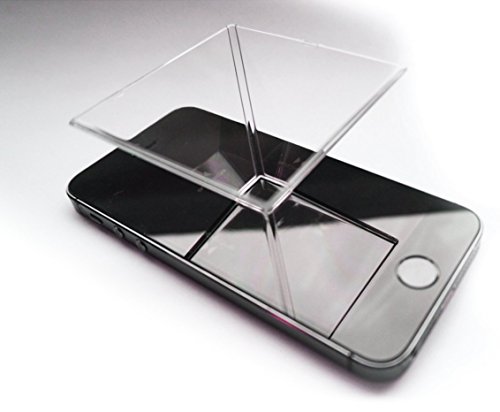
Desktop pyramids use a classical theatrical technique dating back to nineteenth-century stage productions. Known historically as the Pepper’s Ghost illusion, this approach relies on transparent glass or semi-reflective acrylic set at a precise 45-degree angle. Light emitted from a horizontal screen travels upward and strikes the angled sheet, where part of the light reflects toward the viewer while the rest passes directly through the clear material.
Because the clear pane allows the background wall or room behind it to remain visible, the reflected image appears superimposed onto the physical world. Four-sided optical pyramids place this effect in a multi-directional format, taking advantage of a smartphone or tablet screen placed flat beneath or above the plastic prism. The mobile screen displays four separate perspectives of a single 3D model, each facing toward one of the pyramid facets.
When an observer circles the pyramid, each facet reflects the corresponding angle of the digital asset, creating an illusion of spatial depth. Units such as the Spectre Hologram prism utilize specially coated plastic to boost light reflection while minimizing double-reflection ghosting. The entire trick collapses if the source video includes a lit background, because any light from the phone screen reflects into the prism and breaks the edge boundaries of the virtual object.
Digital Content Structure and Transparency Formatting
The visual impact of any holographic simulator depends almost entirely on how creators format their digital assets. Standard video footage recorded with regular cameras contains edge-to-edge pixels that illuminate an entire rectangular screen area. If projected through a hologram fan or prism, a full rectangular video looks like an ordinary flat television floating clumsily in midair, shattering the intended 3D depth perception.
Effective holographic content relies on pure black backgrounds set to an absolute RGB value of zero across every frame. On an LED blade, a pure black pixel instructs the controller to keep the corresponding diode completely powered down at that point in its rotation. Because the unlit diodes blend into the dark environment, only the brightly colored subject reflects light into the viewer’s pupils. This high-contrast boundary creates the distinct impression that the rendered subject has broken free of conventional physical screens.
Content creators must also consider object rotation, directional shading, and realistic lighting highlights within their 3D rendering engines. Introducing subtle cast shadows, surface specular reflections, and smooth 360-degree rotational movement provides secondary depth cues for human binocular vision. As the rendered model turns, perspective shifts trigger natural stereoscopic processing in the human brain, enhancing the illusion of genuine physical volume without needing specialized polarized glasses.
Hardware Architecture: Microcontrollers, Motors, and Diode Density
Inside a professional rotational display, specialized hardware works under tight timing tolerances to maintain image cohesion. The primary drive unit utilizes a brushless direct-current motor engineered for continuous high-speed operation with minimal vibration. Brushless motors offer extended operating lifespans and run noticeably quieter than traditional brushed motors, which is crucial when operating inside retail storefronts or quiet showroom environments.
Power delivery presents a serious mechanical challenge because electrical current must transfer from a stationary base to rapidly spinning blades. Premium manufacturers employ rotary slip rings or wireless induction power coils to route electricity across the rotating joint without mechanical binding. If electrical contact fluctuates even slightly, the power drop can cause the onboard logic boards to reset, resulting in violent display stutters or sudden shutdowns.
Modern fan systems integrate high-performance system-on-chip processors directly onto the spinning circuit board. These processors decode compressed video formats locally from integrated flash memory cards or internal solid-state chips. By handling the video decompression on the blade itself, the system avoids transferring raw, uncompressed gigabit data streams across rotating slip rings, dramatically reducing signal corruption and dropped video frames during playback.
True Laser Holography Versus Persistence Illusion
While the market widely labels rotating fans and reflective prisms as holograms, true holography relies on wave optics and laser physics. Coined by physicist Dennis Gabor, genuine holography records the actual phase and amplitude of light waves bouncing off a physical subject. This recording process captures the entire wavefront, allowing an observer to view true parallax where moving your head reveals previously hidden parts of the object.
Creating an authentic optical hologram requires splitting a coherent laser beam into an object beam and a reference beam. The object beam reflects off the item, while the reference beam shines directly onto a specialized photosensitive glass plate or emulsion. When these two beams collide at the photographic plate, their intersecting waves create microscopic interference patterns that encode microscopic spatial depth into the chemical emulsion.
When someone shines a matching reference light through that developed plate, the microscopic grooves diffract the light beams back into their original spatial trajectories. The result is a true optical duplicate of the original object that responds naturally to changes in your vantage point. Real-time dynamic laser holography remains largely confined to advanced research institutions due to the immense computing power needed to calculate interference patterns on the fly.
Network Synchronization and Large-Scale Multi-Fan Arrays
Retail chains and arena producers frequently splice multiple holographic fans together to create visual displays measuring several feet across. A single fan typically reaches an operational diameter between sixteen and thirty inches, which limits its practical viewing distance in massive commercial spaces. To overcome this geometric constraint, engineers build modular video walls containing dozens of individual rotating units mounted in a grid.
Operating a multi-fan array requires synchronized hardware clocks to prevent visible tearing along the seams where adjacent blades intersect. A central master controller takes a large ultra-high-definition video stream, segments the canvas into coordinate tiles, and distributes each tile to the corresponding fan node. Coordinating these devices often resembles the digital signaling used when you connect a computer to a projector for synchronized secondary display output.
The blades on adjacent units must spin in tight synchronization so their tips do not physically collide while running inches apart. Control units utilize dedicated wireless local area networks or hardwired serial cables to broadcast millisecond-level timing pulses. If one unit in the array lags by even a fraction of a cycle, the displayed human figure or corporate logo appears sliced and disjointed across the wall, breaking the visual immersion.
Key Operational Factors for Stable Holographic Projection
Setting up and maintaining a floating display requires attention to structural placement, environmental lighting, and routine hardware cleaning:
- Position the rotating unit at least seven feet off the ground or enclose it behind a transparent acrylic protective shield.
- Balance the ambient lighting so the display produces adequate contrast without straining viewer visibility in sunlit areas.
- Wipe optical prism surfaces with a non-abrasive microfiber towel to remove fingerprints that scatter light and reduce image sharpness.
- Clean dust accumulation from fan cooling vents and motor housings to prevent elevated operating temperatures during long retail cycles.
- Secure all mounting brackets with thread-locking hardware to counteract the continuous rotational vibration generated by high-speed blades.
- Verify that the wireless network broadcasting video playlists operates on an uncrowded channel to avoid communication timeouts.
Safety Protocols and Mechanical Precautions
Because consumer holographic fans rotate at rapid speeds, unshielded blades represent an impact hazard for curious bystanders and venue staff. The outer edges of a spinning blade carry significant kinetic energy that can cause physical lacerations or motor damage if obstructed by hands, cables, or foreign debris. Manufacturers strongly instruct operators to install clear polycarbonate shields or mount the hardware well out of reach of store visitors.
Never touch the spinning arms while the device receives power, and always allow the brushless motor to come to a complete resting halt before attempting to swap storage cards or adjust cabling. If an arm becomes slightly bent during transport or unboxing, running the machine can cause severe rotational imbalance that quickly destroys the internal motor bearings. Follow the manufacturer’s installation manual regarding structural wall studs and designated weight tolerances when anchoring hardware.
Thermal management is another critical safety consideration for high-output diode assemblies running continuously for hours. Dense clusters of luminous elements generate concentrated heat along the circuit boards, requiring constant passive airflow to prevent component degradation. Never cover ventilation slots on the motor housing, and verify that enclosed display cases feature adequate air intake and exhaust vents to maintain safe operating temperatures.
Evaluating your specific viewing space, ambient light conditions, and target audience determines whether a spinning persistence display or an optical reflection prism best meets your visual presentation goals.
About the author
For me a gaming projector lives or dies on lag and refresh rate, not on a big brightness claim. I write about consoles and PC on a big screen: what the input lag figures really mean, which resolution and refresh combinations are worth chasing, and which modes quietly add delay. I read spec sheets and owner feedback with a skeptical eye and I try to explain the catch behind every headline feature. My notes follow the site's review methods: research-based comparison, not lab testing.