
How Does a Cinema Projector Work? A Plain-English Guide
Light source, imaging chip, and lens explained: how does a cinema projector work and what it means for compact home models in October 2026.
 By Daniel Whitaker
Updated
By Daniel Whitaker
Updated

A movie that looks rich in a theater can turn flat and gray the moment you try it in a living room with the blinds open. That gap comes down to how the picture is made and how much light is fighting it. Once you see the path from light source to screen, a lot of spec-sheet jargon starts to make sense.
The short version of how does a cinema projector work is a bright light source, an imaging stage that shapes that light into pictures, and a lens that focuses the result on a screen. Small home projectors repeat the same steps at a much lower scale, so their listings are a handy way to see each stage. This guide sticks to published specifications and manufacturer claims, and it points out where a listing leaves a detail unstated, such as the throw distance or the light source type. The projectors below are a starting point for anyone who wants that big-screen feel at home.
| Award | Product | Best Projector Reviews Score About Best Projector Reviews ScoreBest Projector Reviews Score is a comparison aid based on available product information, not a hands-on testing result. Read our review methods. | |
|---|---|---|---|
| Best Overall |
 Mini Projector with WiFi and Bluetooth
|
9.1/10 | Buy |
| Best Budget |
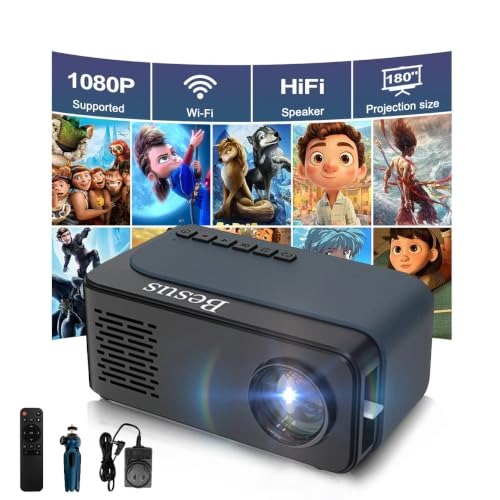 Mini Projector, HD 1080P WiFi Video Projector
|
8.6/10 | Buy |
 Native 1080P Projector with WiFi 6 and Two-Way
|
8.4/10 | Buy |
Inside the Light Path: From Signal to Screen
A cinema projector creates a bright beam, shapes it into a moving image, and focuses it through a lens onto a screen across the room. Every spec on a projector listing belongs to one of those three jobs. The home models covered here are far smaller, but they follow the same path, which makes them useful for seeing how each stage affects the final picture. Knowing the stages also explains why one projector can look vivid after dark and weak at noon.
Stage one: making enough light
Every projector starts with a light source. Traditional cinema machines relied on powerful lamps, while newer commercial and home designs often use laser or LED sources, and the choice affects brightness, heat, color, and upkeep. Lamps fade as hours add up and eventually need replacing, so light source life is one of the first things worth checking on a spec sheet.
The home listings here lean toward LED. The Mini Projector, HD 1080P WiFi Video Projector listing describes LED technology and a lamp life of more than 50,000 hours, while the Native 1080P Projector with WiFi 6 and Two-Way listing cites 100,000 hours of LED lamp bead life. Both are manufacturer figures, not measured results, and neither says how bright the picture will be late in that life.
The Mini Projector with WiFi and Bluetooth listing doesn’t name its light source in the data. A buyer who cares about maintenance should confirm that detail before ordering. The same goes for rated life, since a source that dims early costs more over time.
Strong light sources also make heat, and the fan and vents exist to move it out. Keep intake and exhaust vents clear, follow the manufacturer’s cooling guidance before moving the unit, and never stare into the lens while it’s running. Anything involving the inside of the housing belongs to the manufacturer or a qualified technician.
Stage two: turning light into an image
Raw light has no picture in it. A film projector pulls a strip of film through the beam one frame at a time, while a digital projector sends the beam through or off an imaging device, usually a chip or panel, that shapes the light pixel by pixel from the incoming video signal. Home projectors take the digital route, and the number of pixels the imager can show is what people mean by native resolution.
Resolution wording deserves a careful read. The Dxyiitoo listing states a native 1920×1080 resolution and describes compatibility with 4K input, which means it accepts a 4K signal, not that it shows 4K detail. The AKIYO and SEXZCUSKT listings say they support 1080P, but the text doesn’t call that native, so it’s safest to treat 1080P as the highest signal they accept until the maker says more.
Contrast describes the gap between the darkest and brightest parts of the picture. The Dxyiitoo listing gives a contrast ratio of 10000:1 and the AKIYO listing gives 2000:1. Brands don’t always measure contrast the same way, so these numbers work best as a rough hint about how a picture may look in a dim room, not as a promise.
Stage three: the lens and where the picture lands
The lens takes the shaped light and spreads it across the screen. Move the projector back and the picture grows; move it closer and it shrinks. A listing’s maximum image size tells you the ceiling, not the distance needed to reach it, and none of the listings here gives a throw ratio, so measure the room against the manufacturer’s distance guidance before buying.
Placement problems show up as geometry. A projector aimed upward at a wall throws a trapezoid, and keystone correction pulls that shape back toward a rectangle by digitally reshaping the image. The AKIYO listing describes automatic vertical keystone correction, a 360° rotating stand that allows wall, ceiling, or drawing-table projection, and a zoom-out of 50% from the remote.
Digital correction is convenient, but squeezing an image to straighten it can soften fine detail. Level placement aimed square at the screen is still the cleaner route when the room allows it. If you do rely on keystone, keep the angle modest and check text and edges afterward.
Why room light decides how the picture looks
Brightness is measured in lumens, and ANSI lumens is the usual basis for comparing projectors. The AKIYO listing gives 200 ANSI brightness and states the projector works better in a dark environment, and the SEXZCUSKT listing also recommends a dark room. Those are the manufacturers telling you the picture will wash out when ambient light competes with it. A commercial cinema solves that by being windowless, while a living room has to solve it with curtains, a smaller image, or a brighter projector.
Image size matters as much as the lumen figure. The same amount of light spread over a bigger screen gets thinner, so the 300-inch maximum in the Dxyiitoo listing is best read as an upper limit, not a size at which the picture will look bright in a lit room. The listing doesn’t give a lumen figure for that model, so this is a question to settle with the seller before you plan a big screen.
A dedicated screen can help too, since a wall’s color and texture change what reaches your eyes. Screen gain and material alter viewing angles, so check them against your seating layout. A plain, smooth, light-colored wall is a reasonable starting point for casual viewing.
Getting the movie into the projector
A cinema receives its films as files from a server, and a home projector takes its sources over cables or wireless links. The Dxyiitoo listing names HDMI, USB, AV, and a 3.5mm audio jack, and it describes AirPlay, screen mirroring, cable connection, and WiFi or hotspot options for phones. The AKIYO listing offers HDMI, USB, and a 3.5mm audio output, plus a peer-to-peer casting mode that doesn’t require a WiFi network.
Streaming apps are where expectations tend to break. The AKIYO and SEXZCUSKT listings both warn that copyrighted services such as Netflix, Amazon Prime, Disney, and Hulu may not play when mirrored from a phone, and the SEXZCUSKT listing points to HDCP content protection as the reason. Both suggest plugging a TV stick or Chromecast-style device into the projector instead.
If streaming is the main use, plan on a stick or choose a model with built-in apps. If you mostly play your own videos, photos, or a laptop presentation, USB or HDMI will likely cover it. Either way, check which ports the listing names before you buy cables.
Sound is a separate system
In a theater, audio runs through a speaker array that is separate from the projector. Home projectors fold in small speakers because most buyers don’t want another box. The Dxyiitoo listing describes a dual-speaker system and Bluetooth 5.2, the SEXZCUSKT listing mentions built-in HiFi speakers, and the AKIYO listing offers Bluetooth 5.2 along with a 3.5mm output.
One AKIYO detail is easy to miss: the listing notes that Bluetooth doesn’t support connecting to smartphones. It’s there for wireless headphones or speakers, so phone audio needs another route. Built-in speakers in compact projectors are rarely a match for a real sound system, so an external speaker is a sensible upgrade for movie nights.
Fan noise is the other audio factor. The listings mention reduced fan noise or efficient cooling, but none of them gives a decibel figure for the Dxyiitoo or AKIYO models, so quiet-room performance is unverified. A projector placed within arm’s reach of your seat will always be more noticeable than one behind you.
How the three listed projectors differ
The Mini Projector, HD 1080P WiFi Video Projector is the pocketable one, at about 0.6 pounds with a mini tripod included. That makes it the easiest to carry between rooms or outdoors, though its listing supplies no ANSI brightness figure. The Mini Projector with WiFi and Bluetooth adds a 2-year warranty, automatic keystone correction, and phone casting without WiFi, in a body the listing compares to two soda cans.
The Native 1080P Projector with WiFi 6 and Two-Way is the one whose listing leans hardest on the home theater idea. It names a native 1920×1080 panel, the highest stated contrast ratio, a 300-inch maximum image, and a 3-year after-sales service. It also sits at the higher price tier, so the extra features are a tradeoff against budget.
None of these listings describes cinema-style projection in a literal sense, and a living room setup won’t match a commercial auditorium. What they offer is the same sequence of light, image, and lens in a form that fits a shelf or a bag. Which one fits depends on whether you value portability, easy phone casting, or the largest stated image.
Reading a spec sheet with the light path in mind
Match each spec to its stage and the sheet gets simpler. Light source type and rated life describe stage one, native resolution and contrast describe stage two, and zoom, keystone, and image size describe stage three. Brightness in ANSI lumens ties all three to the room, since it tells you how much light the lens can put on the wall.
Before you buy, confirm three things the listings leave open: the throw distance needed for your screen size, the light source on the AKIYO model, and the brightness of the Dxyiitoo model. Then match your sources to the ports. A dark room, a measured distance, and a plan for streaming apps will do more for picture quality than any single headline spec.
About the author
I care more about how a projector handles a dark scene than about any single number on a spec sheet. My beat here is home theater: contrast, black levels, HDR handling, and how the same picture holds up in a dedicated room versus a living room. I write the way I shop. I compare spec sheets, read what owners complain about most, and point out the trade-offs before the highlights. If a feature only looks good on paper, I will say so. My notes follow the site's review methods: research-based comparison, not lab testing.