Best Projector Mount With Pitch Adjustment of 2026
best projector mount with pitch adjustment options for cleaner alignment and flexible placement. Compare compatibility, pitch range, mounting style and surface limits for November 2026.
 By Daniel Whitaker
Published

A projector that will not line up with the screen can turn a simple installation into a frustrating adjustment session. This roundup of Best Projector Mount With Pitch Adjustment focuses on the details that affect alignment, including pitch adjustment, mounting-hole fit, placement options and stated weight limits. The XINLEI option emphasizes a low-profile ceiling position with tilt, swivel and rotation adjustment. WALI and both Mount-It! models offer ceiling or wall configurations, with extension options that may help in rooms where height matters. Aurzen takes a different approach with a centered 1/4-inch thread and a lower stated weight limit. If you’re still choosing the projector itself, this Epson projector overview can provide useful model context before you check mount compatibility.
Compatibility should come before the advertised adjustment range. Check your projector manual for the mounting pattern, number of mounting holes, projector weight and any ventilation or service-access requirements, then compare those details with the product listing. XINLEI lists hole spacing from 2.83 to 11.42 inches and a weight limit under 30 pounds, while WALI and the Mount-It! brackets list narrower hole-pattern ranges and higher stated capacities. Aurzen is limited to a centered 1/4-inch thread, and its listing separately states ceiling and wall weight limits. These are manufacturer-provided specifications, not independent installation or safety verification, so suitable structural support and the supplied instructions still matter.
| Award | Product | Best Projector Reviews Score About Best Projector Reviews ScoreBest Projector Reviews Score is a comparison aid based on available product information, not a hands-on testing result. Read our review methods. | |
|---|---|---|---|
| Best Overall |
 XINLEI Universal Projector Ceiling Mount Low |
9.1/10 | Buy |
| Best Value |
 WALI Projector Mount Ceiling/Wall |
8.9/10 | Buy |
| Best Premium |
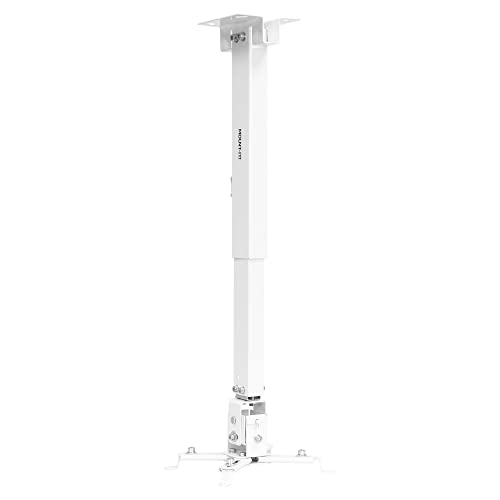 Mount-It! Wall or Ceiling Projector Mount |
8.6/10 | Buy |
 Mount-It! Projector Ceiling Mount and Wall Mount |
8.6/10 | Buy | |
| Best Budget |
 Aurzen Ceiling Projector Mount |
7.8/10 | Buy |
Projector Mount Questions Buyers Ask
How do I verify compatibility before buying one of these mounts?
Check the projector manual against the listing’s mounting pattern, mounting holes and projector weight. Universal does not mean every model fits, so compare hole spacing, thread type and the stated compatibility list before purchase.
Which listed mount offers the most placement flexibility?
WALI and both Mount-It! models support ceiling or wall configurations, while XINLEI is presented as a ceiling mount. Their extension options, tilt adjustment and swivel adjustment may help with screen alignment, but the listed ranges differ.
Is a low-profile projector mount better for a low ceiling?
It can be, if a shorter drop suits the room and still clears the projector’s vents and ports. XINLEI lists a five-inch ceiling distance, while some alternatives use an extension pole, so compare height, cable management and service access.
Can these projector mounts be installed on drywall or vaulted ceilings?
Not all of them can. WALI specifically excludes vaulted ceilings and regular drywall, while Mount-It! also calls for solid ceilings or walls; check the surface guidance, ceiling joist needs and structural support requirements before installation.
Does pitch adjustment guarantee a properly aligned image?
No, pitch adjustment alone does not guarantee alignment. The projector’s throw distance, lens shift, mounting position and screen location also matter, so follow the projector manual and compare the mount’s rotation, tilt and placement range.
Is the Aurzen mount suitable for every projector in this roundup?
No, Aurzen requires a centered 1/4-inch thread and does not support off-center holes, M6 or M8 threads. Its listing also excludes the Aurzen D1 MAX and states separate ceiling and wall limits, so verify the exact model first.
Where can I check projector options before matching a mount?
Use the projector’s manual and model specifications first, then compare the mount’s compatibility details. A separate ViewSonic projector specification overview illustrates the kind of model information to confirm, including weight and mounting details.
About the author
I care more about how a projector handles a dark scene than about any single number on a spec sheet. My beat here is home theater: contrast, black levels, HDR handling, and how the same picture holds up in a dedicated room versus a living room. I write the way I shop. I compare spec sheets, read what owners complain about most, and point out the trade-offs before the highlights. If a feature only looks good on paper, I will say so. My notes follow the site's review methods: research-based comparison, not lab testing.