
Best Gaming Projector Stand of 2026 Review
Best gaming projector stand options for flexible console and PC setups, with height, tray, stability, and portability details for November 2026.
 By Daniel Whitaker
Published

Stable Placement for Console and PC Gaming
Controller response and motion quality depend on the projector, but a shaky or poorly positioned platform can still make a gaming setup frustrating. The supplied products focus on best gaming projector stand needs such as adjustable height, tray tilt, device support, and easier room placement. Their listings do not provide projector input lag, refresh rate, resolution, HDMI features, HDR support, brightness, or gaming picture modes, so those specifications must be checked separately for your console or PC. For projector-specific buying criteria, see this guide to projectors for gaming.
CAHAYA offers the widest stated load capacity at 30 pounds, while both DECOSIS models and the Facilife stand list a 22-pound limit. Height ranges vary from 22 to 47 inches on Facilife, 23 to 46 inches on the shorter DECOSIS model, 23.5 to 63.5 inches on the taller DECOSIS model, and 26 to 51.5 inches on the CAHAYA tripod. The wheeled CAHAYA model reaches 65 inches and adds locking casters, which may help with repositioning in a living room or shared media space. Check your projector’s dimensions, weight, ventilation needs, and connection access before placing it on any tray.
| Award | Product | Best Projector Reviews Score About Best Projector Reviews ScoreBest Projector Reviews Score is a comparison aid based on available product information, not a hands-on testing result. Read our review methods. | |
|---|---|---|---|
| Best Overall |
 CAHAYA Projector Stand Tripod Adjustable Height |
9.1/10 | Buy |
| Best Premium |
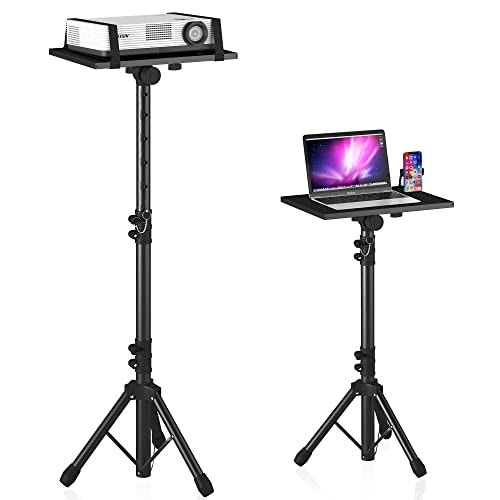 DECOSIS Projector Stand Tripod Laptop Stands |
8.8/10 | Buy |
| Best Value |
 Facilife Projector Stand Tripod |
8.4/10 | Buy |
 DECOSIS Projector Stand Tripod Laptop Stands |
8.4/10 | Buy | |
| Best Budget |
 CAHAYA Projector Stand Adjustable Laptop Tripod |
8.1/10 | Buy |
FAQs About Best Gaming Projector Stand
Does a gaming projector stand reduce input lag?
No input-lag result is provided for these stands. A stand affects placement and stability, not the projector’s processing speed, so check the projector’s stated lag and low-latency mode separately.
Will these stands support a console or gaming PC projector?
The listings describe support for projectors and other devices, including laptops on several models. They do not specify console, PC, HDMI, refresh-rate, or resolution compatibility. Verify the projector’s connections and the stand’s weight and tray dimensions before purchase.
Which stand offers the most height adjustment?
The taller DECOSIS model adjusts from 23.5 to 63.5 inches, while the wheeled CAHAYA model adjusts from 29 to 65 inches. The CAHAYA option also includes four casters, with one spare, and locking mechanisms for repositioning.
Can the tray angle be adjusted for a gaming setup?
Each listed model specifies tray adjustment up to 180 degrees. This can help aim the projector from a seated or standing position, but it does not replace projector focus, keystone, lens shift, throw-distance, or screen specifications.
Which option suits a heavier projector?
The CAHAYA Projector Stand Tripod Adjustable Height and CAHAYA Projector Stand Adjustable Laptop Tripod list 30-pound maximum capacities. The DECOSIS and Facilife models list 22 pounds. Confirm your projector’s actual weight and keep cables from pulling against the tray.
Are brightness, refresh rate, and HDMI features included?
Those projector specifications are not provided in the stand listings. Buyers should verify brightness for the room, supported resolution and refresh-rate combinations, HDMI features, audio connections, and any gaming mode directly on the projector listing. Related projector comparisons include budget gaming projector options and short-throw gaming projector details.
About the author
I care more about how a projector handles a dark scene than about any single number on a spec sheet. My beat here is home theater: contrast, black levels, HDR handling, and how the same picture holds up in a dedicated room versus a living room. I write the way I shop. I compare spec sheets, read what owners complain about most, and point out the trade-offs before the highlights. If a feature only looks good on paper, I will say so. My notes follow the site's review methods: research-based comparison, not lab testing.