
What Is Dlp in Projector? DLP Explained for 2026
Mirrors, color wheels, and sharp motion. Here's what is dlp in projector explained simply, with real examples, in October 2026.
 By Maya Okonkwo
Updated
By Maya Okonkwo
Updated

Spec sheets throw around three-letter terms, and DLP is one of the most common ones. It shows up on classroom projectors, living room models, and pocket-sized units, yet it rarely comes with an explanation on the page. Knowing what it means can help you read a listing without guessing, and it explains why two projectors with similar numbers can look different on the same wall.
The short version is that what is dlp in projector refers to Digital Light Processing, an imaging technology built around a chip covered in tiny, movable mirrors that steer light. It affects how a projector handles motion, color, and contrast, and it comes with trade-offs worth knowing before you buy. This guide explains how it works, how it compares with LCD, and what the listed DLP projectors say about their own capabilities. By the end, you should be able to tell which DLP traits matter for your room and your eyes.
| Award | Product | Best Projector Reviews Score About Best Projector Reviews ScoreBest Projector Reviews Score is a comparison aid based on available product information, not a hands-on testing result. Read our review methods. | |
|---|---|---|---|
| Best Overall |
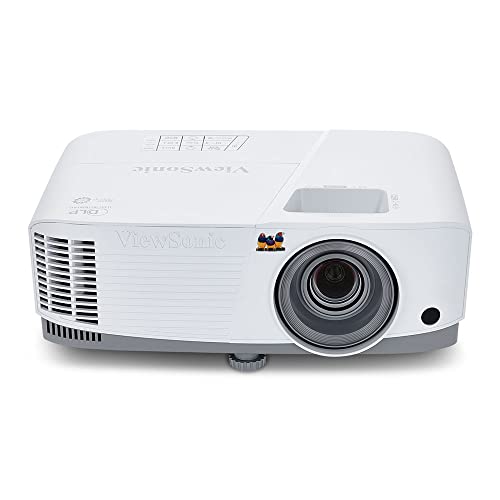 ViewSonic PA503W 4000 Lumens WXGA DLP Projector
|
9.1/10 | Buy |
| Best Budget |
 InFocus IN114xa 3D Ready DLP Projector - 720p
|
8.8/10 | Buy |
| Best Premium |
 ViewSonic 3200 Lumens Full HD 1080p Shorter Throw
|
8.8/10 | Buy |
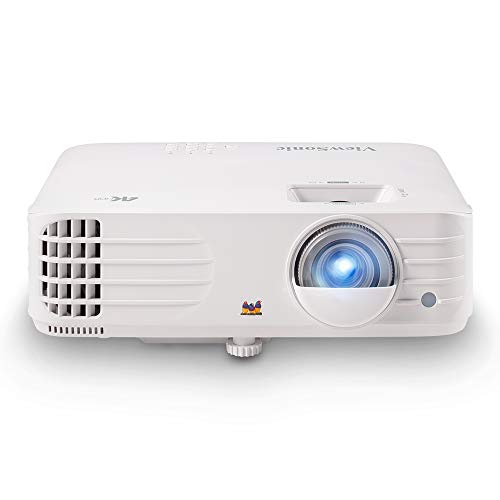 ViewSonic PX701-4K UHD Projector, 3200 Lumens
|
8.4/10 | Buy | |
 AKASO Mini Projector, Pocket-Sized DLP
|
8.1/10 | Buy | |
| Best Value |
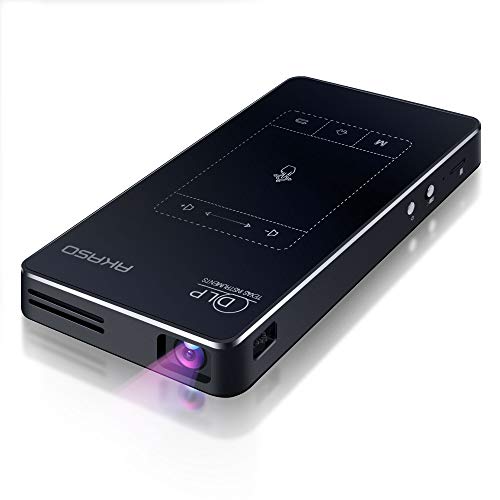 AKASO WT50 Mini Projector with WiFi and Bluetooth
|
8.1/10 | Buy |
Digital Light Processing in Plain Terms
DLP is a way of forming an image from light. Light from a lamp, LED, or laser reaches a chip called a digital micromirror device, or DMD. The chip’s mirrors tilt to send light toward the lens or away from it, and the pattern of tilting builds the picture.
The sections below walk through the mirrors, the color system, the trade-offs, and how DLP shows up in real products. They also cover how DLP differs from LCD, since that comparison drives many buying decisions.
How the Mirror Chip Builds an Image
Each mirror on the chip is microscopically small and represents one pixel, or a closely related piece of the image. A mirror can tilt toward the lens, which makes that pixel bright, or away from it, which makes it dark. The mirrors flip thousands of times per second, and varying how long each one stays on creates shades of gray.
Because the chip handles light, not color, a color system is needed. Most single-chip DLP projectors use a spinning color wheel with red, green, and blue segments, or they switch colored LEDs or lasers in sequence. The projector shows each color rapidly in turn, and your eyes blend them into a full-color image.
Higher-end cinema systems use separate chips for each color, which avoids the sequential approach. Home and office projectors mostly use a single chip, which keeps size and cost down. That single-chip design explains both the strengths and the common complaints about DLP.
The Rainbow Effect and Who Notices It
Because single-chip DLP shows colors one after another, some viewers see brief flashes of red, green, or blue at the edges of bright objects, especially when moving their eyes quickly. This is often called the rainbow effect. Many people never notice it, and others find it distracting.
Sensitivity varies a lot between individuals. If a DLP projector has bothered you in the past, try one in person or buy from a seller with an easy return policy. Faster color wheels and different color systems can reduce it, but the details vary by model.
LCD-based projectors don’t use a color wheel, so they don’t show this effect. They have their own trade-offs, covered in the next section. The best choice depends on how sensitive you are and what you plan to watch.
DLP Compared With LCD
LCD projectors pass light through tiny liquid crystal panels, usually one for each primary color. DLP bounces light off mirrors. Both can make excellent pictures, and each has habits.
DLP is often praised for smooth motion and for contrast, and its sealed optical path can help keep dust off the imaging chip. LCD projectors are often noted for strong color brightness and for the absence of the rainbow effect. Both claims depend on the specific model, so use them as tendencies, not rules.
Size is another difference. DLP chips are compact, which helps explain why many pocket and portable projectors use them. LCD systems use multiple panels and a combining prism, which can add bulk.
Where DLP Shows Up: Office and Classroom Models
The ViewSonic PA503W 4000 Lumens WXGA DLP Projector is a clear example of a business and education DLP unit. The listing describes WXGA 1280 by 800 resolution, 4,000 ANSI lumens, and a throw ratio of 1.5 to 1.7. It also lists 1.1x optical zoom, vertical keystone correction, a 16ms input latency, and a 120Hz refresh rate.
According to the listing, it can project a 100-inch image from about 11 feet away, with screen sizes from 80 to 150 inches. It is described as a lamp projector that supports ceiling mounting with a ViewSonic mount, model PJ-WMK-007. These are manufacturer statements, but they show how DLP is used for bright, presentation-focused rooms.
The InFocus IN114xa 3D Ready DLP Projector – 720p listing gives a sense of an older-style classroom unit. It lists XGA 1024 by 768 resolution, up to 3200 lumens, a throw ratio of 1.9 to 2.09, a 15,000:1 contrast ratio, and a lamp rated for up to 10,000 hours. Connectivity includes HDMI 1.4, two VGA inputs, composite and S-Video, and an RS232C port.
The same listing says it supports 3D content over HDMI, with DLP Link glasses required. That fits a point worth knowing: DLP has a long history with 3D support. Today, 3D is less common, so check whether you’d use it.
Home Theater and Gaming DLP Models
The ViewSonic 3200 Lumens Full HD 1080p Shorter Throw listing targets home theater. It states Full HD 1920 by 1080 resolution, 3200 lumens, a screen up to 300 inches, two built-in 10W speakers, and HDMI input. It also says a Dynamic Eco mode lets the lamp last up to 10,000 hours, which is a manufacturer figure that depends on that mode.
The ViewSonic PX701-4K UHD Projector, 3200 Lumens listing leans toward gaming and movies. It describes 3840 by 2160 resolution, 3,200 ANSI lumens, a 240Hz refresh rate, and 4.2ms input lag. It also lists HDR and HLG compatibility, auto keystone, four-corner adjustment, 1.1x optical zoom, dual HDMI inputs, and a 100-inch image from about 10.9 feet.
A note of caution on resolution applies here. Some DLP projectors reach 4K output using a smaller chip with rapid pixel shifting, which can look very sharp but is not the same as a chip with a mirror for every 4K pixel. The listing describes the resolution as 4K UHD, so check the manufacturer’s spec sheet for the imaging method if native resolution matters to you.
Light Sources Inside DLP Projectors
DLP describes the imaging method, not the light source, so a DLP projector may use a lamp, LEDs, or lasers. The listings above show two of those paths. The ViewSonic and InFocus listings describe lamp-based units, while the AKASO listing describes an LED light source.
Lamp-based models usually offer high brightness for the money, and a replacement lamp restores the original output when the old one dims. LED designs are compact and generally long-lived but lower in brightness. Laser designs, found on higher-end models, are marketed for long life and consistent brightness, with a higher purchase cost.
Lamp life figures in listings depend on the power mode. The ViewSonic listing ties its up-to-10,000-hour figure to a Dynamic Eco mode, while the InFocus listing says only ‘up to’ that many hours without naming a mode. Expect shorter life in the brightest mode, and treat any number as a manufacturer rating, not a promise.
Refresh Rate, Input Lag, and Motion
DLP’s fast mirror switching is one reason it’s popular for gaming and sports. Listings such as the PX701-4K one state a high refresh rate and a low input lag figure. Those numbers describe the projector’s own processing under the manufacturer’s conditions, and they matter most with a console or gaming PC.
For movies, refresh rate matters less. For competitive games, low input lag is useful, and a game mode setting can help. Verify those specs on the manufacturer’s page, since listings summarize them in different ways.
Portable DLP Projectors
DLP’s compact chip suits small projectors. The AKASO Mini Projector, Pocket-Sized DLP listing mentions 1080P support, a 50 ANSI lumen LED light source with a stated life of up to 30,000 hours, and a 1000:1 contrast ratio. It also lists a rechargeable battery, a stated run time of up to 2.5 hours, and connections including Type-C, HDMI, AV, and Micro SD.
The AKASO WT50 Mini Projector with WiFi and Bluetooth listing describes a DLP projector with a 0.2-inch DMD chip, a weight of 0.64 pounds, and a 5000mAh battery rated for about two hours. It lists AirPlay, Miracast, EShare, and DLNA screen sharing, plus Android 9.0. Both listings note that copyrighted streaming content may not play directly.
A low ANSI rating, like the 50 lumens in one listing, points to dark-room use on a modest screen. The brightness number matters more than the DLP label for deciding where a pocket projector will work. Portable DLP models trade brightness for size.
Strengths and Limits to Weigh
DLP tends to be a good fit when you want sharp edges, quick motion handling, and a compact projector. Gamers may like fast refresh figures, though input lag and refresh rate depend on the specific model. Presenters may like bright, simple, lamp-based designs for lit rooms.
The main limits are the rainbow effect for sensitive viewers and the fact that color brightness can be lower than white brightness on single-chip designs. Lamp-based DLP models also need a lamp replacement eventually. LED and laser DLP designs avoid that, with their own cost and brightness trade-offs.
None of these points is a reason to avoid DLP. They’re things to check against your own habits and room. A label on a spec sheet is a starting point, not a verdict.
What to Check on a DLP Spec Sheet
Start with the light source type, the rated life, and the brightness measurement. Then check native resolution, throw ratio, and input lag if you play games. Confirm the ports match your devices.
Look for any mention of the color system, such as the wheel speed or LED illumination, if the rainbow effect worries you. Check the return policy for a trial period. And if you plan to mount the projector, use hardware rated for its weight and ask a qualified installer for ceiling work.
In the end, DLP is one imaging technology among several. Understanding it makes spec sheets less mysterious, and helps you match a projector to the room, the screen, and the viewer.
About the author
For me a gaming projector lives or dies on lag and refresh rate, not on a big brightness claim. I write about consoles and PC on a big screen: what the input lag figures really mean, which resolution and refresh combinations are worth chasing, and which modes quietly add delay. I read spec sheets and owner feedback with a skeptical eye and I try to explain the catch behind every headline feature. My notes follow the site's review methods: research-based comparison, not lab testing.