
What Is a Dlp Projector: Clear Answer
Learn what is a dlp projector, how digital micromirror chips work, and why DLP technology suits movies and gaming in November 2026.
 By Ben Carter
Published

A Digital Light Processing display relies on millions of microscopic tilting mirrors mounted on a semiconductor chip to reflect light toward a projection screen. Understanding what is a dlp projector helps you determine whether this optical architecture fits your visual entertainment or presentation needs. Originally developed by Texas Instruments, this projection design powers everything from pocket-sized battery units to commercial cinema screens across the country. Inquiring viewers often explore reflected light comfort compared to televisions when choosing an optical display for long viewing sessions.
Buyers routinely turn to this hardware because microscopic mirrors create smooth imagery with minimal spacing between pixels. This tight mirror alignment virtually eliminates the visible grid pattern historically known as the screen-door effect. Modern DLP units deliver sharp motion clarity, reliable color reproduction, and durable optical components that resist degradation over thousands of hours. The technology also accommodates varied lighting sources, including traditional high-pressure lamps, solid-state light emitting diodes, and high-efficiency laser diodes.
| Award | Product | Best Projector Reviews Score About Best Projector Reviews ScoreBest Projector Reviews Score is a comparison aid based on available product information, not a hands-on testing result. Read our review methods. | |
|---|---|---|---|
| Best Overall |
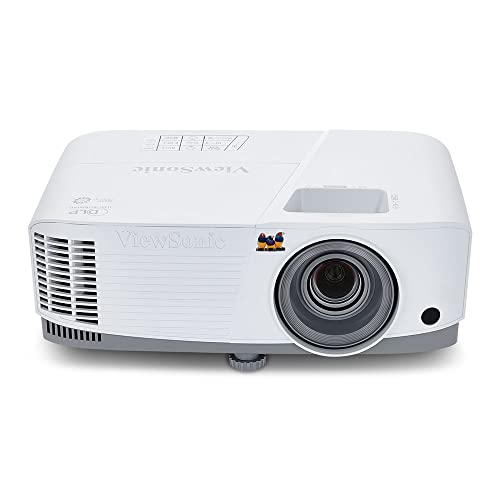 ViewSonic PA503W 4000 Lumens WXGA DLP Projector |
9.1/10 | Buy |
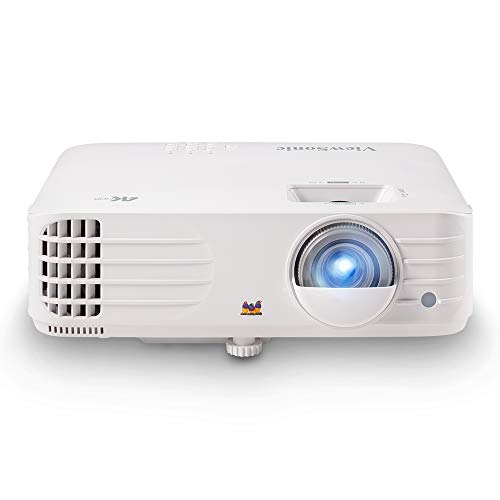 ViewSonic PX701-4K UHD Projector, 3200 Lumens |
8.4/10 | Buy | |
| Best Budget |
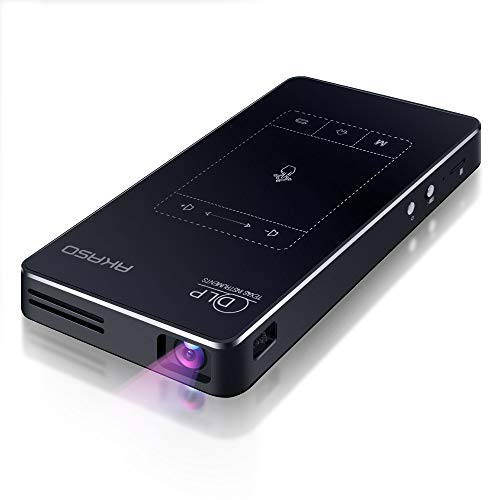 AKASO WT50 Mini Projector with WiFi and Bluetooth |
8.1/10 | Buy |
How Digital Light Processing Technology Functions
At the center of every DLP system sits an optical semiconductor known as a Digital Micromirror Device. This specialized silicon chip contains an expansive rectangular array of microscopic aluminum mirrors corresponding directly to the pixels in an image.
Each tiny mirror pivots toward or away from an illumination source thousands of times every second to modulate light intensity. When tilted toward the projection lens, a mirror reflects light onto the viewing surface to create an illuminated pixel. Pivoting away directs that light into an internal absorption baffle to produce dark areas.
| DLP Component | Primary Role | Key Advantage |
|---|---|---|
| DMD Chip | Pivots microscopic aluminum mirrors | High native pixel fill factor |
| Color Wheel or RGB LEDs | Sequences red, green, and blue light | Compact single-chip chassis design |
| Sealed Optical Engine | Protects internal mirrors from debris | Resists dust spots and color decay |
| Projection Lens | Focuses and enlarges the image | Consistent optical sharpness across screen |
Evaluating projection components helps clarify how these hardware elements collaborate to generate high-definition video:
- Digital micromirror chips feature millions of microscopic hinges that tilt back and forth rapidly to control brightness levels.
- Optical illumination engines channel focused light through specialized condensing lenses to hit the reflective surface evenly.
- Color filtering systems synchronize spectral timing with mirror tilt positions to build full-color images frame by frame.
- Thermal cooling pathways draw operating heat away from delicate silicon surfaces to maintain reliable long-term functionality.
- Sealed housing assemblies prevent ambient household dust from settling directly on internal optical elements over extended operating spans.
The Mechanics of the Digital Micromirror Device
A standard DMD silicon chip packs an extraordinary number of mechanical parts into an area smaller than a postage stamp. Each individual mirror measures mere micrometers across, supported by flexible torsion hinges attached to an underlying memory array.
Electrostatic forces pull opposite sides of the mirror down depending on whether an electrostatic charge is applied. This rapid switching allows each mirror to turn on or off over a thousand times during a single video frame. The proportion of time a mirror remains active determines the exact greyscale shade of that individual pixel point.
Because the gaps between adjacent mirrors measure less than one micron, light fills nearly the entire area of each pixel. This high fill factor produces a smooth, seamless film-like image that avoids the blocky pixel boundaries found on competing designs. The solid-state reflective design also handles high-intensity illumination without blistering, fading, or losing color integrity over years of regular use. These microstructures deliver consistent optical performance throughout the operating lifespan of the projection device.
Single-Chip Versus Three-Chip Optical Architecture
Most consumer home theater and business projectors utilize a single DMD chip architecture to control physical manufacturing costs and maintain a compact chassis footprint. In a single-chip configuration, color generation relies on sequential timing rather than simultaneous light projection. White light from a lamp or solid-state source passes through a rapidly spinning color wheel containing red, green, blue, and sometimes clear segments. The micromirror array changes state in exact synchronization with each color segment, allowing your brain to combine the sequential flashes into a unified, full-color image.
High-end digital cinemas and commercial venue projectors employ a three-chip DLP optical arrangement instead. These advanced commercial units use internal dichroic prisms to split white light continuously into dedicated red, green, and blue beams. Each color beam strikes its own dedicated DMD chip simultaneously before recombining through an output prism and passing through the projection lens. This simultaneous output produces exceptional color saturation, maximum light efficiency, and completely eliminates temporal rainbow artifacts.
Understanding Light Sources in Modern DLP Displays
Traditional DLP units utilize high-pressure mercury vapor lamps as their primary illumination source. These classic lamps output tremendous brightness, making them well suited for classrooms and conference rooms that must contend with ambient overhead lighting. The ViewSonic PA503W 4000 Lumens WXGA DLP Projector showcases this category by pairing high-output lamp illumination with a versatile optical zoom lens. Traditional lamps eventually require periodic bulb replacement when brightness levels diminish after several thousand operating hours.
Solid-state light emitting diodes represent an increasingly popular alternative for portable and compact units. Triple-color LED systems use separate red, green, and blue diodes, completely eliminating the need for a mechanical spinning color wheel. These LED sources cycle on and off electronically with extreme speed while offering operating life ratings extending past twenty thousand hours. Compact battery-powered devices benefit substantially from the lower electrical consumption and modest heat generation that solid-state LEDs provide.
Laser phosphor illumination sits at the performance frontier of modern single-chip DLP technology. Blue laser arrays excite specialized phosphor elements to generate intense, broad-spectrum light with pinpoint optical focus. Laser systems achieve near-instantaneous startup times, wide color gamut coverage, and exceptional contrast modulation by dimming the laser source dynamically during dark scenes. They provide sustained brightness performance over tens of thousands of viewing hours without requiring routine bulb servicing.
Visual Performance Attributes and Contrast Behavior
Contrast performance on a DLP display relies heavily on the physical tilt angle of its micromirrors. When a mirror tilts into the off position, light deflects away from the lens barrel into an internal light trap designed to absorb excess energy. This mechanical redirection yields deep black levels and impressive intra-frame contrast, commonly referred to as ANSI contrast. High ANSI contrast ensures that bright objects adjacent to dark backgrounds retain sharp edges without bleeding brightness across the visual frame.
Color rendition in single-chip designs depends significantly on the design and speed of the color wheel. Six-segment wheels utilizing alternating red, green, and blue sectors deliver richer color saturation tailored for home cinema viewing. Conversely, four-segment wheels that incorporate an uncolored clear segment boost white lumen output for brightly lit classrooms at the cost of cinematic color depth. Modern processing systems balance these factors by utilizing sophisticated gamma curves and color-mapping algorithms.
Resolution Capabilities and Pixel-Shifting Technology
Consumers shopping for high-definition displays frequently encounter both native resolution panels and pixel-shifted optical systems. True 1080p DMD chips contain a physical mirror for every single display coordinate on the screen. However, producing a native 4K silicon chip with over eight million microscopic mirrors on a compact consumer die remains technically challenging. To achieve ultra-high definition, many modern consumer displays leverage Texas Instruments XPR pixel-shifting technology.
Pixel shifting utilizes an optical actuator to refract light diagonally across four distinct spatial positions during each video frame. Because the micromirrors switch positions millions of times per second, the display flashes four unique sub-frames in rapid succession. The human visual cortex merges these four rapid positions into an unbroken, eight-million-pixel image on screen. Units like the ViewSonic PX701-4K UHD Projector, 3200 Lumens leverage this fast switching speed to deliver sharp ultra-high definition clarity at accessible consumer price points.
Gaming Advantages and Motion Handling
Fast-paced gaming represents one of the strongest use cases for modern micromirror technology. Liquid crystal panels depend on molecules physically twisting inside fluid chambers to block or transmit light, creating modest response lag. In contrast, solid-state micromirrors snap between on and off states within microseconds, producing virtually instantaneous pixel transitions. This mechanical responsiveness keeps fast motion crisp, clean, and free of trailing ghost artifacts during competitive video gameplay.
Modern gaming projectors combine this rapid mirror switching with high refresh rates and ultra-low input latency. Video inputs supporting 120Hz or 240Hz signals synchronize seamlessly with high-speed DMD processing engines. Players connecting modern consoles or gaming rigs experience responsive hand-to-eye feedback with input lag dropping into single-digit milliseconds. When setting up a multi-device media station, learning how to link a computer display output properly ensures your hardware transmits low-latency signals without resolution mismatches.
Before configuring a display system for interactive gameplay, review these critical setup considerations:
- High-speed video cables must support required bandwidth limits to enable elevated refresh rates and lower input latency modes.
- Dedicated gaming picture modes bypass non-essential video processing algorithms to minimize internal signal delay.
- Keystone correction features should be set conservatively because heavy digital geometry processing can increase overall input latency.
- Direct native resolution matching between your host source and projector prevents extra scaling delays inside the device.
- Surrounding room lighting levels should match the projector lumen output to prevent washed-out shadow detail in game environments.
Portability and Form Factor Versatility
The compact footprint of single-chip micromirror architecture makes it the dominant format for ultra-portable projection gear. Because the optical assembly requires only a single miniature chip, manufacturers can build palm-sized devices featuring integrated batteries and smart streaming operating systems. These tiny units slip easily into travel bags for mobile entertainment, business travel, or impromptu backyard movie nights. Solid-state light sources allow these micro-projectors to run coolly without demanding noisy cooling fans.
The internal optical path in a DLP engine is completely sealed against external environmental debris. Dust contamination poses a persistent threat to open-frame projection technologies, often resulting in permanent discolored specks on the projected image. Sealed optical blocks protect micromirrors, prisms, and internal condensing lenses from airborne lint, pet hair, and particulate matter. This maintenance advantage eliminates the chore of cleaning internal optical polarizers or replacing delicate air filters.
Understanding the Rainbow Effect
The single-chip DLP architecture introduces one specific optical phenomenon known colloquially as the rainbow effect. Because single-chip units flash primary colors sequentially rather than simultaneously, rapid eye movement across high-contrast scenes can briefly separate the colors. Viewers sensitive to this effect may perceive momentary flashes of red, green, and blue along bright white edges. Most casual viewers rarely notice this artifact during routine movie viewing or bright business presentations.
Display manufacturers minimize rainbow artifacts by increasing color wheel rotation speeds and refining segment design. Older projectors used two-speed color wheels that frequently triggered visual sensitivity in susceptible users. Contemporary home theater units incorporate multi-segment wheels spinning at four-speed or six-speed frequencies, dramatically tightening color sequencing intervals. Solid-state RGB LED and laser projectors cycle colors electronically even faster, suppressing color-separation anomalies down to near-imperceptible thresholds.
Selecting the Right Projector for Your Room Setup
Choosing an ideal projector requires balancing room lighting, viewing distance, and intended media consumption. Dedicated theater basements with complete light control allow viewers to prioritize contrast depth, accurate color gamuts, and native 4K pixel structure. Multipurpose living rooms with unshaded windows demand higher ANSI lumen output to keep images from appearing faded or washed out. Evaluating throw distance helps confirm that the lens can cast your desired screen size within the physical boundaries of the room.
Mounting options also play a vital role in finalizing your overall home display layout. Ceiling brackets provide a permanent, clean installation that keeps power lines and video cabling safely tucked out of foot traffic paths. Tabletop placement provides immediate flexibility for outdoor screenings or casual viewing sessions across multiple rooms. Verifying optical zoom range, vertical offset, and manual or automatic keystone tools ensures your projected image squares up accurately on your designated projection surface.
Understanding the inner mechanics of micromirror technology empowers you to select display hardware that aligns with your specific space constraints, lighting realities, and entertainment goals.
About the author
I am the person friends ask whether a cheaper projector is good enough. My focus is budget picks and comparisons: where the savings are fine, where they hurt, and what to skip. I write buying guides that start with how you will use the projector and end with a short list, and I try to be upfront about the compromises at every price. My notes follow the site's review methods: research-based comparison, not lab testing.