
How to Make Hologram With Projector: Practical Guide
A hologram effect is an illusion built from dark rooms and the right surface. See how to make hologram with projector in October 2026.
 By Maya Okonkwo
Updated
By Maya Okonkwo
Updated

A ghost that seems to float in mid-air at a party is not a true hologram. It is an illusion made from a dark room, a bright subject on a black background, and a surface that lets light pass through or reflect it in a convincing way. If you want to try how to make hologram with projector gear, the good news is that the pieces are simple and the tricks are well known.
Two products in the list below show two different routes. One is a small prism that sits on a smartphone and reflects video into a floating image, and the other is a translucent screen designed for rear projection with a projector. The sections ahead explain how each effect works, how to set up a scene, and what limits to expect before you start, so you can pick the one that suits your room and your budget.
| Award | Product | Best Projector Reviews Score About Best Projector Reviews ScoreBest Projector Reviews Score is a comparison aid based on available product information, not a hands-on testing result. Read our review methods. | |
|---|---|---|---|
| Best Overall |
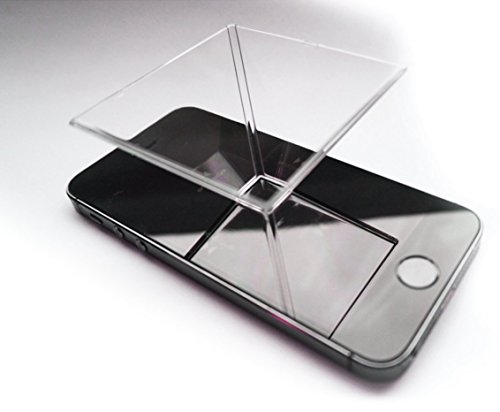 Pack of 2! Individually Packaged
|
8.9/10 | Buy |
| Best Value |
 Halloween Projector Hologram Foldable Screen
|
7.8/10 | Buy |
Building a Floating-Image Effect: What Is Actually Happening
A hologram effect with a projector is really a rear projection or reflection trick. Light from the projector lands on a translucent surface, or on a reflective sheet, and the audience sees a bright figure hanging in front of a dark background. Real holograms record light fields in a different way, so the practical goal here is a convincing illusion, not a physical hologram.
Two routes: a phone prism or a rear projection screen
The simplest route needs no projector at all. The Pack of 2! Individually Packaged listing describes a smartphone hologram prism: you place it on a phone, dim the lights, and play holographic videos from sites such as YouTube. The listing says it can be used with any smartphone. The image is small, which suits a desk or a table.
For a larger scene, a rear projection screen is the usual approach. The Halloween Projector Hologram Foldable Screen is listed as a double-sided translucent fabric screen for rear projection. The listing says it helps create a hologram-illusion effect, where characters appear to materialize in open space. The projector sits behind the screen, and the audience watches from the front.
Choose the phone prism when you want a quick, compact effect for a few viewers. Choose the screen when you want a bigger image for a doorway, a window, or a yard display. The two approaches can even complement each other at the same event.
Why a dark room and a black background matter
Both methods depend on contrast. Dark areas in the video stay dark, and bright areas stand out, so a figure on a pure black background seems to hover in space. Light spilling from lamps, windows, or street lights flattens that effect and makes the image look washed out.
For a phone prism, dim the room as far as you can and turn the phone’s brightness up. The listing suggests turning the lights down and playing freely available holographic videos. A video made for this purpose usually shows the subject in four views on a black background, so the reflection looks correct from each side.
For a projector setup, the same rule applies, plus the light source matters. Brightness is rated in ANSI lumens, and a brighter projector fights ambient light better, but the data gives no projector rating, so check your own unit’s specifications. A dark space and a black backdrop are free and make the biggest difference.
Setting Up a Rear Projection Hologram Scene
Positioning the screen and projector
Hang the screen where the audience can walk or sit in front of it, and where a projector can sit behind it. The listing says the screen comes with hooks, ropes, and stickers for hanging on a wall or window, and that mounting takes about five minutes. It describes use indoors and outdoors, including windows, props, and yards.
Leave enough space behind the screen for the projector and its throw distance. Throw ratio tells you how far the projector must be from the surface to fill a given width, and the projector’s manual lists it. Measure the screen’s width and the available distance before you set anything in place.
Stand-alone setups need a stable base. Put the projector on a table or stand, keep its vents clear, and run the power cable where nobody can trip on it. Avoid hanging cloth near the projector’s exhaust.
Using rear projection correctly
In rear projection, the image is flipped, because the projector is behind the screen. Many projectors have a rear or reverse projection setting in their menus. Switch it on if your text or logos look backwards, and test with a word or a number.
Focus on the screen from the front side, not the back. Ask a helper to check the audience view while you adjust. Keystone correction can square a tilted image, though large corrections can soften it, so aim the projector straight at the center when possible.
The HOIN listing describes soft, stretchy polyester fabric that is double-sided and translucent. Wrinkles and folds can show up on translucent fabric, so hang it taut and smooth. If the screen has been folded, hang it for a while before the event.
Choosing and preparing content
Look for videos described as hologram or Pepper’s ghost style, with the subject on a pure black background. A black background means no light is projected there, and the screen stays nearly clear. A bright subject then appears to float on its own.
Keep motion simple. Slow turns, floating figures, and ghostly outlines work well, while busy backgrounds ruin the illusion. If you make your own content, film a subject against black cloth and keep the lighting even.
Test the video from the audience’s seats. Image brightness, color, and size look different from far away. Adjust the projector’s brightness or picture mode until the figure is clear without making the screen glow.
Lighting the scene around the screen
The area in front of the screen should be dim but not pitch black, so guests can walk safely. Keep any lamps away from the fabric, because light that lands on the front face lifts the black areas and reduces the floating look. Aim any decorative lighting at the sides or the floor, never at the screen itself.
Props can strengthen the illusion. A railing, a fog-free dark backdrop, or furniture placed just in front of the screen gives the eye a reference point, so the figure appears to stand in the room. Keep props simple and non-reflective, and avoid shiny surfaces that catch stray light.
Sound sells the effect as much as the picture. A small speaker placed near the screen, rather than at the projector, makes the voice seem to come from the figure. Check the volume at the seats and keep cables out of walkways.
Matching the Setup to the Occasion
Halloween displays and windows
The screen listing is aimed at Halloween decoration, with ideas such as animated digital decorations on windows, walls, props, and yards. A window setup works well because the room behind it stays dark and the neighbors on the street see a figure floating in the glass. Position the screen so passersby look at the front of the fabric.
Weather matters outdoors. Projectors are not made for rain, and moisture can damage them. Keep the projector under cover, dry, and ventilated, and use the maker’s guidance on outdoor use. Check that the screen is secured against wind before the event.
For a safe party, keep cords out of walkways and keep the projector’s lens clear of anyone’s face. Avoid staring into the beam, because projectors are bright enough to be uncomfortable at close range.
Tabletop displays with a phone prism
The prism approach suits desks, counters, and gift tables. Set the phone flat, place the prism in the center of the screen, and start a hologram video. Rotate the phone until the four views align with the prism’s sides.
The listing notes that the pack contains individually packaged prisms, which can be handy if you want to give one as a gift. Its marketing also calls it a conversation piece and a calming visual aid. Those are descriptions from the listing, not measured results.
Expect a small, soft image compared with a projector setup. A larger phone makes a bigger effect, and the room needs to be dim. Screen protectors with glare can reduce the clarity, so check the phone’s surface.
Limits, Realistic Expectations, and Next Steps
Cleaning and storage also affect the next show. The screen listing describes a foldable fabric, so fold it loosely instead of crushing it, and check the maker’s care notes before washing. Store the prism in its packaging so the surface doesn’t scratch, because scratches scatter light and blur the reflection.
What the effect can and can’t do
An illusion like this works best from the front, at a moderate distance, in a dark space. Viewers who walk around it will notice the screen or the reflection. That is normal for a rear projection or reflected image.
The listings give no brightness numbers, screen gain, or viewing-angle figures for the HOIN screen, so don’t promise a specific size or clarity for your event. Test your own projector with the fabric first. Fabric that looks clear in dim light may look different in a bright room.
If you are buying a projector for this purpose, brightness in ANSI lumens, throw ratio, and a rear projection setting in the menu are the useful items to look for. Quiet fan noise helps at close range. Check these in the manufacturer’s specifications.
Budget is the last practical question. A phone prism is the lower-cost entry point and needs nothing beyond a smartphone, while a rear projection setup needs a projector you already own or plan to buy. If you have a projector, the screen adds the most visible upgrade per dollar, and if you don’t, the prism lets you try the idea first.
A practical order of operations
Pick the route that fits the space, then darken the room. Prepare black-background content, and test it on the actual surface before guests arrive. Place the projector with clear ventilation and a stable base.
On the day, run through the show once with the lights off. Check focus, image direction, and sound, and adjust the volume for the room. A short rehearsal catches the problems that would otherwise appear mid-party.
About the author
For me a gaming projector lives or dies on lag and refresh rate, not on a big brightness claim. I write about consoles and PC on a big screen: what the input lag figures really mean, which resolution and refresh combinations are worth chasing, and which modes quietly add delay. I read spec sheets and owner feedback with a skeptical eye and I try to explain the catch behind every headline feature. My notes follow the site's review methods: research-based comparison, not lab testing.