
What Is Dlp Projector? How DLP Works
What Is Dlp Projector? See how DLP projection works, what the specs mean, and which listed models suit classrooms, gaming, or travel in October 2026.
 By Maya Okonkwo
Updated
By Maya Okonkwo
Updated

Product pages love the letters DLP, but they rarely stop to explain them. A classroom projector, a gaming projector, and a pocket-sized portable model can all carry the label, even though they look and behave very differently. Knowing what the term means helps you read a spec sheet without getting lost.
So, what is dlp projector? DLP stands for Digital Light Processing, a way of building an image with a chip covered in tiny mirrors. The technology is only one part of the picture, and brightness, native resolution, throw distance, and input lag shape the real experience just as much. This guide explains how DLP works, what viewers sometimes notice about it, and how the listed models differ, so you can judge them on specs rather than the label. Along the way, it covers lamp and battery trade-offs, since the light source changes how a projector fits into daily use.
| Award | Product | Best Projector Reviews Score About Best Projector Reviews ScoreBest Projector Reviews Score is a comparison aid based on available product information, not a hands-on testing result. Read our review methods. | |
|---|---|---|---|
| Best Overall |
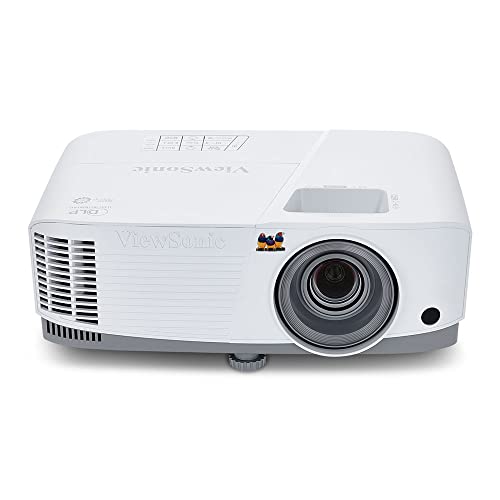 ViewSonic PA503W 4000 Lumens WXGA DLP Projector
|
9.1/10 | Buy |
| Best Value |
 Optoma HZ40HDR HD DLP Theatre and Gaming Projector
|
8.9/10 | Buy |
| Best Premium |
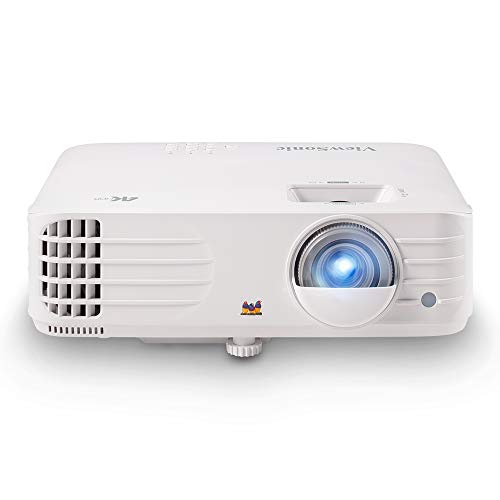 ViewSonic PX701-4K UHD Projector, 3200 Lumens
|
8.4/10 | Buy |
| Best Budget |
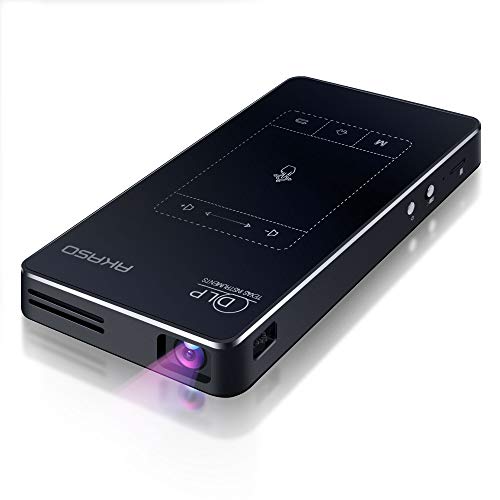 AKASO WT50 Mini Projector with WiFi and Bluetooth
|
8.1/10 | Buy |
DLP Projection Explained: How It Works and What to Check
A DLP projector forms its picture with a digital micromirror device, usually shortened to DMD. The chip holds a grid of microscopic mirrors, and each mirror tilts toward or away from the lens many times a second. Light that is reflected toward the lens becomes part of the image, and light directed away is discarded.
How the mirrors, light, and color create an image
Each mirror represents a pixel, so the number of mirrors on the chip relates to the picture’s resolution. By rapidly switching a mirror on and off, the projector can create different brightness levels for that pixel. A bright area keeps its mirror pointed at the lens longer, and a dark area keeps it away.
Color enters through the light path. Many DLP projectors pass light through a spinning color wheel that cycles through colors in quick sequence, and your eyes blend those colors into a full-color picture. Other designs use separate chips or different light arrangements, so the exact setup varies by model.
The light source is a separate part of the design. The ViewSonic PA503W listing, for example, calls the model a high-brightness DLP lamp projector, while the AKASO WT50 listing describes a built-in battery. The chip technology is the same family, but the light source changes how bright, how portable, and how maintainable the projector is.
How DLP differs from LCD in basic design
LCD projectors form the picture by passing light through liquid-crystal panels, usually one for each primary color. A DLP projector reflects light off mirrors instead of passing it through panels. Both approaches can produce a good image, and the differences are mostly in how the picture looks up close, how the optics are built, and what visual artifacts a viewer might notice.
Marketing often claims one is better, but the better choice depends on the specific model. A well-built LCD projector can look excellent, and a basic DLP unit can look ordinary. Compare actual specifications such as brightness, native resolution, and contrast, and treat the technology label as one factor among several.
What viewers sometimes notice with DLP
Two visual terms come up often. The first is the rainbow effect, where a few viewers see brief flashes of color at the edge of a bright object, especially when their eyes move quickly across the screen. Sensitivity varies a lot from person to person, and many people never notice it.
The second term is the screen door effect, a faint grid of lines between pixels. The AKASO WT50 listing says its DLP chip produces a clearer image than LCD projectors and maintains sharpness without pixelation or the screen door effect. That is a manufacturer statement, not a measured result, so treat it as a description of what the product is designed to do.
Neither effect is certain, and each depends on the model, the content, and the viewer. If you’re unsure whether you’re sensitive to the rainbow effect, try watching a DLP projector in person before you commit to a large purchase.
How the listed models divide the work
The listed projectors show how wide the DLP label can be. The ViewSonic PA503W 4000 Lumens WXGA DLP Projector is aimed at classrooms, meetings, and presentations. It lists 4,000 ANSI lumens, WXGA resolution of 1280×800, and a throw ratio of 1.5 to 1.7.
The Optoma HZ40HDR HD DLP Theatre and Gaming Projector targets movies and games. Its listing names 4000 lumens, a native Full HD resolution of 1920×1080, a throw ratio of 1.21 to 1.59, and HDR10 and HLG support. It also lists game-mode input lag figures such as 4ms at 1080p 240Hz and 16ms at 1080p 60Hz.
The ViewSonic PX701-4K UHD Projector, 3200 Lumens is described as a true 4K UHD home theater projector with 3,200 ANSI lumens, a 240Hz refresh rate, and 4.2ms input lag. The listing mentions auto-keystone, four-corner adjustment, and a 1.1x optical zoom. Finally, the AKASO WT50 Mini Projector with WiFi and Bluetooth is a portable 1080P DLP model with a built-in 5000mAh battery, listed for about 2 hours of projection.
Reading the specs that sit beside the DLP label
Brightness is the first number most people check. ANSI lumens describe how much light the projector puts out, and a higher figure can help in a room with some ambient light. The PA503W listing connects its 4,000 ANSI lumens to classrooms and meeting rooms with moderate ambient light, but how a picture looks still depends on the room and the screen.
Native resolution comes next. WXGA, Full HD, and 4K describe different pixel grids, and a text-heavy spreadsheet looks sharper on a higher resolution than on a lower one. For business slides, WXGA may be enough, while movies and games usually benefit from Full HD or 4K. Check the native figure rather than a label such as 4K support, because a projector can accept a signal it can’t display at full resolution.
Throw ratio and throw distance determine where you can place the projector. The ViewSonic listings state that a 100-inch image comes from about 11 feet away for the PA503W and 10.9 feet for the PX701-4K. The Optoma lists a throw ratio of 1.21 to 1.59, so measure your room before choosing a model.
Contrast, HDR, and what a bigger number means
Contrast describes the difference between the brightest and darkest parts of a picture. The Optoma listing states a 300,000:1 contrast ratio, achieved through Dynamic Black, along with HDR10 and HLG support. Those are manufacturer figures, and contrast ratios from different brands aren’t always measured the same way.
HDR support means the projector can accept high dynamic range signals, but it doesn’t mean the picture will look like a high-end TV in every room. A dim room helps dark scenes look deeper, while a bright room raises the black level. Read HDR claims as a compatibility detail, not a promise of a specific look.
Gaming, input lag, and refresh rate
For games, input lag matters as much as brightness. The Optoma and the PX701-4K both list low input lag figures in their gaming modes, and the PA503W lists 16ms with a 120Hz refresh rate. These are manufacturer statements, so check what resolution and refresh rate each figure applies to.
The Optoma listing, for example, ties its 4ms figure to 1080p at 240Hz and its 16ms figure to both 4K at 60Hz and 1080p at 60Hz. A single number without a stated mode isn’t very informative. Match the mode to the console or PC you’ll use.
Setup features that save time
Keystone correction and zoom make placement more forgiving. The PA503W lists vertical keystone and a 1.1x optical zoom, and the PX701-4K lists auto-keystone, four-corner adjustment, and the same 1.1x zoom. Keystone adjusts a tilted picture into a rectangle, but heavy correction can reduce sharpness, so a straight-on placement is still the cleanest option.
Connectivity is the other time-saver. The AKASO listing lists AirPlay, Miracast, EShare, and DLNA for wireless mirroring, plus USB, HDMI, audio, and Micro SD. Check that the ports on the projector match your devices before you buy.
Light source, noise, and upkeep
The light source affects both cost of ownership and everyday use. The PA503W is described as a lamp projector, and lamp models eventually need a replacement bulb, so check the listing or manual for lamp life and replacement details before you buy. Lamp, LED, and laser designs differ in brightness, noise, and maintenance, so the data doesn’t let us rank them.
Fan noise matters in quiet rooms, but the listings here don’t give noise figures for the listed models. If a quiet room is a priority, look for a stated decibel level or read the manual. Keep the vents clear and follow the manufacturer’s care guidance to avoid overheating.
The AKASO WT50 takes a different path with a built-in 5000mAh battery and a listed weight of 0.64 pounds. Battery operation suits outdoor and travel use, but about 2 hours of listed runtime means a long movie may need a power connection. Plan for power access if the story is long.
When DLP fits and when to compare other types
A DLP projector often suits classrooms, offices, and gaming rooms, where the listed brightness, refresh rate, and input lag match the use case. A battery-powered DLP model suits movie nights on the go. The tradeoff is size, since a bright lamp-based unit is larger and a pocket projector is dimmer.
If you’re sensitive to color flashes, or if you want the exact color behavior of another technology, compare an LCD model side by side. Neither type is universally better, and the right choice depends on the room, content, and viewer. Read each listing for the details that matter to you.
Room lighting should drive the decision. A dark room can work with a lower-brightness model, while a room with windows may call for the higher lumen figures listed on the classroom and gaming models. The screen matters too, and a flat matte white surface is a common starting point.
Putting it together
A good way to use the term DLP is as a starting point, not a verdict. Once you see it, check the light source, the native resolution, the lumens, the throw ratio, and the input lag. Those five items tell you more about daily use than the chip technology alone.
Next, picture where the projector will sit and how big the image needs to be. Compare the listed throw figures and zoom range with your room, then choose the model whose specs fit that plan. If a listing leaves out a figure you need, ask the seller or check the manual before you buy.
About the author
For me a gaming projector lives or dies on lag and refresh rate, not on a big brightness claim. I write about consoles and PC on a big screen: what the input lag figures really mean, which resolution and refresh combinations are worth chasing, and which modes quietly add delay. I read spec sheets and owner feedback with a skeptical eye and I try to explain the catch behind every headline feature. My notes follow the site's review methods: research-based comparison, not lab testing.