
How to Make Projector at Home: DIY or Buy?
Learn how to make projector at home with a phone, lens, and box, then see when a ready-made mini projector is the smarter pick in October 2026.
 By Tom Reyes
Updated
By Tom Reyes
Updated

Building a projector from a box, a lens, and a phone is one of those projects that looks easy online and teaches you plenty once you try it. You’ll learn quickly how distance, darkness, and focus control the picture. You’ll also learn why a finished projector, even a small one, can look so much better. That contrast is useful whether you stick with the experiment or end up shopping.
The honest answer to how to make projector at home is that a phone-and-lens projector is a fun experiment with limits on brightness and sharpness, while a ready-made mini projector adds a real light source, a lens designed for the job, and built-in focus or keystone tools. The products here are finished mini projectors and a book projector, so this guide covers both paths, starting with the homemade version and then showing what the commercial listings offer. Product details come from the listings and reflect manufacturer descriptions.
| Award | Product | Best Projector Reviews Score About Best Projector Reviews ScoreBest Projector Reviews Score is a comparison aid based on available product information, not a hands-on testing result. Read our review methods. | |
|---|---|---|---|
| Best Overall |
 Mini Projector with WiFi and Bluetooth
|
9.1/10 | Buy |
| Best Premium |
 Aurzen Roku TV D1R air USB-C Powered
|
9.1/10 | Buy |
 Yaber T1 Pro2 Mini Projector with WiFi
|
8.3/10 | Buy | |
| Best Budget |
 Littleluma Book Projector
|
7.8/10 | Buy |
| Best Value |
 HP Projector Built-in Apps
|
7.8/10 | Buy |
What a Homemade Projector Can and Can’t Do
The basic build in plain terms
A homemade projector is a lens, a holder, and a dark enclosure. The phone sits at one end with its screen facing the lens, and the lens focuses the screen’s image onto a wall some distance away. A box blocks stray light and keeps the phone aligned with the lens, and you move the lens or the phone to bring the picture into focus.
Common materials include a shoebox, a magnifying lens, tape, and a phone stand. A lens with a larger diameter gathers more light, and one with the right focal length gives a usable image size at a reasonable distance. Everything depends on small adjustments, so patience matters more than skill.
Limits you should expect The phone’s screen is the only light source, so brightness is limited. Spreading that light over a large wall makes the picture dim, and the room has to be dark to see anything clearly. Detail also drops, because the lens enlarges a small display and any imperfection in the lens becomes visible.
Focus is fussy too. A basic lens may keep the center sharp while the corners blur, and the image will appear flipped until you rotate the phone. These are normal results of the setup, not signs that you made a mistake.
Why people still enjoy the project The project is cheap, quick, and an easy way to see how optics work. Families build them for science projects, and it makes a good introduction to how real projectors form an image. If you treat it as an experiment, the results are rewarding.
If your goal is regular movie nights or presentations, though, the limits show up fast. That’s the point where a finished mini projector starts to make sense.
Making a Phone Projector Step by Step
Prepare the box and the phone
Measure your phone and cut a slot or stand inside the box to hold it steady with the screen facing the lens. The lens opening should line up with the center of the screen. Paint or line the inside of the box with a dark, matte material if you can, since that cuts reflections.
Turn off auto-rotate and set the phone to its highest brightness. Disable the screen timeout, or the display may turn off in the middle of a video. Keep the phone cool by leaving a small vent that doesn’t leak light toward the wall.
Set up the lens and find focus Mount the lens in the front of the box so it can slide in and out, or move the phone back and forth behind a fixed lens. Aim the box at a light, smooth wall in a dark room. Play a bright video or a test image with sharp lines.
Slide the lens or phone until the image appears sharp. If the picture is upside down, flip the phone or use a mirror setting. Then adjust the distance to the wall to get the size you want, and refocus each time you move.
Keeping it safe and stable Phones can warm up when they run at full brightness inside an enclosed box. Leave a small vent that doesn’t leak light toward the wall, and check the phone’s temperature now and then. If it feels hot, take it out and let it cool before continuing.
Place the box on a stable surface where it can’t be knocked off, and keep cables out of walkways. Don’t use unrated lamps, bulbs, or batteries to boost brightness, because the heat and electrical risks outweigh any gain in picture quality.
Improve the picture Use a flat, light wall or a white sheet pulled tight to avoid texture. Tape any gaps in the box to block stray light, and darken the room as much as possible. A larger lens often helps, but keep it clean and free of scratches.
Raise the phone’s brightness and avoid watching dark scenes, since they disappear in a dim projection. Short clips and high-contrast images work best. Keep expectations modest and treat each adjustment as a learning step.
When a Ready-Made Mini Projector Makes More Sense
What commercial listings add
A finished mini projector brings its own light source, a lens designed for projection, and built-in features such as focus and keystone correction. Many also have streaming apps and speakers, which removes the need for a phone as the source. That’s a big jump in convenience compared with a box and a lens.
The listings show the range. They describe wireless connections, built-in streaming systems, and portable power options. Specifications such as brightness and resolution vary, so compare them against your room and use.
Comparing the supplied mini projectors The Mini Projector with WiFi and Bluetooth from AKIYO lists 1080p support, 200 ANSI brightness, a 2000:1 contrast ratio, automatic vertical keystone correction, and a 360 degree rotating stand. It notes that the projector works better in a dark environment, and that its Bluetooth is for speakers or headphones and not for smartphones.
The Aurzen Roku TV D1R air USB-C Powered is described as a portable projector with Roku TV built in, native 1080p, Wi-Fi, Bluetooth, and USB-C PD power. The listing says a Roku account and internet connection are needed for activation, and that it requires a 65W or higher USB-C PD power source and a suitable cable.
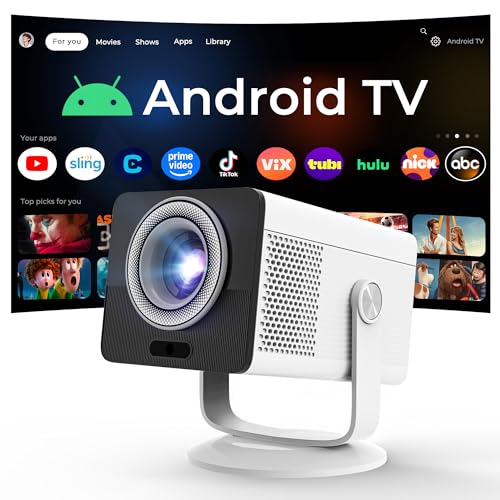
The Yaber T1 Pro2 Mini Projector with WiFi lists native 1080 FHD with HDR10, preinstalled streaming apps, autofocus, keystone correction, an 8W speaker, and Wi-Fi 6 with Bluetooth 5.4. It recommends keeping the projection angle within 20 degrees for the best results. The HP Projector Built-in Apps listing mentions an Android TV OS, 150 ISO lumens, native 1280 by 720, support for 1080p and 4K input, and power bank compatibility with a 65W or higher source.
Picture setup features worth noticing Autofocus and keystone correction matter more than they sound. On a homemade build, you refocus by hand every time you move the box, and the image stays a trapezoid if you aim it up or sideways. The listings for the Yaber and HP models mention automatic or remote-controlled adjustments, which may make setup quicker for people who move the projector often.
Digital keystone correction can soften the image slightly, so the best setup still starts with the projector sitting level and square to the wall. Treat automatic correction as a finishing tool, not a replacement for good placement.
A different kind of projector for reading The Littleluma Book Projector is aimed at projecting book text on a wall or ceiling. The listing describes Wi-Fi 6, HDMI, and USB connections, a 180 degree body that rotates, automatic calibration, and quiet operation. That is a niche use, and it is not the same as a general home theater projector.
It shows how varied the term “projector” is. If your goal is nighttime reading, a purpose-built device may fit better than a homemade version, but check the listing to see if the features match your needs.
How to read brightness and resolution claims Brightness figures come in different units, such as ANSI lumens and ISO lumens, and they aren’t directly comparable across brands. The listings here state 200 ANSI for one model and 150 ISO for another, but the numbers alone don’t tell you how the image will look in your room. Room darkness and screen size change the result.
Resolution claims also need care. A projector that accepts a 4K signal may still have a lower native resolution, as the HP listing’s native 1280 by 720 shows. Look for the word native when you compare, and treat claims as manufacturer descriptions.
Sound and streaming A phone-and-lens build has no sound of its own, so you rely on the phone speaker or an external one. The finished projectors in the listings include built-in speakers, such as the 8W speaker on the Yaber model and the stereo speakers on the HP one, along with streaming apps. That cuts the number of devices you have to carry.
App access depends on the system. The Aurzen listing relies on Roku TV, and the HP listing mentions an Android TV OS, so check that your favorite services are available before you buy. Streaming apps also need a network connection, and the listings describe how each one connects.
Power and portability Several of these projectors accept USB-C PD power, which can work with a power bank, but the listings call for 65W or higher. A power bank below that rating may not run the projector, so check the output before buying one. Long cable runs also matter, so keep the cable and power source close to the projector.
For travel or camping, the combination of compact size and a rotating stand can be helpful. Plan for a dark spot and a flat surface to project onto, since even good portable models need those conditions.
Choosing between building and buying If you want to learn how projection works, build one. If you want a reliable picture for movies, games, or presentations, a finished mini projector is more practical, and the listings above show the kinds of features to compare. Match the choice to how often you’ll use it, how dark the room can get, and how much setup you want.
A good plan is to try the homemade version first. It costs little, and it shows you exactly how much light and sharpness matter, which makes a later purchase much easier to judge.
About the author
I like gear that earns its place in a bag, so I look at portable projectors the same way: weight, battery claims, fan noise, and whether the picture is usable without a perfect room. I write for people who want movie night in a hotel room, a dorm, or a small apartment. Expect plain talk about what small projectors do well and where they cut corners. My notes follow the site's review methods: research-based comparison, not lab testing.